
A $520,000 license bill sized before go-live became $700,000 once people started working across Finance, Supply Chain Management, Project Operations, and Human Resources, because one full D365 license doesn't cover all four. It's a common finding, it isn't a mistake by the security team, and it's usually easier to bring back down than it first looks.
Every application a person works in adds a license, and an analysis of phase 1 usage usually takes back 20 to 30% of the higher bill.
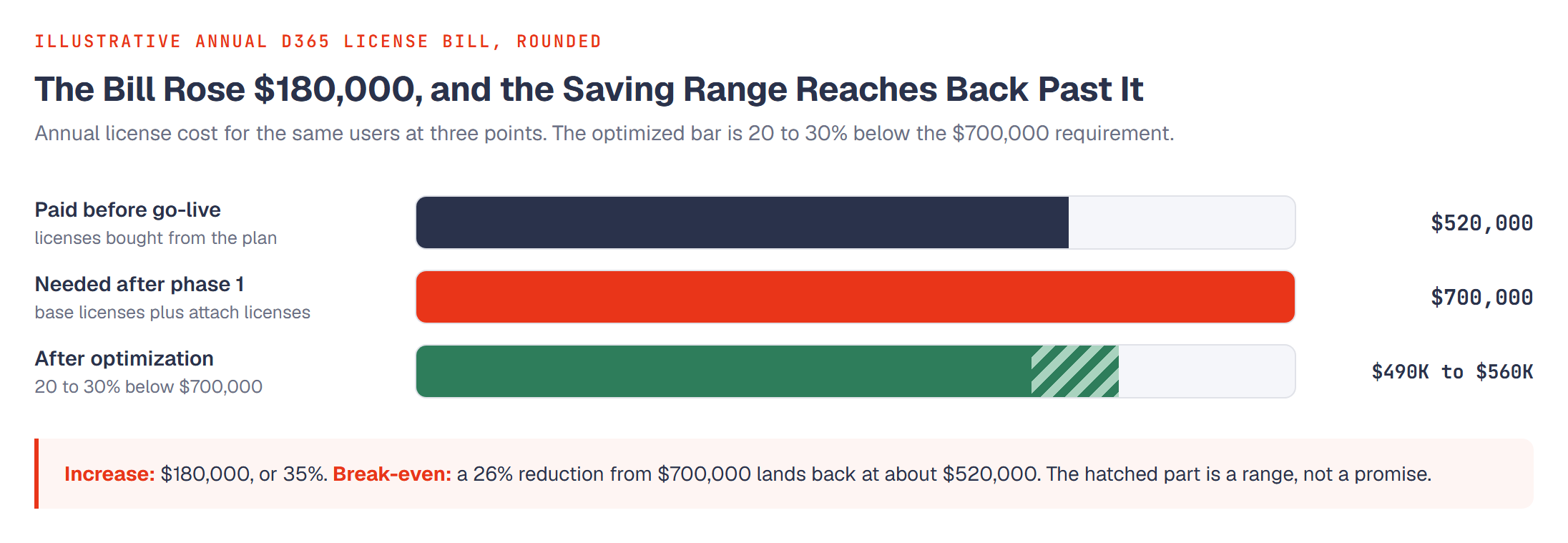
Here's a situation we came across, with the numbers changed. A company bought about $520,000 a year of D365 licenses from the project plan. After phase 1 went live, IT found that people who work across modules need two to four licenses each, not one. The bill is now about $700,000, which is $180,000 or 35% more.
If you found a number like that, you didn't cause it, and you're not alone. In 65 of the 66 license analyses and remediations we've run over the last two and a half years, the licenses current access requires cost more than the client was paying. Licenses are bought from a plan; access is decided later, one phase at a time (why a 30% saving can still mean a bigger bill).
Why one license doesn't cover Finance, Projects, and HR
Each D365 application has its own full license. Finance, Supply Chain Management, and Commerce list at $210 per user per month; Project Operations and Human Resources at $135. A person who works in more than one application holds one base license, the highest-priced one they need, plus a much cheaper attach license for each additional application. Finance plus Supply Chain Management costs $210 plus $30, or $240 instead of $420.
It still adds up. A project controller who posts journals in Finance, maintains project contracts in Project Operations, and creates purchase orders in Supply Chain Management needs three licenses; add compensation records in Human Resources and it's four. Our plain-English primer and how one extra access right triggers an attached license explain the rule.
This was never the security administrator's job
A security administrator grants the access the business asks for and never sees prices, quantities, or renewal terms. It's easy to assume they pick each role's license, but in reality, it's calculated: the administrator decides what a role can do, and the system works out from Microsoft's rules what each person needs across all of their roles. There was nothing for them to choose differently.
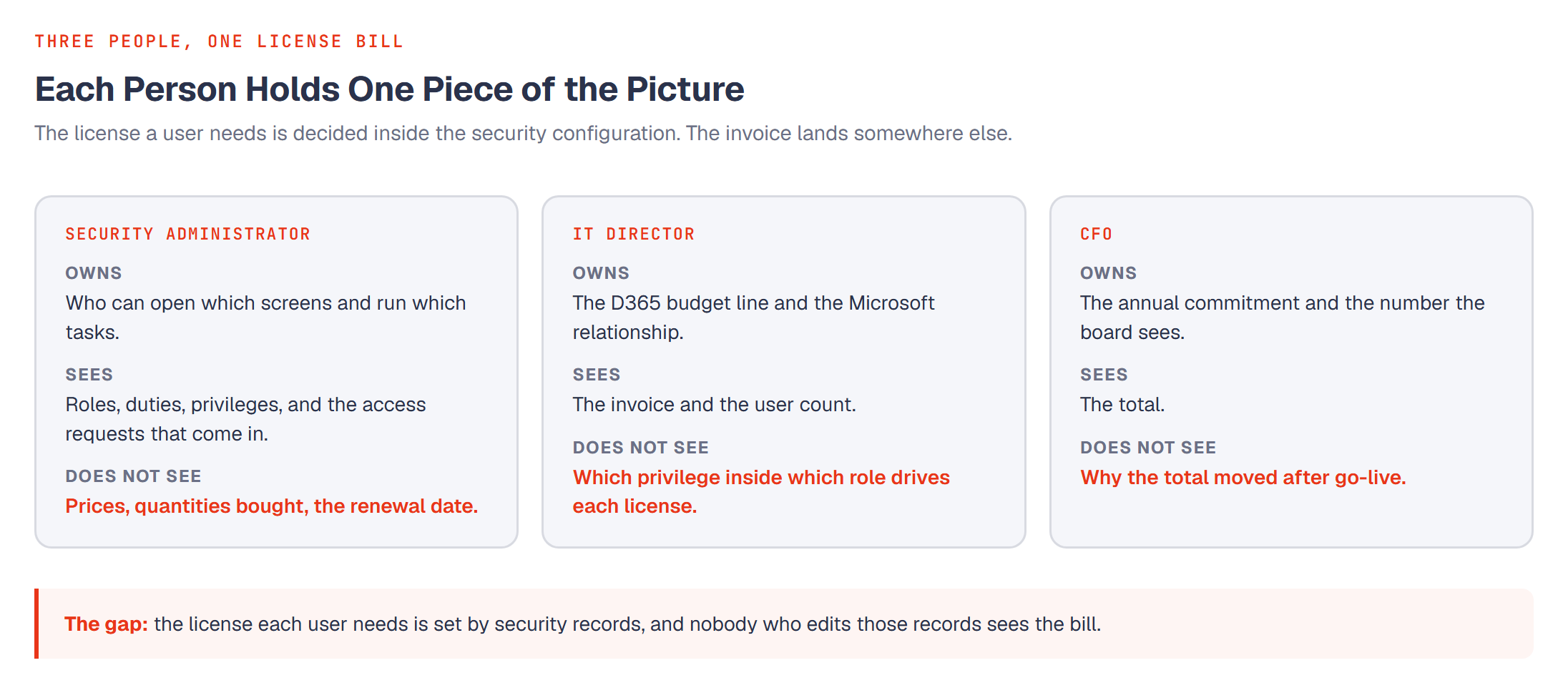
License optimization is management territory: it decides which access is worth paying for. Your security configuration sets how many licenses you need, so the count can change.
The report's number may be a little high
The license report in the Power Platform admin center is built to cover every user, not to find the cheapest way, so it can slightly overestimate. Our free License Optimization Model checks it from your license subscriptions and one D365 table, and recalculates the optimal licenses for the security you already have.
Assign licenses that cover each person's needs and they leave the unlicensed and under-licensed lists. If one then shows as over-licensed for a license the workbook added on purpose, keep it. Check with your Microsoft partner before moving owned seats between license types.
Free workbook or paid analysis: what's the difference?
The free workbook recalculates the cheapest license mix for the security you already have, which the Power Platform admin center report doesn't fully optimize. The paid analysis finds the permissions people don't use, and that's where the larger savings are.
| Free workbook | Paid analysis | |
|---|---|---|
| What it does | Recalculates licenses. Your security stays as it is, so it can't reduce what that security requires | Proposes a redesign that keeps the access people need. Your managers decide |
| What to expect | A lower bill when the license mix or purchase minimums are the problem | Usually 20 to 30% of the bill you'd otherwise pay, once the redesign is deployed |
| Who runs it | You | We run the analysis. We or your team deploy |
| Cost | Free | Paid: at 20 to 30%, it saves $200,000 to $300,000 a year per $1 million of the bill you'd otherwise pay. Deployment is priced separately |
Download the free License Optimization Model, or see how the paid analysis works.
What an IT director can do before phase 2
The timing is better than it feels. Phase 1 gives real usage data, and phase 2 roles can still be priced before they ship.
We never promise to cut a bill in half. An optimization usually saves 20 to 30% of the bill a company would otherwise pay: here, $140,000 to $210,000 a year, for a bill between $490,000 and $560,000, partly from users who need no full license at all. A 26% reduction lands back at about $520,000, the amount already in the budget. It's not a guarantee, but it turns "we have a $180,000 problem" into "we found a gap early, and here's a plan."
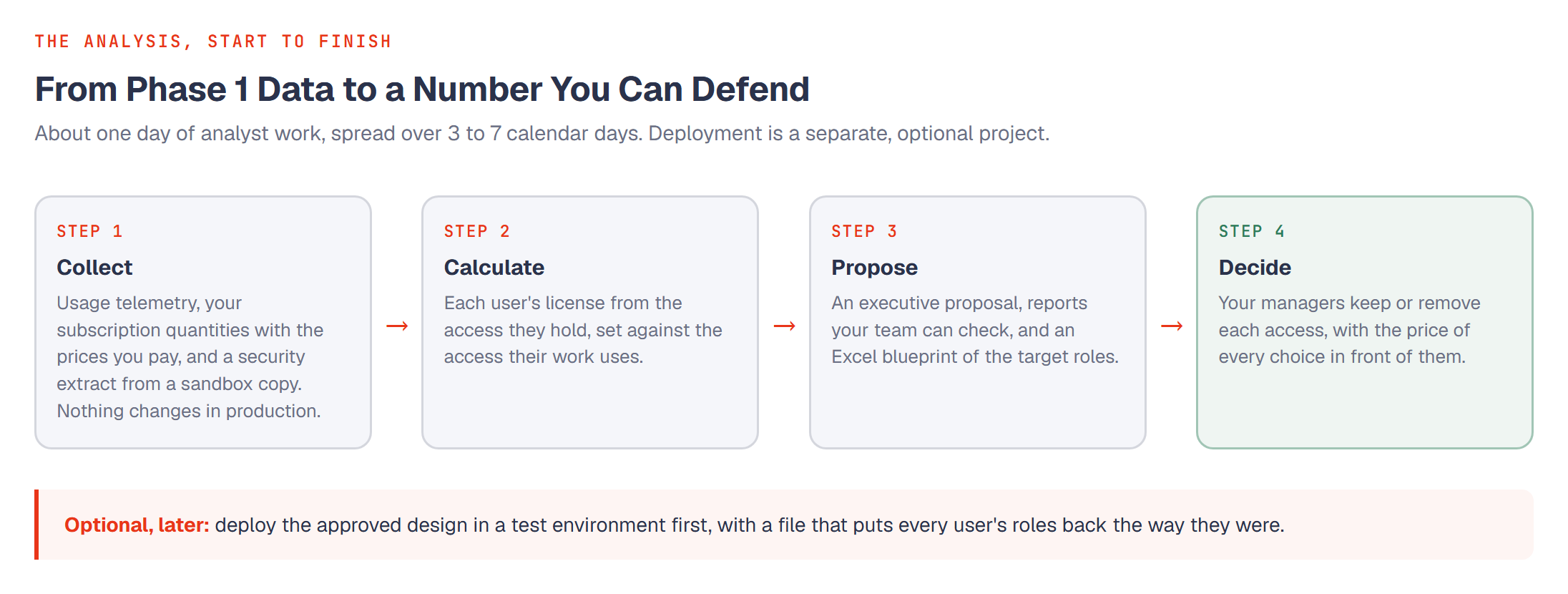
It takes about one day of analyst work over 3 to 7 calendar days, with no changes in production (what to prepare, where the data goes). Your managers decide what access stays. Deployment is separate, optional, and reversible.
What a CFO or CIO will want to know
| Question | Short answer |
|---|---|
| Is the higher number real? | Yes, though the report can run slightly high. Since January 15, 2026, Microsoft validates licenses per user from each tenant's renewal or anniversary date. |
| What is the saving measured against? | The higher bill. Book it as avoided cost, next to the other two numbers. |
| When does it reach an invoice? | Added licenses bill when you buy them. Reductions depend on your agreement and usually wait for renewal, so start before the last 90 days. |
| What does finding out cost? | Priced per engagement by our sales team, from $0 to $4,500. |
| Does it weaken controls? | It doesn't have to. Optimization only removes access. Segregation of duties is checked separately, because license optimization doesn't fix it. |
The 20 to 30% is typical, not a promise. Yearly tasks like year-end close may not show in phase 1 usage yet, and some attach licenses are simply correct.
A bill that grows after go-live is a finding, not a failure. The person who spotted it early gave the company room to act: before phase 2 adds more users, and before the next renewal fixes the number for another term.
Frequently asked questions
Should our security administrator have caught this?
No. They grant the access the business asks for and usually never see prices or quantities. Watching the bill is a management responsibility.
How much of the higher bill can an optimization take back?
Usually 20 to 30% of the bill the company would otherwise pay. It's a typical range, not a promise, and depends on which access your managers keep.