
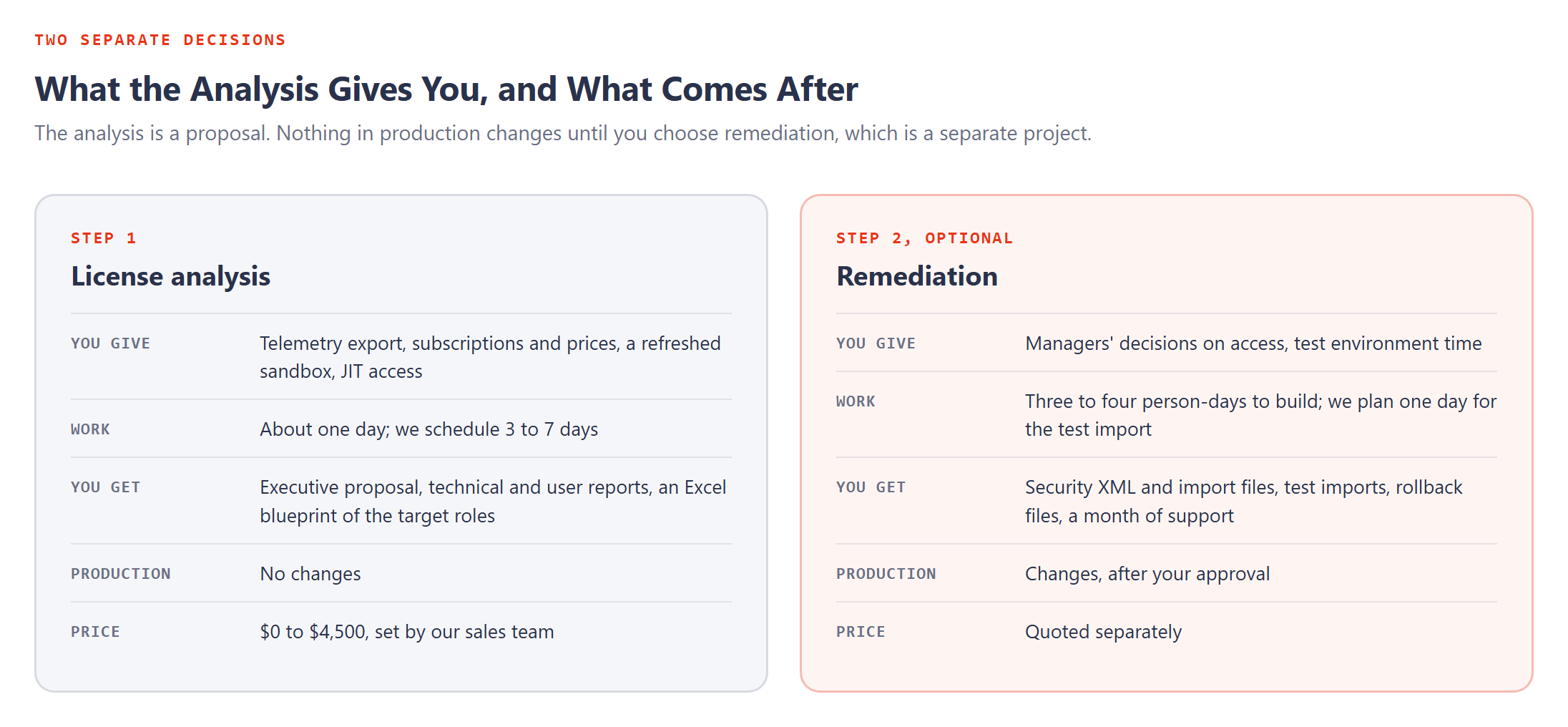
About one day of work turns your usage, security, and subscription data into an executive proposal, detailed reports, and an Excel blueprint of the target roles. Our sales team sets the price for each engagement, from $0 to $4,500, and nothing changes in production. Deploying the redesign is a separate, optional project.
That day of work starts once the data is in hand. We still ask for 3 to 7 days on the calendar, because data sometimes has to be pulled again, or something turns up that changes the picture. Here's what we ask for, what you receive, what it costs, and what happens only if you decide to go further.
What you prepare
Four things. The sandbox refresh is the one that needs scheduling, because it overwrites whatever is in that sandbox. Once telemetry has been running, the rest take your team minutes:
- A usage telemetry export. Sixty days is the ideal, because it covers a couple of month-ends. Sometimes one week is all there is, and we can still work with it. If telemetry isn't switched on yet, it takes about 15 minutes to configure, so turn it on today even if the analysis is months away.
- Your current subscription quantities and the prices you actually pay. Agreements and resellers differ, so list prices aren't good enough for a renewal decision.
- A sandbox refreshed from production. It has to be Tier 2 or higher, and recent enough to reflect your current security setup.
- Just-in-time database access to that sandbox. Someone on your team with Lifecycle Services access requests it and allow-lists our IP address, and the access expires on its own after eight hours. A script then pulls the security, role, user, and license data in one run, as described in our data collection walkthrough.
We load the extract into Microsoft Fabric, calculate the current requirement and the target one, and build the reports from there. If you want the reasoning behind each dataset, what we collect and why goes through them one by one.
If you go ahead, the same extract feeds the first draft of the remediation design, so going further doesn't start from scratch.
What you get
- An executive proposal. Where you stand today, what licensing would cost if you bought what the assessment says, and the savings we expect after remediation, broken down by license type.
- Technical and user reports. Enough detail for your own team to check every finding, user by user and role by role.
- An Excel blueprint of the target security. How each proposed role connects to its duties and privileges, and which privileges belong where. It has enough detail for your team or your partner to build the design without us.
That last point matters to CIOs for a reason that has nothing to do with licensing. If you'd rather implement the design in-house, you can.
What it doesn't do
It doesn't change production security. It doesn't claim the proposed design has passed your acceptance tests. And it doesn't decide anything about access. The model prices the options, and your managers decide which access people should keep, which is where most of the difference between the first number and the final one comes from.
It also can't see what the usage window didn't capture. A task done twice a year won't show up in a week of telemetry. So the model doesn't cut access just because nobody was seen using it: a user whose observed work needs a given license keeps the access that license already covers, and anything uncertain is flagged for a business decision. No usage data isn't the same as not needed covers how that works.
With only a week of telemetry, the model has to be more conservative and leans harder on business review. Sixty days with a couple of month-ends gives a sharper number, so the earlier you switch telemetry on, the better the analysis gets.
What it costs
The analysis costs from $0 to $4,500. Our sales team sets the price for each engagement, based on the terms you agree on with them. For scale, $4,500 is about what 21 Finance or Supply Chain Management licenses cost for a single month at the $210 list price. Remediation is a separate project, priced separately.
If you go further: remediation
Remediation is optional. If you choose it, we generate the security configuration as XML along with the import and assignment files, import it into a test environment, and work through it with your managers until the design is approved. Building takes three to four person-days once clean data is in hand. We plan a full day for each test import, even though the import itself can be done in about an hour when the schedule is tight.
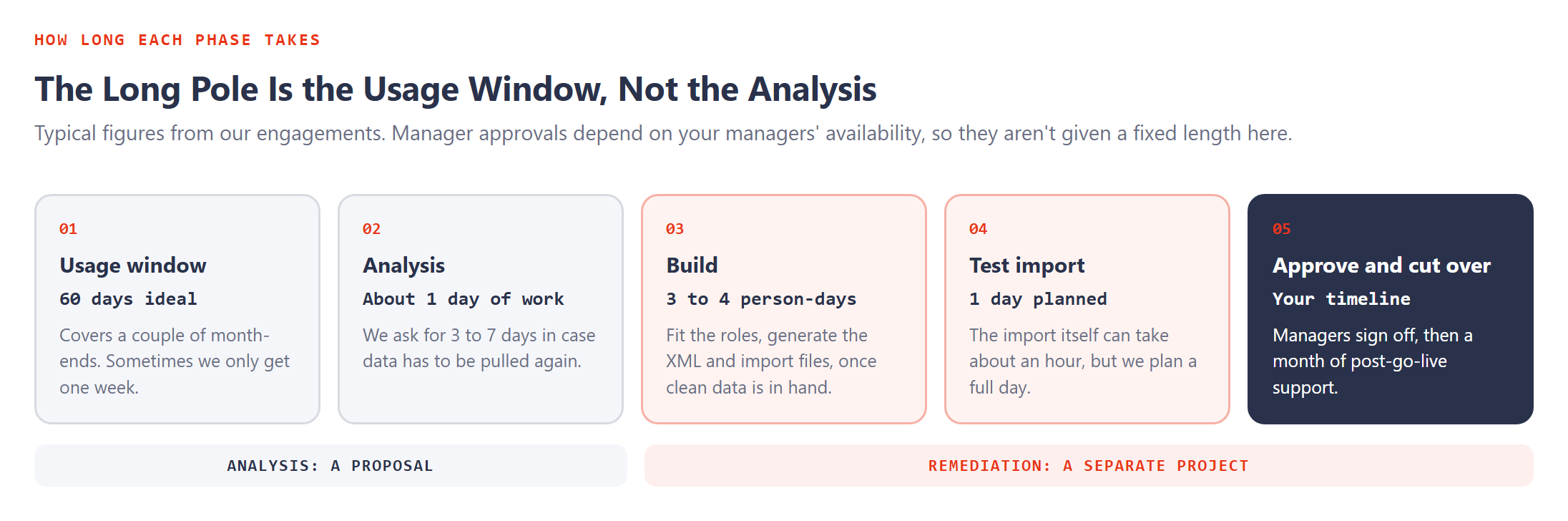
Before cutover, we prepare the files that put every user's role assignments back the way they were, and after go-live we support the new design for a month. The import is the quick part. As our automated migration case study found, the hard part is everything around it.
The analysis is the cheapest way to learn how much of your renewal increase you can avoid before anyone touches a role. Give it the longest usage window you can, and treat what comes back as a proposal your managers still have to decide on.
If your renewal is coming up, the analysis also tells you what the saving means for the renewal itself, which we cover in why a 30% saving can still mean a bigger bill than last year. For a fuller pre-flight list, see the 106 questions a real licensing analysis checks first.
Free workbook or paid analysis: what's the difference?
The free workbook recalculates the cheapest license mix for the security you already have, which the Power Platform admin center report doesn't fully optimize. The paid analysis finds the permissions people don't use, and that's where the larger savings are.
| Free workbook | Paid analysis | |
|---|---|---|
| What it does | Recalculates licenses. Your security stays as it is, so it can't reduce what that security requires | Proposes a redesign that keeps the access people need. Your managers decide |
| What to expect | A lower bill when the license mix or purchase minimums are the problem | Usually 20 to 30% of the bill you'd otherwise pay, once the redesign is deployed |
| Who runs it | You | We run the analysis. We or your team deploy |
| Cost | Free | Paid: at 20 to 30%, it saves $200,000 to $300,000 a year per $1 million of the bill you'd otherwise pay. Deployment is priced separately |
This page describes the paid analysis. The workbook is a separate, free download.
Frequently asked questions
Can we implement the proposed design ourselves?
Yes. The Excel blueprint shows how each proposed role connects to its duties and privileges. Your team or your implementation partner can build from it without us.
Do you need access to production?
No. The security data comes from a Tier 2 or higher sandbox refreshed from production, through just-in-time database access that expires after eight hours. The usage telemetry is an export you send us.
How soon do we get the result?
The analysis is about one day of work once the data is in hand. We ask for 3 to 7 days on the calendar in case data has to be pulled again.