
The migration itself took about ninety minutes: an XML file, an import, a couple of CSVs to assign and unassign roles. No one built a single role by hand. That part worked on the first real attempt. The framework we had to build to make that ninety minutes trustworthy took considerably longer, and it's now how we migrate security everywhere.
This was our first pilot of a fully automated process for D365 F&SC security configuration and migration: building the optimal security model and moving it into the system without anyone creating roles by hand. This is the third in a series on D365 license optimization. The first covered an integration-heavy environment where the standard playbook failed outright. The second covered a client whose security was excellent, and still 35% overpriced.
Why this project mattered
The client itself presented a fairly average analysis picture, which made it a good proving ground. A few inactive users, a few contradictory permissions, and telemetry showing that roughly half of the configured permissions were never used. Decent, unremarkable, and exactly the kind of environment where we knew we could do our job and save on licenses.
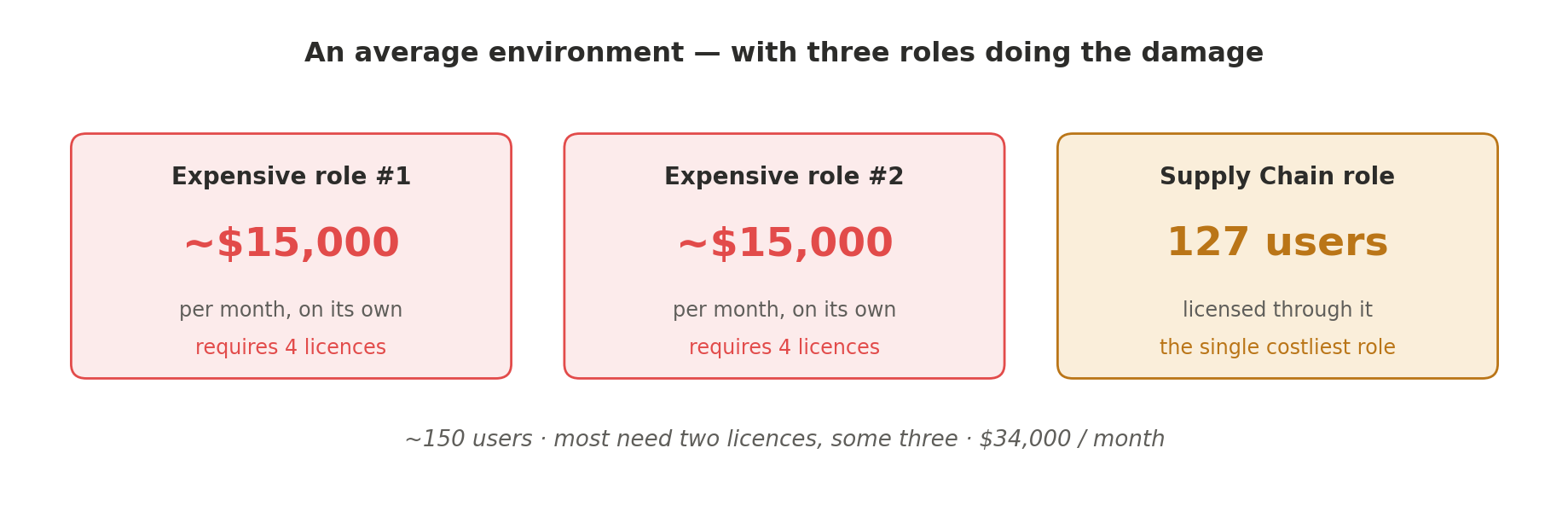
The environment has roughly 150 users, and almost every one requires a full license. Most users require two licenses; some require three. The overall monthly cost sat around $34,000. The security itself was average in quality, with one notable exception: a couple of roles that were extremely expensive, about $15,000 each on their own, each requiring four licenses. The single costliest role in the environment, demanding the Supply Chain Management SKU, had 127 users licensed through it.
The goal was the usual sequence: analyze, save, and then carry the client all the way through remediation. It was the last step that made this project different.
The analysis: refreshingly ordinary
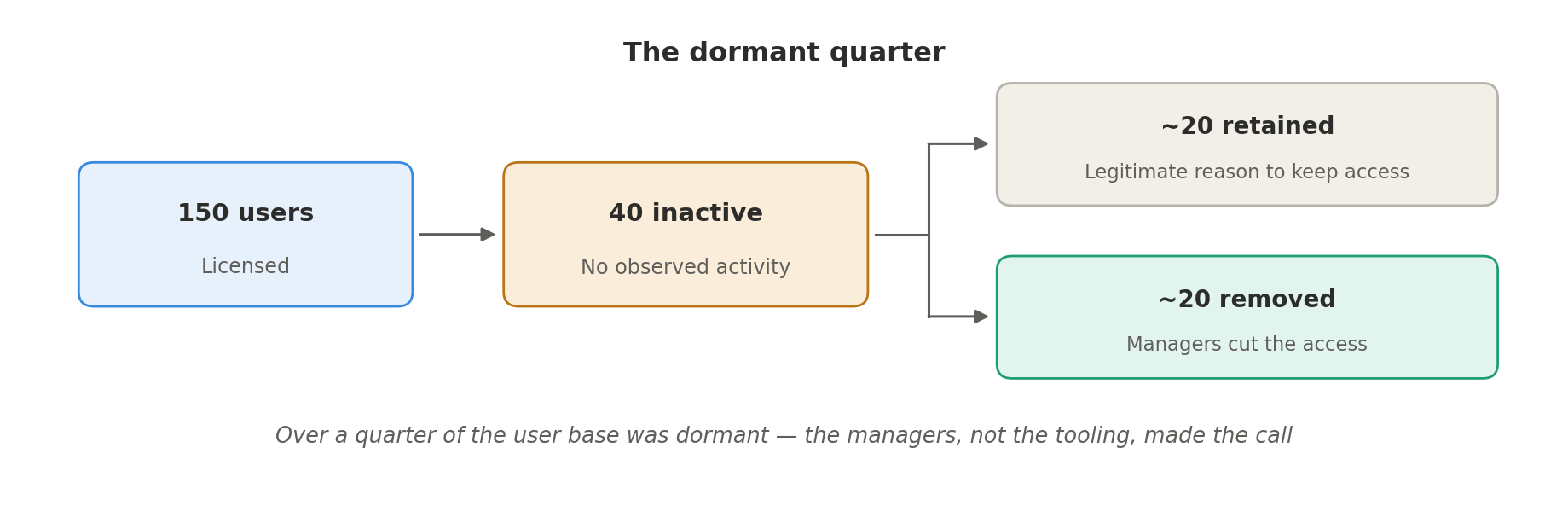
Among the 150 users, we found 40 inactive users, a remarkably high share for an environment this size. After review, roughly half turned out to have a legitimate reason to stay. For the other half, the client's managers made the call, and about 20 users lost their access outright.
From there we ran our regular analysis: discrepancies and contradictory access, where the same user holds both a grant and a deny on the same object. Here we got a genuinely good sign. Not a single privilege carried a multiple-license requirement. Readers of our other case studies know why that matters: mixed-license privileges snowball upward through duties and roles until users are billed for SKUs they never needed. This environment had none of that.
So far, a very average license analysis. We built the optimal configuration. And then the interesting part began.
Ninety minutes to a new security model
We tested the automatic creation of the security configuration, an importable XML file generated directly from our optimal design, and imported it into Finance and Supply Chain. Alongside it, we generated CSV files that automatically assigned the new roles to users and unassigned the old ones.

The new model was fully migrated in about an hour and a half. No manual role building, no hand-assignment of hundreds of users. It was a very positive experience, and it validated the core idea of the pilot.
The migration was the easy part. The framework we had to build around it was the project.
What full automation actually requires
The obvious part of a security migration is the roles themselves. The non-obvious part is the web of relationships those roles have quietly accumulated over years of production life.
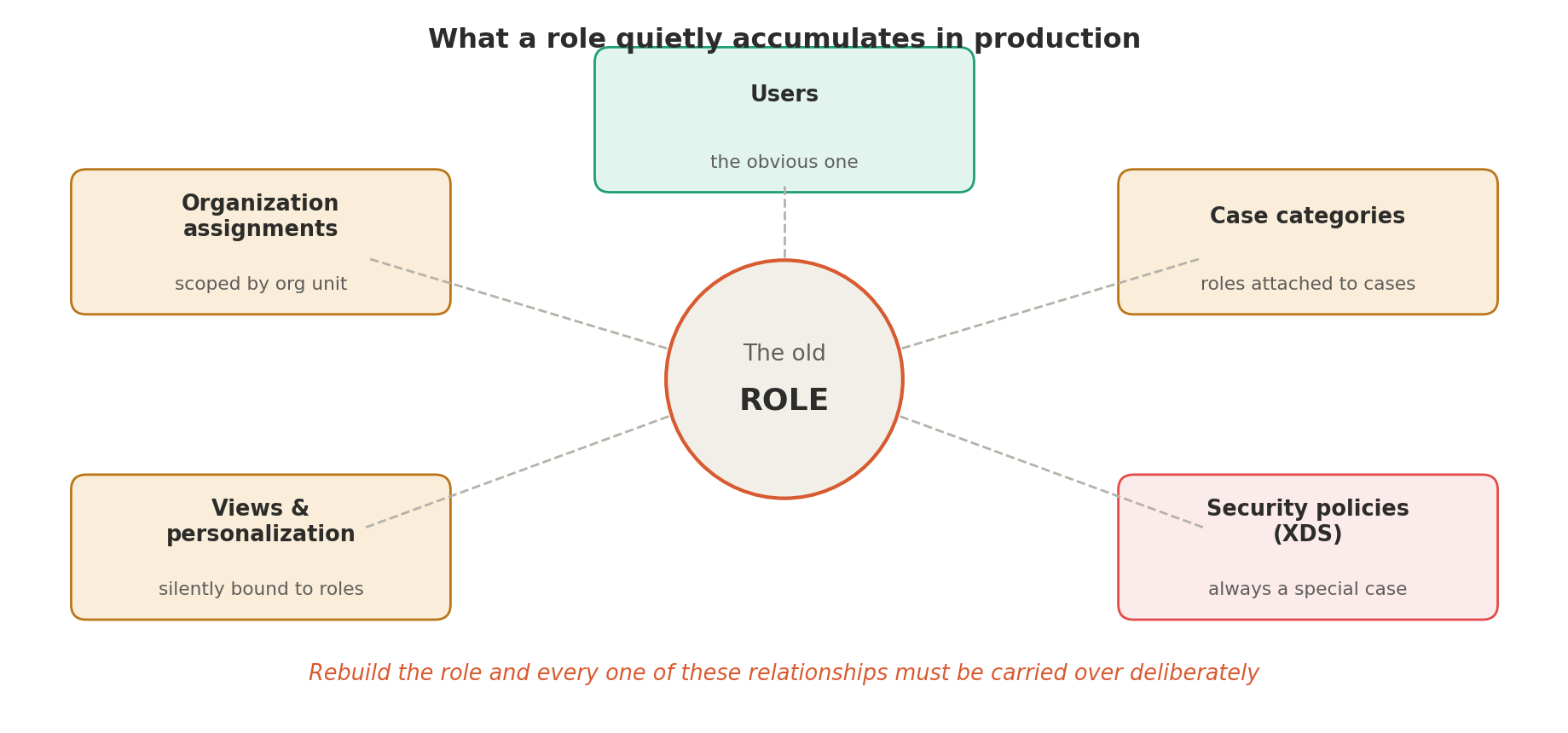
Roles can carry organization assignments; a role isn't merely granted to a user, it's granted within a specific part of the organization. Roles can be attached to case categories. Roles can be referenced by views and personalizations. When you rebuild security from scratch, the new roles inherit none of these relationships automatically.
And some roles have security policies (XDS) applied. Those have to be treated as a special case entirely. Where we suspected a policy was shaping what users could see, we used the roles Microsoft designed specifically for this diagnostic purpose, XDSDataAccessPolicyBypassRole and XDSPolicyByPassRoleScenarioTestRole. Assigning one of these tells you immediately whether the behavior you're seeing comes from the security configuration or from a policy sitting on top of it. We used them extensively as identifiers throughout the project.
The conclusion was unavoidable: to fully automate optimal security configuration and migration, you can't script the happy path. You have to build a whole framework that supports the new configuration end to end. We built it, and we now migrate security using data migration entities and XML files, instead of asking people to create security by hand.
The task recorder discovery
The lesson we'd put at the top of the list is organizational, not technical: strong support from managers on the client side is the key to remediation. With it, decisions get made. Without it, every access gap becomes a negotiation.
On the practical side, we developed a communication framework for testing, and its centerpiece was an unglamorous but powerful discovery: the best way for users to communicate missing security is through a task recording.

When a user hits something they can't access, they record the task: their expectation of what they should be able to do. We parse that recording with the tool Microsoft provides in the security governance family, found under System administration → Security → Security governance → Security process role maintenance. The parser reads the recording and produces the list of entry points, the menu items the user expected to reach. From there we identify which privileges and roles support each menu item and add them to the newly created roles.
What makes the newer parser genuinely robust is its coverage: display menu items, action menu items, and output menu items from controls, where the older task recorder analysis covered display menu items only. Buttons and reports, historically the blind spots of security analysis, are finally visible.
In a highly customized environment like this one, that discipline proved essential. When users reported missing access with a screenshot instead of a recording, we spent considerable time simply locating where in the system the gap actually was. We eventually made it a formal requirement: report missing access as a task recording, with the user ID attached.
The obstacles nobody plans for
A pilot project earns its keep through its surprises, and this one had several.
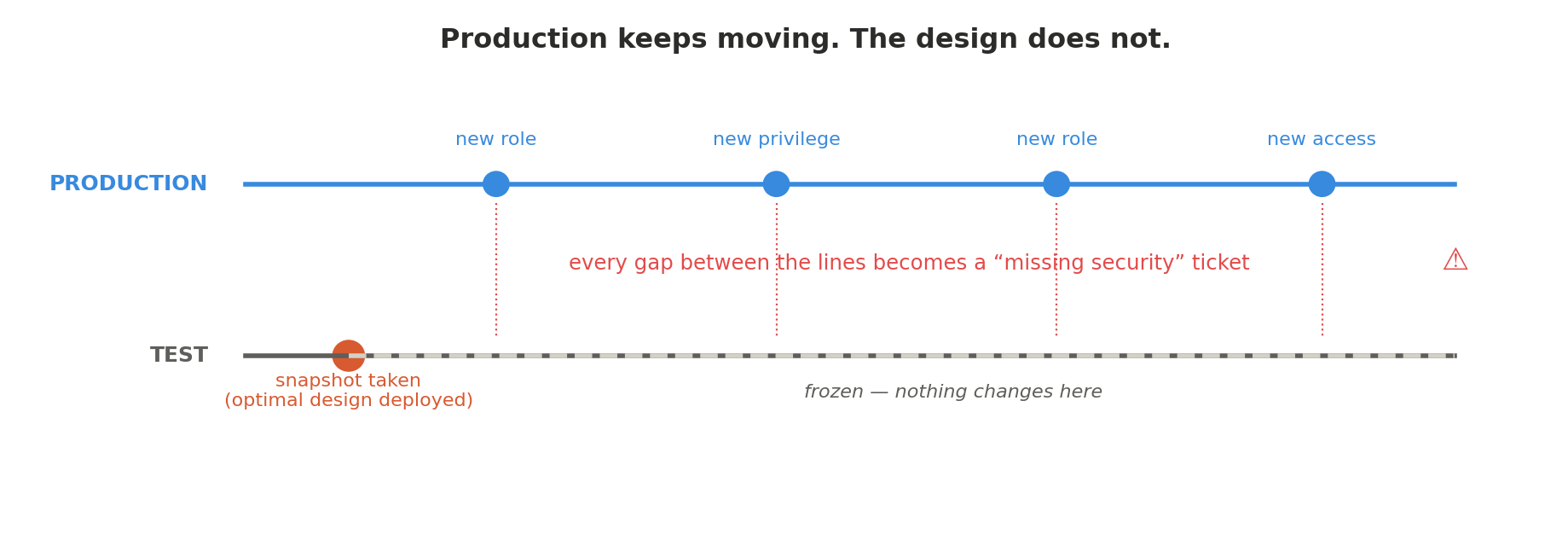
Production drift deserves particular attention because it's the obstacle most likely to be mistaken for a failure of the new model. Our optimal configuration captures the state of the world at the moment we designed it. Meanwhile, production lives its own life: users are granted new roles, new permissions. They then report missing access in test simply because the test design has no evidence of a role that didn't exist when the snapshot was taken. None of this reflects on the quality of the model, but every ticket still has to be investigated.
| Obstacle | What actually happens | How we handle it now |
|---|---|---|
| Surprise data refresh | Test environment is refreshed from production; the entire new configuration is wiped out. | Refresh schedules are agreed and locked before the configuration is deployed. |
| 5 MB import ceiling | Microsoft's security import tool rejects anything larger than 5 MB. | The generated XML is automatically split into 5 MB or smaller fragments as part of the pipeline. |
| Prod / test mismatch | Code, configuration, workflows, master data, or parameters differ; correct security looks broken. | Every reported gap is triaged; a large share turn out not to be security issues at all. |
| Production drift | Users gain new roles in production that the frozen test design has never heard of. | Expected and tracked. Drift is a category of ticket, not a defect in the model. |
Widen the test group, fast
If we could change one thing about how the project ran, it would be this: move from small-group testing to broad user acceptance testing as early as possible.
Testing with subject matter experts or a handful of users produces a slow drip of individually reported gaps, and the configuration keeps churning in response to each one. Testing with a large group produces far more reliable results, and it changes the economics of every fix: when a missing permission is identified, we don't apply it to the one user who reported it, we apply it to every user who qualifies for it. The sooner more people are covered, the fewer changes remain down the road.
Initial small-group testing is a gate, not a phase. Get through it and move on.
Telemetry's blind spot, and the manager's lever
One of the most significant cost-reduction levers on this project came from recognizing what telemetry can't tell you.
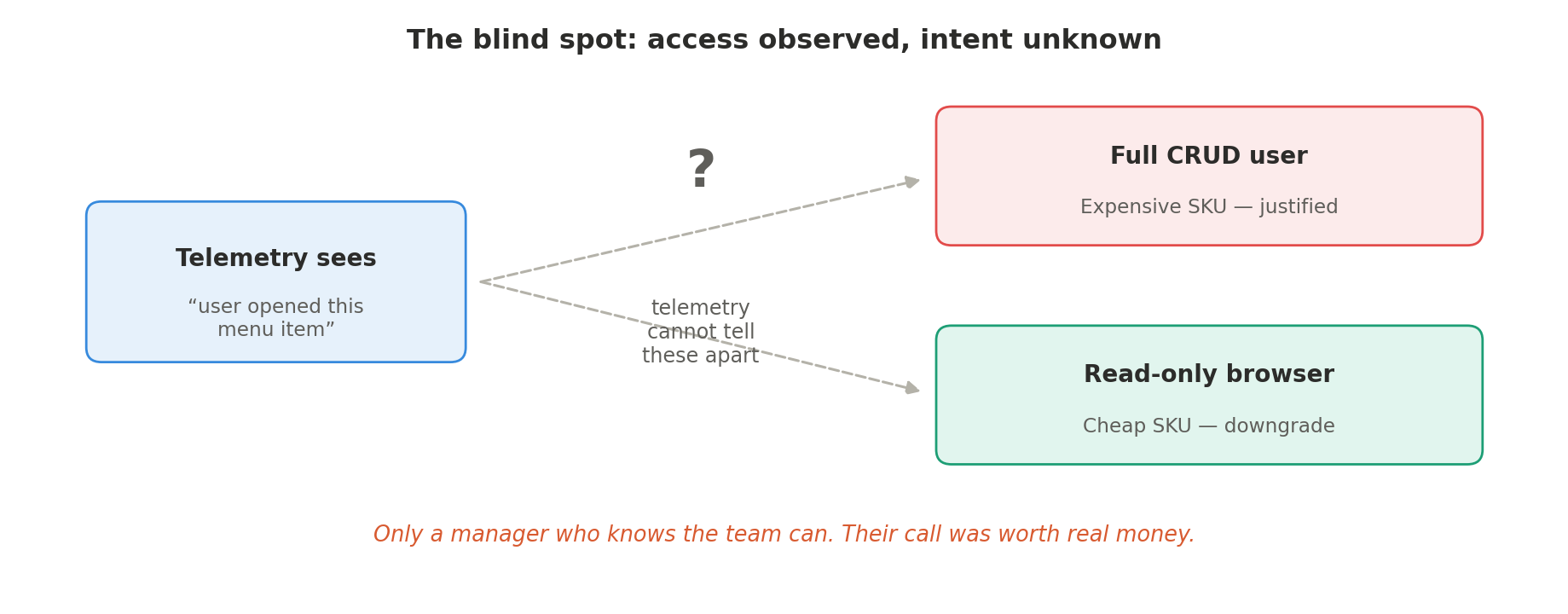
A user might hold a very expensive role because the access level it grants is technically correct, and yet spend all their time merely browsing, viewing, reading. From telemetry alone, we can't distinguish the power user from the window shopper; both simply touched the menu item.
This is where client managers earn their keep. In several cases, managers decided that a group of users would be fine with read access, even though telemetry showed activity on the menu items in question. We reduced those permissions to read-only, the license requirement dropped accordingly, and the savings were significant. Sometimes telemetry shows a false signal, and only a human who knows the team can say so.
The unexpected finale: minimums and reclassification
The last saving arrived after we thought the analysis was finished. We had calculated the optimal number of licenses and were ready to purchase, and ran into Microsoft's minimum purchase requirements.
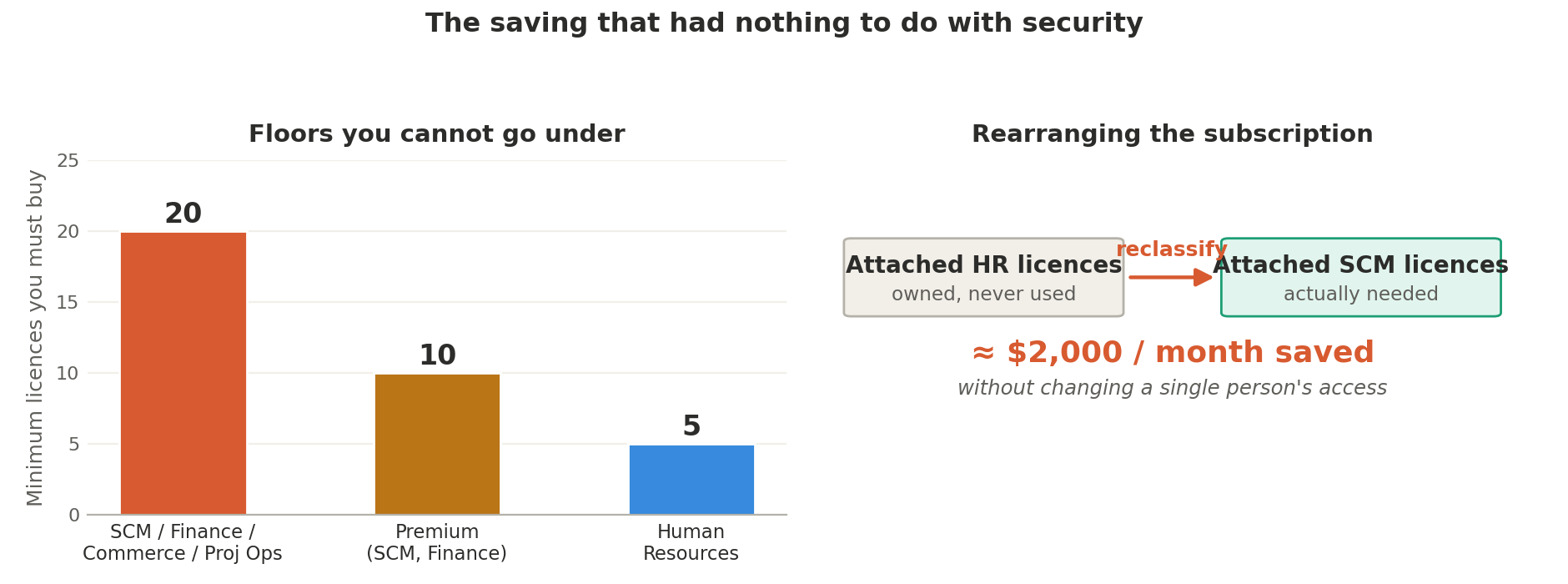
For the base licenses, Supply Chain Management, Finance, Commerce, Project Operations, the client must purchase a minimum of 20. Human Resources carries a minimum of 5. Premium licenses, such as Supply Chain Management Premium or Finance Premium, require a minimum of 10. However elegant your optimal number, you can't buy fewer than the floor.
But the floor turned out to be an opportunity as well as a constraint. By rearranging the numbers, moving attached licenses to full licenses and full licenses to attached where the math favored it, we found additional savings. Existing subscriptions can be reclassified too: attached Human Resources licenses the client was never going to use became the attached Supply Chain Management licenses they actually needed. Purely by manipulating the composition of the subscription against the minimums, without changing anyone's access, we saved a couple of thousand dollars a month.
The result
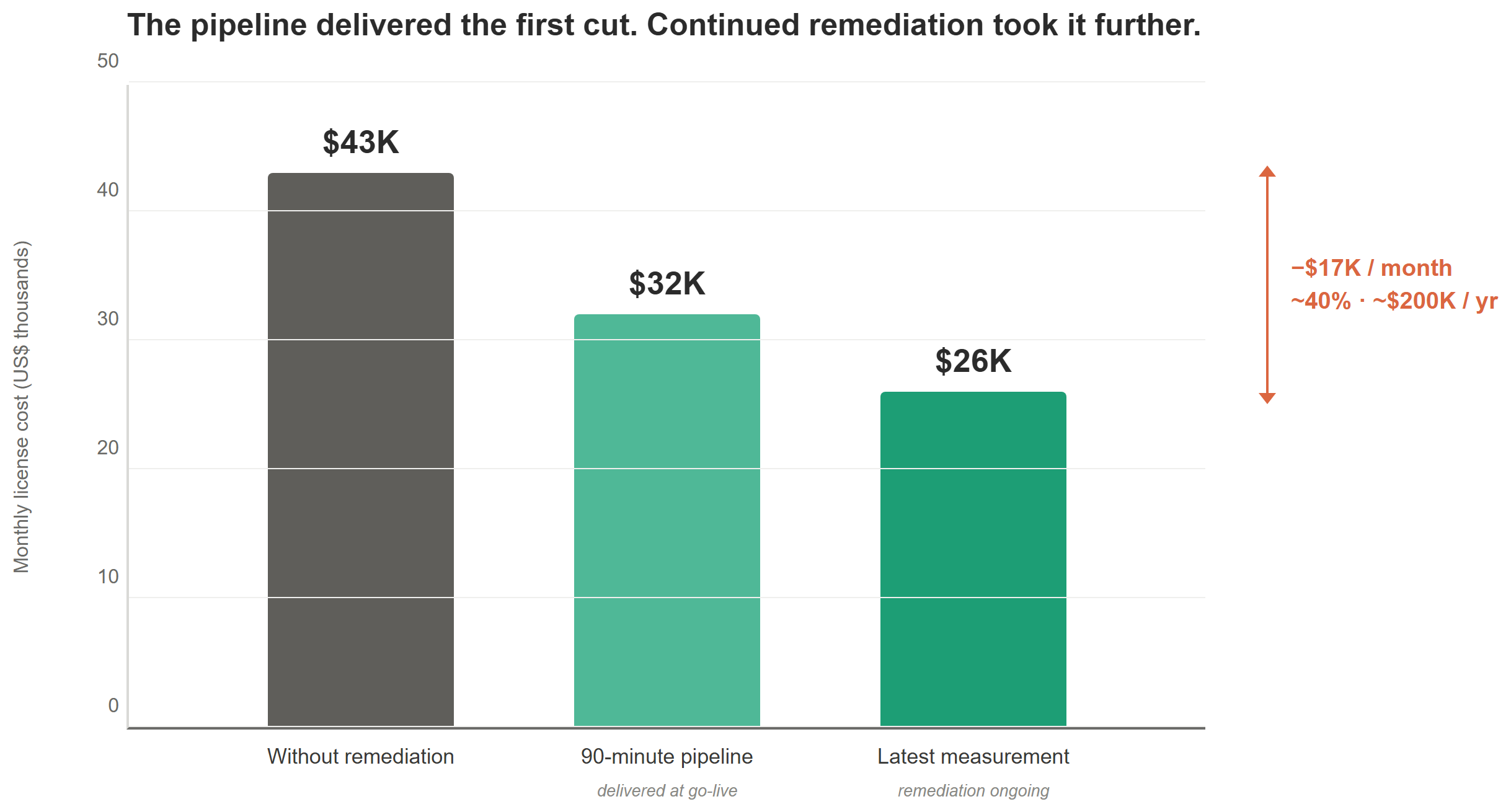
Without remediation, this client was heading toward a requirement of about $43,000 a month. The 90-minute pipeline took their configuration to roughly $32,000 immediately, a saving of around $11,000 monthly, or 25%.
But the number is only half the story. The other half is that the entire remediation, configuration generation, import, role assignment, and unassignment, ran as an automated pipeline, with manual effort concentrated where it belongs: in the decisions only humans can make.
Remediation on this engagement is still open, though nearly closed out: the manager reviews, task-recording checks, and reclassification passes described above have continued past the initial 90-minute migration. At the latest measurement, the license requirement sits at roughly $26,000 a month, a saving of about $17,000, or close to 40%, which projects to around $200,000 a year. Treat this as the current interim figure rather than a final one; we'll update it again once remediation closes.
| Lesson | Why it matters |
|---|---|
| Manager sponsorship is the key | With it, decisions get made. Without it, every access gap becomes a negotiation. |
| Task recordings, not screenshots | A screenshot starts an investigation. A recording with a user ID ends one. |
| Widen the test group fast | Small groups produce a slow drip of churn. Large groups produce reliable results, applied to everyone who qualifies. |
| Automate the relationships, not just the roles | Organizations, case categories, views, personalizations, and XDS policies all ride on the old roles. |
| Check the license minimums before you buy | The floors are real, and rearranging the subscription against them is free money. |
The 90-minute migration only happens if the framework around it already exists: a way to generate the XML and CSVs automatically, a locked refresh schedule, a 5 MB-aware split step, and a task-recording-based testing discipline. Build that framework once, on a project like this one where the underlying security is unremarkable, and it pays for itself on the next migration too. Skip straight to automating the happy path without it, and production drift and the 5 MB import ceiling will eat the time you thought you saved.
The pilot proved the model. The framework it forced us to build is now how we migrate security everywhere.
A fourth engagement in this series caught the same class of problem before it ever reached production: see our case study on a greenfield security design, where a thousand segregation-of-duties conflicts surfaced a day before UAT instead of years into a live environment.