
License projects often quote Microsoft Learn's Security object licenses view page: "When Access level is Read, the applicable license is no higher than Team Members or Human Resources Self-Service." It also flags "a securable object that grants Write access when only Read access is needed," which "can increase the required license from Team Members to a full user license." The implied plan: cut look-only privileges to Read and move their users to Team Members.
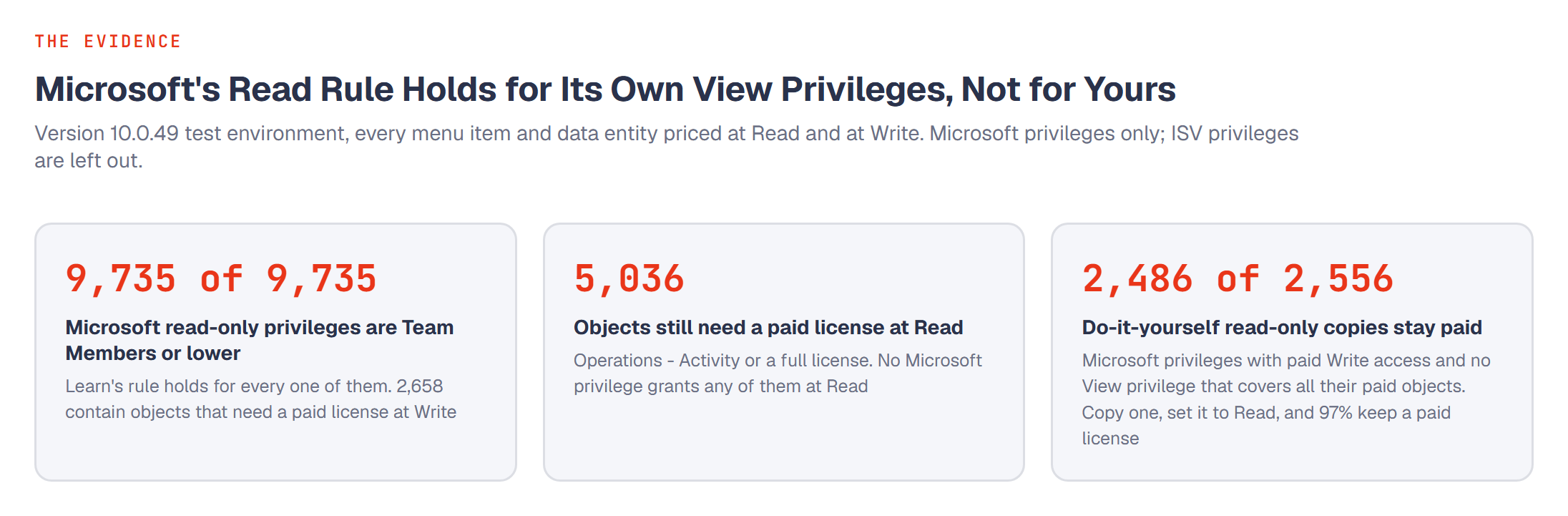
It works in one case, fails in most. In Avantiico's 10.0.49 test environment, the Read and Write license lookup priced menu items and data entities at Read and Write. Checked against every Microsoft privilege, the sentence holds only for Microsoft's own read-only privileges.
Learn's rule describes Microsoft's read-only privileges, not Read access. If a Microsoft View privilege covers every paid object, swap to it; otherwise a read-only copy you build stays paid 97% of the time.
The short answer
| Question | What the test environment showed |
|---|---|
| Is the Learn sentence wrong? | Not for Microsoft's 9,735 read-only privileges, all Team Members or lower. As a general rule, it fails: 5,036 objects are paid at Read. |
| Why does swapping a Maintain privilege for its View twin work? | Microsoft's read-only privileges hold only objects whose Read is cheap. |
| What if I make a read-only copy myself? | Use a Microsoft View privilege that covers every paid object, if one exists; otherwise the copy stays paid 97% of the time. |
| And if Microsoft has no read-only counterpart at all? | Then a read-only copy almost never helps: 98% stay paid. |
| Is there a halfway step, such as Finance at Write and Operations - Activity at Read? | No: a paid object keeps the identical license at Read or drops to Team Members or lower. |
| Which objects are worst? | Action menu items: 92% of the paid ones keep their license at Read, and an action granted only Read may not run. |
What Learn says, and how it gets read
The sentence describes the License column, and the Important note after the column reference scopes it to Microsoft's standard objects and the read-only entry points Microsoft built: "Many out-of-the-box securable objects include read-only entry points. Read access to these standard security objects requires at least a Dynamics 365 Team Members license."
Out of context, plus the advice about Write access "that isn't needed," it reads as a recipe: set any expensive privilege to Read and save.
Where the rule holds: Microsoft's own View privileges
Microsoft's 9,735 read-only privileges here are Team Members or Human Resources Self Service (5,201) or need no license (4,534); none is paid, exactly as Learn says.
Many come in pairs: Maintain grants a form at Write, View or Inquire grants it at Read. In 3,646 pairs (2,656 read-only privileges), a Microsoft privilege grants an object at a paid Write license and a Microsoft read-only privilege grants it at Read. Swapping Maintain for that View twin is the safe version.
Of the 4,975 objects paid at Write but Team Members or less at Read, Microsoft privileges grant 4,973 at Read, read-only ones 4,652. Where Read is cheap, the read-only path usually exists.
Where it breaks: read-only privileges you build yourself
Of the 5,038 paid-at-Write objects that no Microsoft privilege grants at Read, 5,036 keep their exact Write license at Read (same apps, same "or" alternatives).
| Securable type | Full license at Read | Operations - Activity at Read |
|---|---|---|
| Display menu items (forms) | 1,833 | 619 |
| Action menu items | 1,862 | 521 |
| Output menu items (reports) | 108 | 33 |
| Data entities | 59 | 1 |
| Total paid at Read | 3,862 | 1,174 |
No full-license-at-Write object had Operations - Activity at Read, and none cost more at Read, so there's no halfway step.
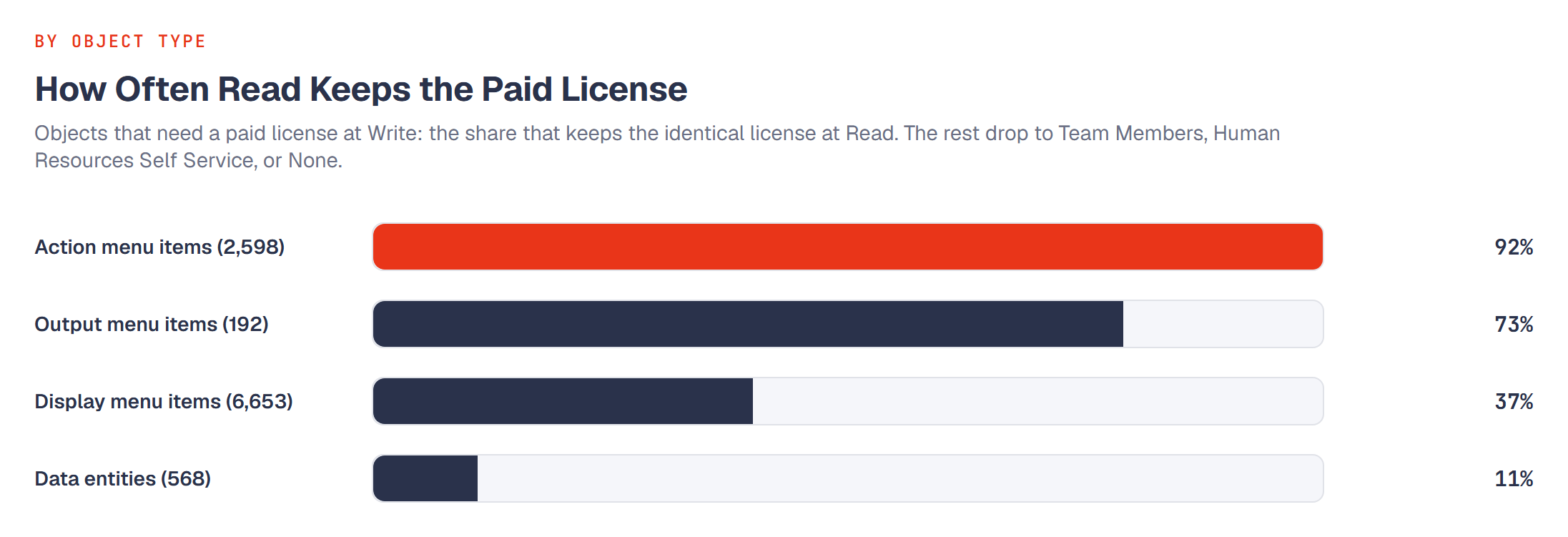
An action granted only Read may also not run, depending on its permission, which the view doesn't show; making it read-only usually means removing it.
What happens when you copy a privilege and set it to Read
We copied the 4,718 Microsoft privileges with a paid Write grant, set every grant to Read, and priced each copy at its highest object license; service operations can't be granted at Read and drop out.
| How well one Microsoft read-only privilege covers its paid objects | Privileges | Read-only copy drops to Team Members or lower | Read-only copy stays paid |
|---|---|---|---|
| Fully: a View privilege grants every paid object at Read | 2,156 | 2,156 (100%) | 0 |
| Partly | 538 | 24 (4%) | 514 (96%) |
| Not at all | 2,018 | 46 (2%) | 1,972 (98%) |
| All | 4,712 | 2,226 (47%) | 2,486 (53%) |
The first row needs no copy: swap to Microsoft's View privilege. Elsewhere, 70 of 2,556 copies (2.7%) got cheaper; six more privileges hold only service operations (Invoke permission only) and can't be made read-only. Of the 2,486 paid copies, 2,012 stay on a full license, 468 on Operations - Activity, and 6 drop from full to Operations - Activity because their objects mix both.
In the partial row, the View privilege is cheap only because it leaves out the objects that stay paid at Read. Maintain accounts receivable parameters grants ten forms at Write, all Commerce or Finance or Supply Chain Management; View accounts receivable parameters is Team Members and grants seven at Read, leaving out SalesQuotationToLineParameters, SalesSummaryParameters, and SalesTable2LineParameters, which keep that license at Read. Swapping to View drops to Team Members minus three forms; a read-only copy doesn't move.
A matching name isn't a twin either. Maintain costing version is Finance or Supply Chain Management at Write; View costing version is Team Members but grants only the periodic costing version form and the costing version entity, not the main CostingVersion form, which keeps its license at Read. A read-only copy doesn't drop, and swapping to View removes the form.
Why production data won't warn you
Production roles inherit Microsoft's habit of granting Read only where it's cheap, so your Security object licenses view hides this: in five client production environments we analyzed, 99.996% of Read rows on a role were Team Members or lower. That's selection: the view shows a Read license only where something grants Read. The lookup article shows how to close this blind spot.
We fell for it too: our engine assumed Team Members for objects never seen at Read, but about 52% of the privileges it flagged as "read-only would lower the seat" hold an object the lookup shows stays paid at Read, overstating estimated savings. It now uses the environment's Read license, then the lookup, else assumes Read costs the same as Write.
Before you swap Write for Read
- Look for a Microsoft View privilege that covers every paid object. That's always Team Members or lower; one covering only some removes access to the rest.
- No full View privilege? Assume Read costs the same as Write. That held for 97% of such privileges here.
- Price your own read-only privilege object by object in a Read and Write lookup before building it: one object that keeps a full license keeps the privilege on it.
- Count the seat, not the privilege. A license drops only if every paid object the user holds goes cheaper at Read and usage evidence shows no writes on any. Telemetry shows a form opened, not a save; audit logs show writes only on tables that record who changed a row. Missing write evidence is unknown, not proof.
- Don't count read-only actions as savings. 92% of the paid ones keep their license, and an action granted only Read may not run.
- Prove it before you quote it. Test the swap on a sandbox user and confirm the license drops, as in our earlier look at read-only access.
All counts come from one test environment on version 10.0.49 (application 10.0.2790.46), exported 2026-10-20, excluding its one ISV solution's 187 privileges. Privileges count by displayed name. Coverage means one Microsoft read-only privilege grants at Read the objects the Write privilege grants at a paid license, not equal functional access. About 40 exported objects, mostly menu items, are missing from the planning privileges and lookup. Licenses are Microsoft metadata and can change by version; money and per-user savings aren't measured.
"Read is no higher than Team Members" describes Microsoft's View privileges, not Read access. Swap to one that covers all paid objects; without one, a read-only copy saves the license only 2.7% of the time, so price every object before promising a Team Members seat.
Related reading: the Read and Write license lookup (and how to build one), our earlier look at read-only access (all menu items), the cheaper door (switching entry points), and pro forma invoices without posting rights (a Finance-priced object in a real role build).