
Most D365 license optimization advice, ours included, leans on reclassification: moving owned seats from a SKU nobody needs onto one that's short. It works, but it carries a dependency people discover late. Reclassification needs your Microsoft agreement to allow it, often only happens at renewal, and usually runs through your partner. So the saving is real but not immediate.
There's a second lever that has none of those strings, and on one real estate it was worth $19,290 a month on its own. It's not reclassification. It's just assigning the licenses you already own to the right users.
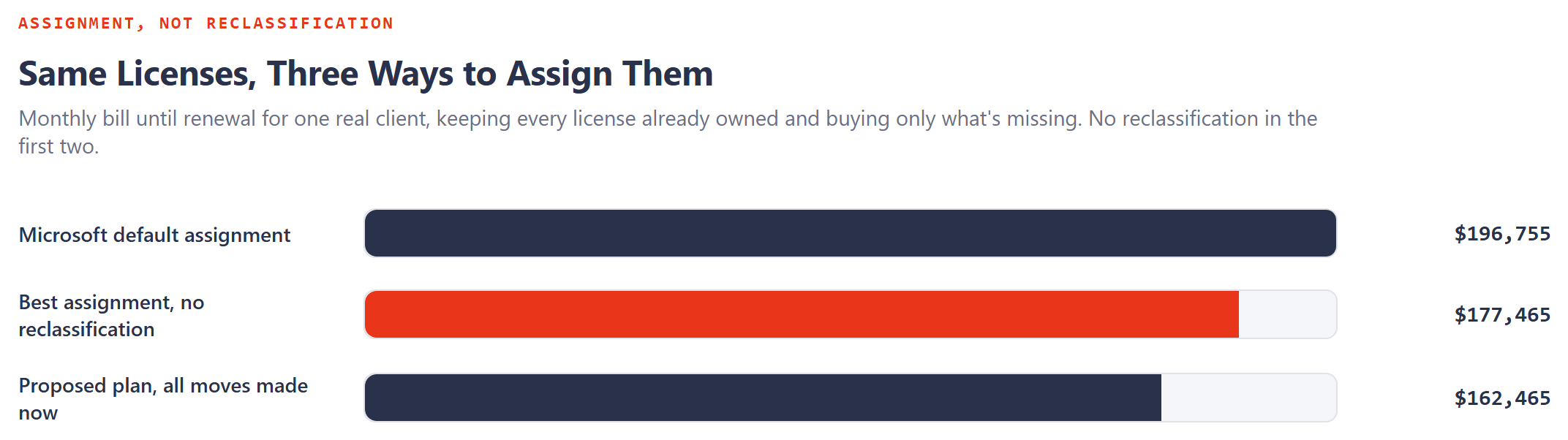
The same user needs, three assignments
Take the estate from our License Optimization Model's worked example: it owns 100 Finance, 60 Supply Chain Management, 160 SCM Attach, and 1,200 Operations-Activity licenses. The licenses its users actually need cost the same in every plan, $142,015 a month at list price, because each user still gets exactly one base license and the same set of applications. What changes between the plans is how well the assignment fits the licenses the company already owns, and whether it trips a minimum.
Why Microsoft's default assignment is the expensive one
Dynamics 365 assigns each user's highest-priority license as their base, following a fixed order (Supply Chain Management first). That rule never looks at what the company owns. Here it makes 340 users SCM base users, but the company owns only 60 SCM base licenses, so it has to buy 280 more SCM seats while 55 Finance and all 160 SCM Attach licenses it already paid for sit idle. On top of that, its 6 Commerce base users trigger the Commerce minimum of 20, leaving 14 idle Commerce seats at $2,940 a month. The result is $196,755 a month until renewal.
Microsoft's default assignment is built to be compliant, not to fit what you already own. That mismatch, not a shortage of licenses, is what forces most of the extra spend.
The best assignment that reclassifies nothing
Now keep every license the company owns on its current SKU, change nothing on the subscription, and just assign those owned licenses deliberately: 191 users get a Finance base, 180 get an SCM base, 160 carry an SCM Attach. That uses up every owned Finance, SCM, and SCM Attach license, and only the 709 spare Operations-Activity seats sit idle until renewal. The bill until renewal drops to $177,465, which is $19,290 a month lower than Microsoft's default ($196,755 minus $177,465), with no security change, no reclassification, and nothing that needs anyone's sign-off.
It gets better after renewal. This no-reclassification plan reaches the same post-renewal bill as the fully-reclassified plan, $142,015 a month, purely by dropping those 709 idle Activity seats when the term ends. No seats ever have to change SKU at all.
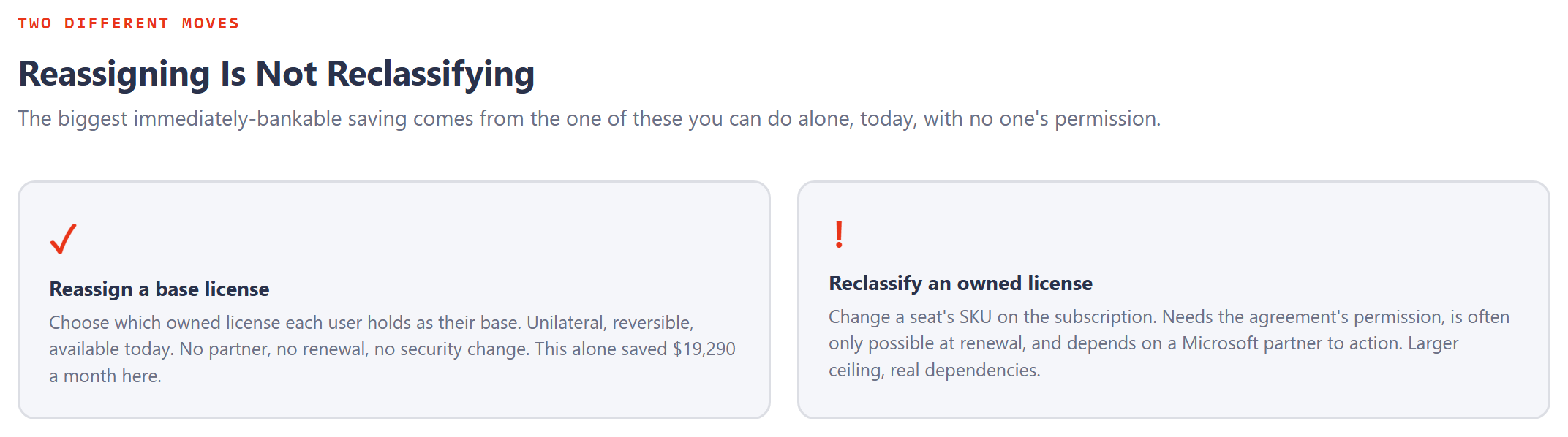
Reassigning is not reclassifying
This is the distinction worth internalizing. Reassigning a base license means choosing which license a user already entitled to holds as their base, among the equally-priced Finance, SCM, and Commerce SKUs. You do it in the Microsoft 365 admin center, today, unilaterally, and you can undo it. Reclassifying means changing a seat's actual SKU on the subscription, which touches the commercial agreement and usually waits for renewal. Both are useful, and the fully-reclassified plan does reach a lower until-renewal bill ($162,465). But the reassignment captures the large majority of the saving with none of the dependencies, which makes it the thing to do first, while reclassification gets negotiated.
A user assigned a base license for an application they don't personally use will show as over-licensed in the Power Platform admin center. That's expected and must not be "corrected", removing it strips the qualifying base from the attach license riding on it, and the minimum it was avoiding comes straight back. These figures are list prices on one estate; your own contract prices and owned-license mix will move the numbers, though not the direction.
Where to see all three plans side by side
The workbook in our free License Optimization Model now has a dedicated License Assignment Comparison sheet that computes all three assignments, Microsoft's default, the proposed reclassified plan, and the best assignment without any moves, so you can see exactly how much of your own saving needs renewal and a partner, and how much you can bank this week on your own.
This workbook isn't our analysis service. It recalculates licenses for the security you have today. See how it differs from the paid analysis.
Before you plan a single reclassification, assign the licenses you already own correctly. On this estate that one move, unilateral and reversible, captured $19,290 a month and most of the post-renewal saving too.
Free workbook or paid analysis: what's the difference?
The free workbook recalculates the cheapest license mix for the security you already have, which the Power Platform admin center report doesn't fully optimize. The paid analysis finds the permissions people don't use, and that's where the larger savings are.
| Free workbook | Paid analysis | |
|---|---|---|
| What it does | Recalculates licenses. Your security stays as it is, so it can't reduce what that security requires | Proposes a redesign that keeps the access people need. Your managers decide |
| What to expect | A lower bill when the license mix or purchase minimums are the problem | Usually 20 to 30% of the bill you'd otherwise pay, once the redesign is deployed |
| Who runs it | You | We run the analysis. We or your team deploy |
| Cost | Free | Paid: at 20 to 30%, it saves $200,000 to $300,000 a year per $1 million of the bill you'd otherwise pay. Deployment is priced separately |
Download the free License Optimization Model, or see how the paid analysis works.
Related reading: which license should be your base covers the price-equivalence rule this depends on, a $750 purchase that raised the bill to $12,700 covers the reclassification side and why timing matters, and Microsoft's purchase minimums force overbuying explains the Commerce-minimum trap the default assignment walks into.