
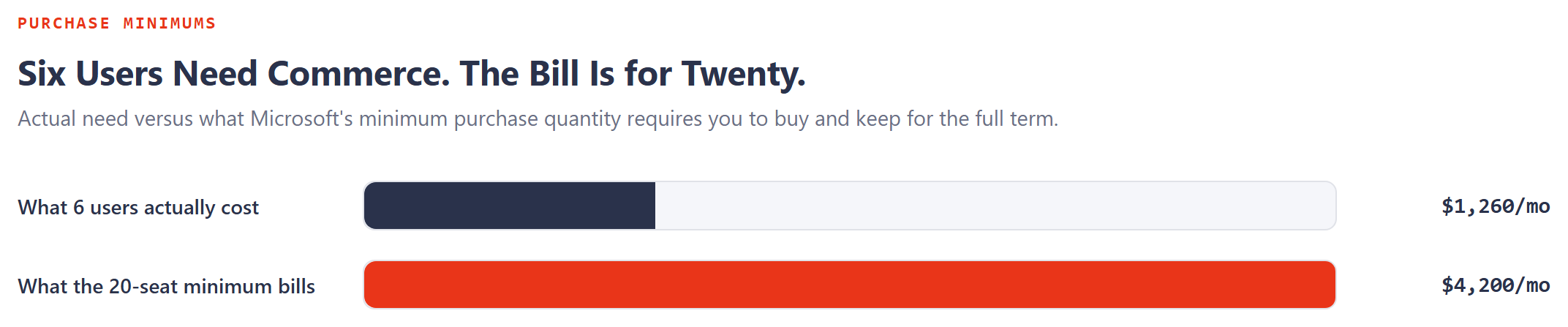
Six users need Commerce. Microsoft bills you for 20. That's $4,200 a month against the $1,260 those six users would actually cost on their own, 14 seats you're paying for whether anyone ever uses them or not.
That gap isn't a pricing mistake or a negotiation failure. It's Microsoft's minimum purchase quantity, a floor on nearly every Dynamics 365 Finance and Operations product, and it applies the moment you use a product at all, regardless of how many people actually need it.
This workbook isn't our analysis service. It recalculates licenses for the security you have today. See how it differs from the paid analysis.
The full minimum purchase table
Per Microsoft's Product Terms, under "Purchasing Minimums, All Programs," these minimum purchases "must be maintained through agreement term," meaning the floor isn't a one-time commitment, it's a standing one for the life of the contract:
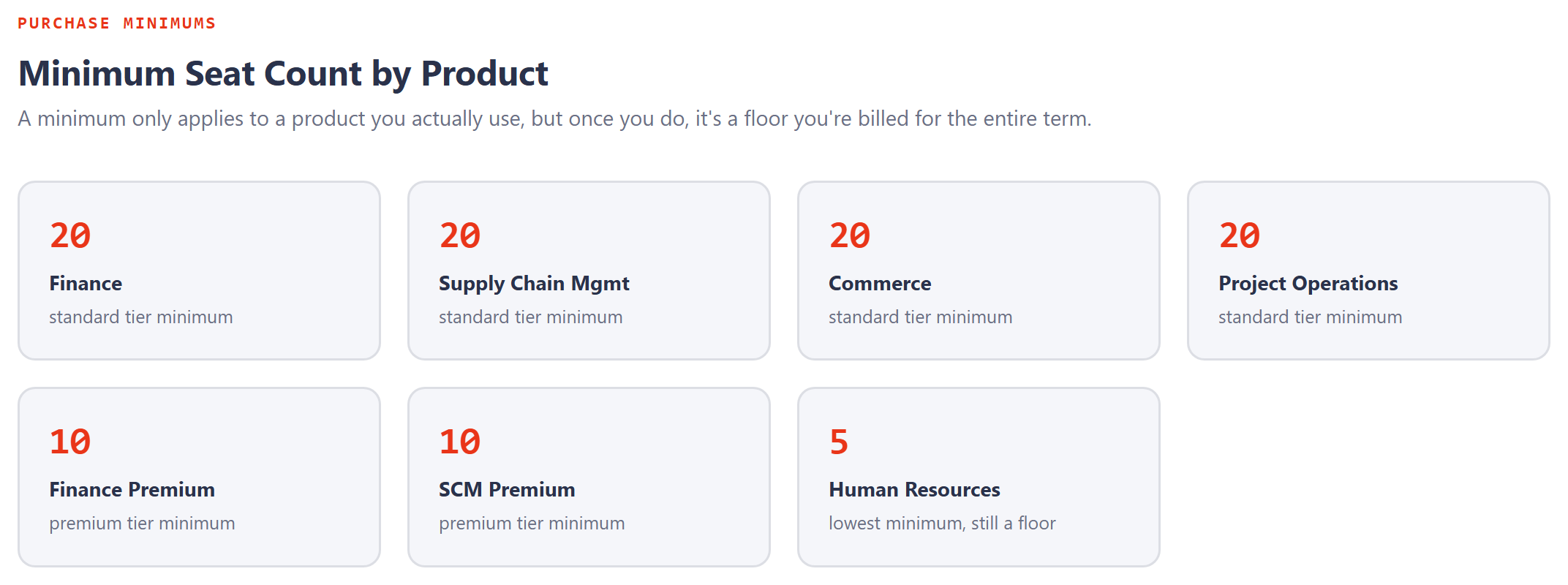
The minimum applies to a product only when you actually use it. If nobody in your tenant needs Commerce, nothing has to be bought. The problem only shows up once a product crosses from zero users to one, at which point you're immediately on the hook for the full minimum, not a pro-rated fraction of it.
Microsoft's Product Terms list minimums per product and don't explicitly state how attach licenses count toward them. The common working assumption, including in our own License Optimization Model, is that attach licenses have no minimum of their own and don't trigger one. Confirm this with your Microsoft partner before relying on it. Any saving built around avoiding a minimum depends on that assumption holding.
Why it's a monthly bill, not a one-time cost
A minimum is a commitment in money, not only in seats. Buying 20 Commerce seats for 6 users doesn't mean the other 14 sit in a drawer at no cost, they're billed at full price every month until the contract term ends or someone acts on it. Over a 12-month term, that's roughly $35,280 paid for seats nobody holds, just from this one product, in this one example, on top of the $15,120 the 6 real users already cost.
Three ways to stop wasting the overage
Once a minimum is triggered, you have three levers to make the unavoidable 20 seats do something useful instead of sitting idle:
- Choose base licenses to avoid triggering the minimum at all. If the 6 Commerce-only users already need Supply Chain Management or Finance for another reason, those SKUs are often already past their own minimum from other users, so assigning Commerce as a cheap attach license instead of a dedicated base avoids the Commerce minimum entirely. We cover exactly when this swap is free in a separate piece on base license choice.
- Reclassify seats you already own but don't need. Owned licenses on a SKU nobody uses can often be moved to cover a shortfall elsewhere, filling a minimum with seats you're already paying for instead of buying new ones. The order this happens in, and a real gotcha in how it affects your monthly bill, is covered in our piece on purchase cost versus the actual bill.
- Let unused Premium seats cover the standard tier. An unused Finance Premium or SCM Premium seat can cover that same product's standard-tier need, even though Premium costs more, which is sometimes still cheaper than buying new standard seats outright.
A minimum only costs you extra once. After that, the 14 idle seats are a resource you already own, worth spending deliberately rather than leaving untouched until renewal.
If any product in your tenant has fewer users than its minimum, you are already paying for the full minimum today. The only open question is whether those extra seats are doing anything for you, or just sitting there.
Free workbook or paid analysis: what's the difference?
The free workbook recalculates the cheapest license mix for the security you already have, which the Power Platform admin center report doesn't fully optimize. The paid analysis finds the permissions people don't use, and that's where the larger savings are.
| Free workbook | Paid analysis | |
|---|---|---|
| What it does | Recalculates licenses. Your security stays as it is, so it can't reduce what that security requires | Proposes a redesign that keeps the access people need. Your managers decide |
| What to expect | A lower bill when the license mix or purchase minimums are the problem | Usually 20 to 30% of the bill you'd otherwise pay, once the redesign is deployed |
| Who runs it | You | We run the analysis. We or your team deploy |
| Cost | Free | Paid: at 20 to 30%, it saves $200,000 to $300,000 a year per $1 million of the bill you'd otherwise pay. Deployment is priced separately |
Download the free License Optimization Model, or see how the paid analysis works.
Related reading: our free License Optimization Model applies all three levers automatically against your own subscription, which license should be your base covers the first lever in depth, and a $750 purchase that raised the bill to $12,700 covers the second.