
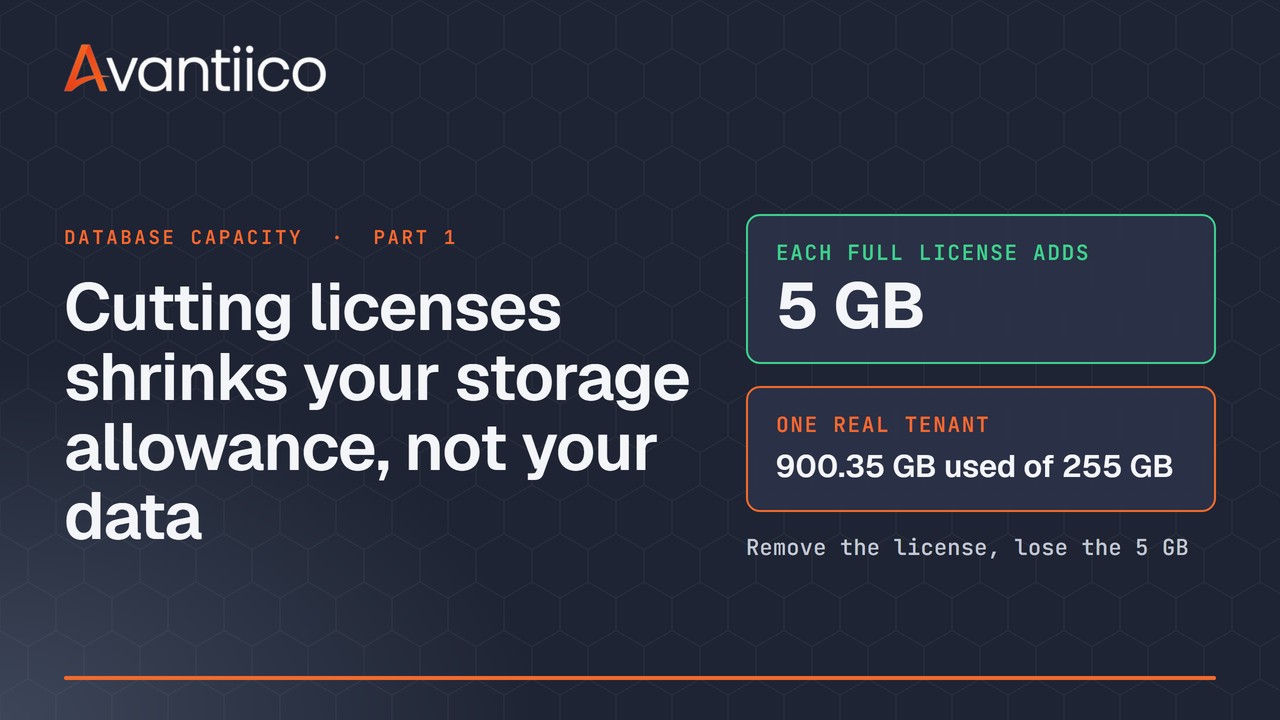
Every full D365 Finance or Supply Chain license adds 5 GB to your tenant's database allowance. Move that user to Operations - Activity and the allowance drops by 4 GB; remove the license and it drops by 5 GB. The data doesn't go anywhere, so a successful license optimization can leave you over your storage allowance.
In plain words: Microsoft gives each tenant a database storage allowance, and most of it comes from your user licenses. When you buy fewer or cheaper licenses, the allowance shrinks. Your database doesn't. Nothing breaks on the day the licenses change, so it's easy to miss.
Database capacity series. Part 1, how license cuts shrink the allowance; Part 2, the LCS to PPAC capacity check; Part 3, where the space goes in four databases; Part 4, what to delete, copy, archive or keep; Part 5, a 3PL tenant on its way from 900 GB to 350 GB. The Part 5 tenant runs the 3PL and Freight Reconciliation solutions.
We run license optimizations for a living, and this is the part we now check before we recommend one. Until recently it rarely came up. Microsoft's move of finance and operations environments from Lifecycle Services (LCS) to the Power Platform admin center (PPAC) changes that, because the migration checks your database capacity before it lets you go. Part 2 covers that check.
Where the allowance comes from
The November 2026 Licensing Guide sets the numbers. A tenant with Finance, Supply Chain Management, Commerce or Project Operations gets 90 GB of database capacity once, plus 5 GB for every full user license. Premium licenses start at 125 GB and add 10 GB per user. Operations - Activity adds 1 GB per user. Team Members and attach licenses, the cheaper second license a user with a full license can add, bring nothing.
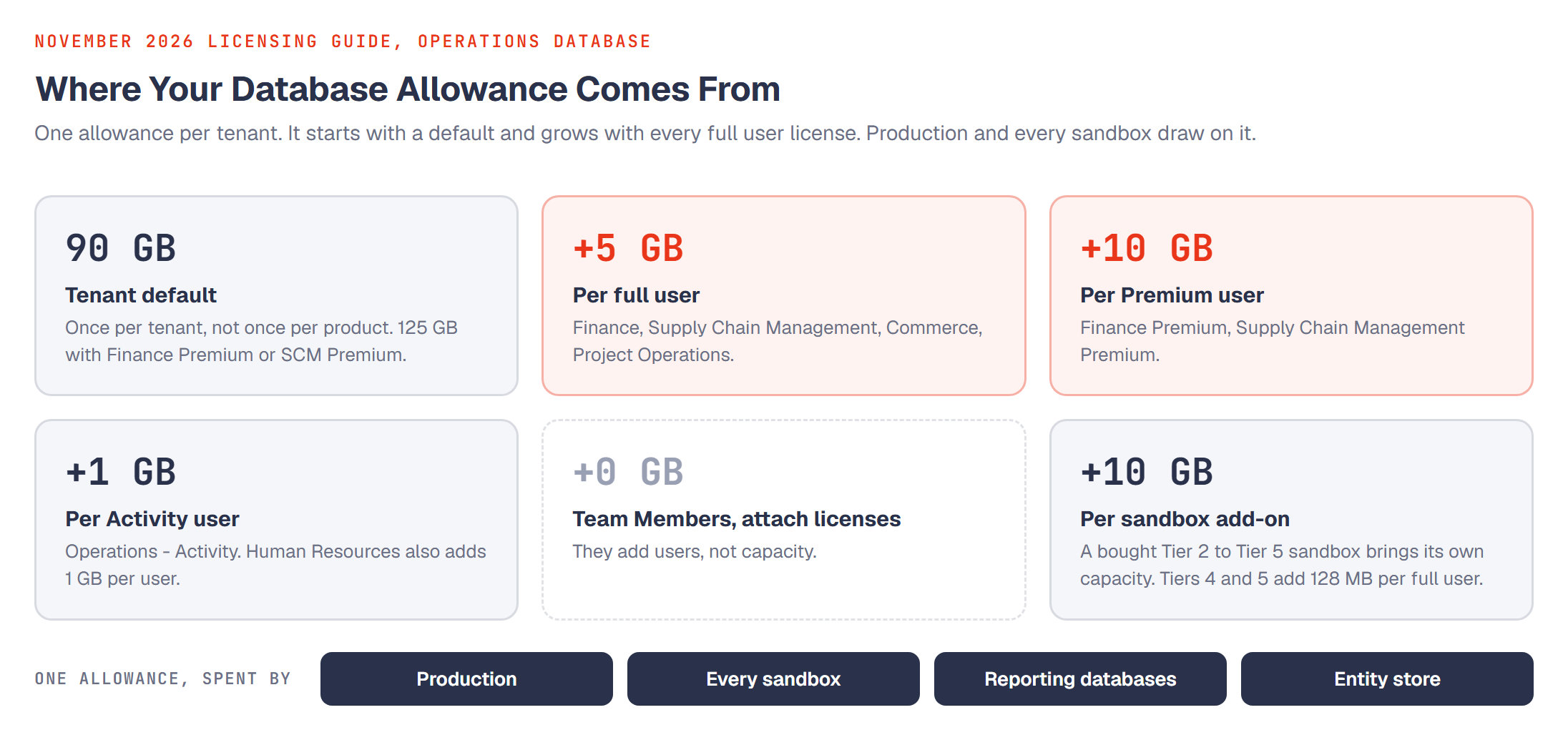
The part people miss is what draws on it. The Licensing Guide says the capacity is inclusive of all storage in production, nonproduction, reporting and entity store databases. The entity store is the reporting database behind the Power BI reports embedded in D365. Every sandbox counts against the same allowance as production, and a sandbox refreshed from production arrives at production's size.
What a license optimization does to it
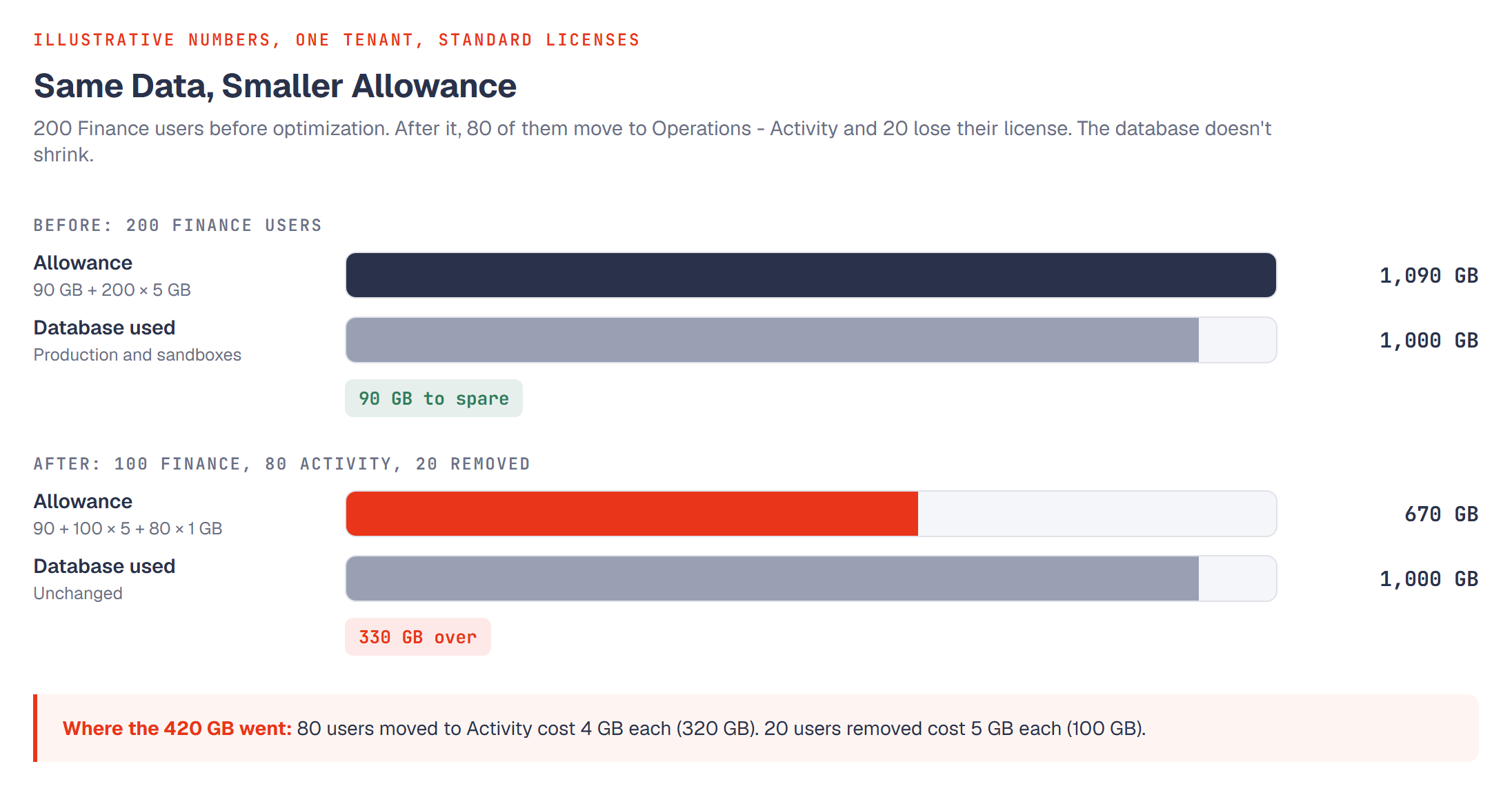
Here's an illustrative example with round numbers. A tenant has 200 Finance users and 1,000 GB of data across production and its sandboxes. Its allowance is 90 GB plus 200 times 5 GB, which is 1,090 GB, so it has 90 GB to spare.
Then the license analysis does its job. 80 users only need Operations - Activity, and 20 don't need a license at all. The allowance becomes 90 GB plus 100 times 5 GB plus 80 times 1 GB, which is 670 GB. The same 1,000 GB of data is now 330 GB over.
| License change, per user | Database allowance lost |
|---|---|
| Finance or SCM to Operations - Activity | 4 GB |
| Finance or SCM to Team Members, or license removed | 5 GB |
| Finance Premium or SCM Premium to the standard license | 5 GB |
| Premium to Operations - Activity | 9 GB |
| Premium license removed | 10 GB |
If the last Premium license goes, check whether the tenant default also drops from 125 GB to 90 GB. The guide lists the two defaults by product but doesn't spell out that case, so confirm it in PPAC after the change rather than assuming either way.
A license optimization is also a capacity decision. Price both before you sign the new license count.
One real tenant, worked through
The license report below comes from a tenant we manage, the same one in Part 5. It has 30 Finance licenses, 15 Operations - Activity licenses, 33 Team Members and 10 Supply Chain Management attach licenses.
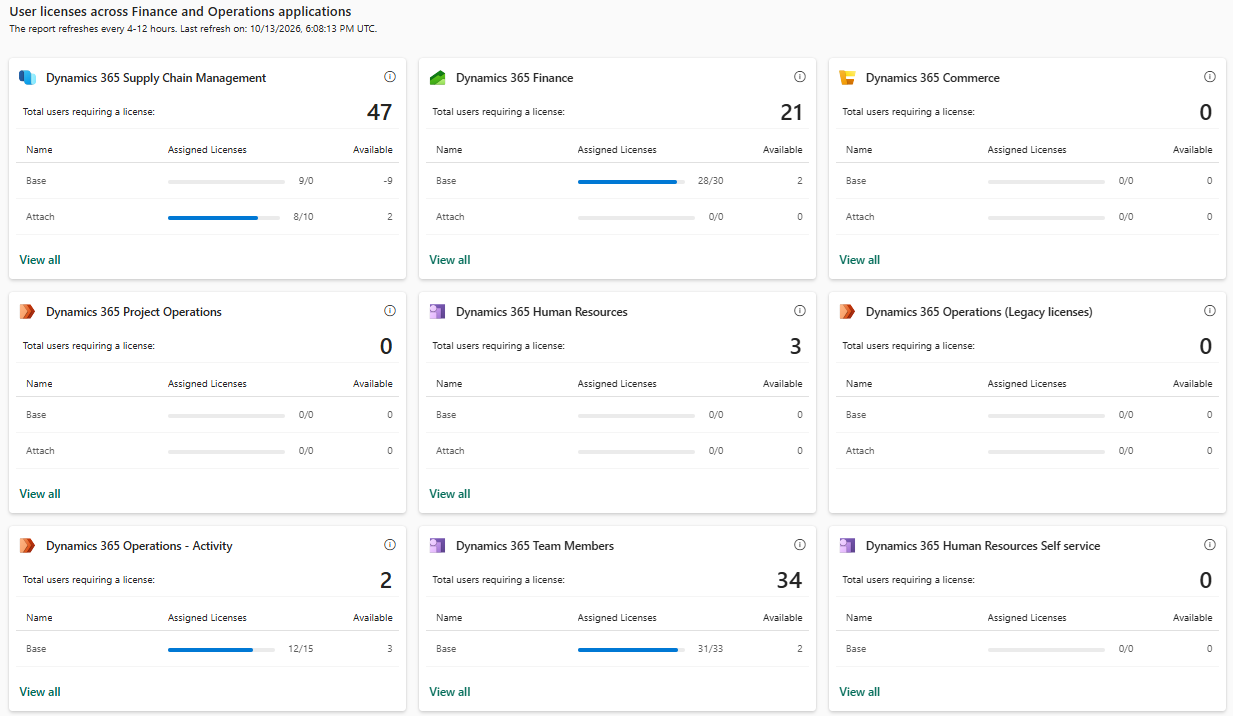
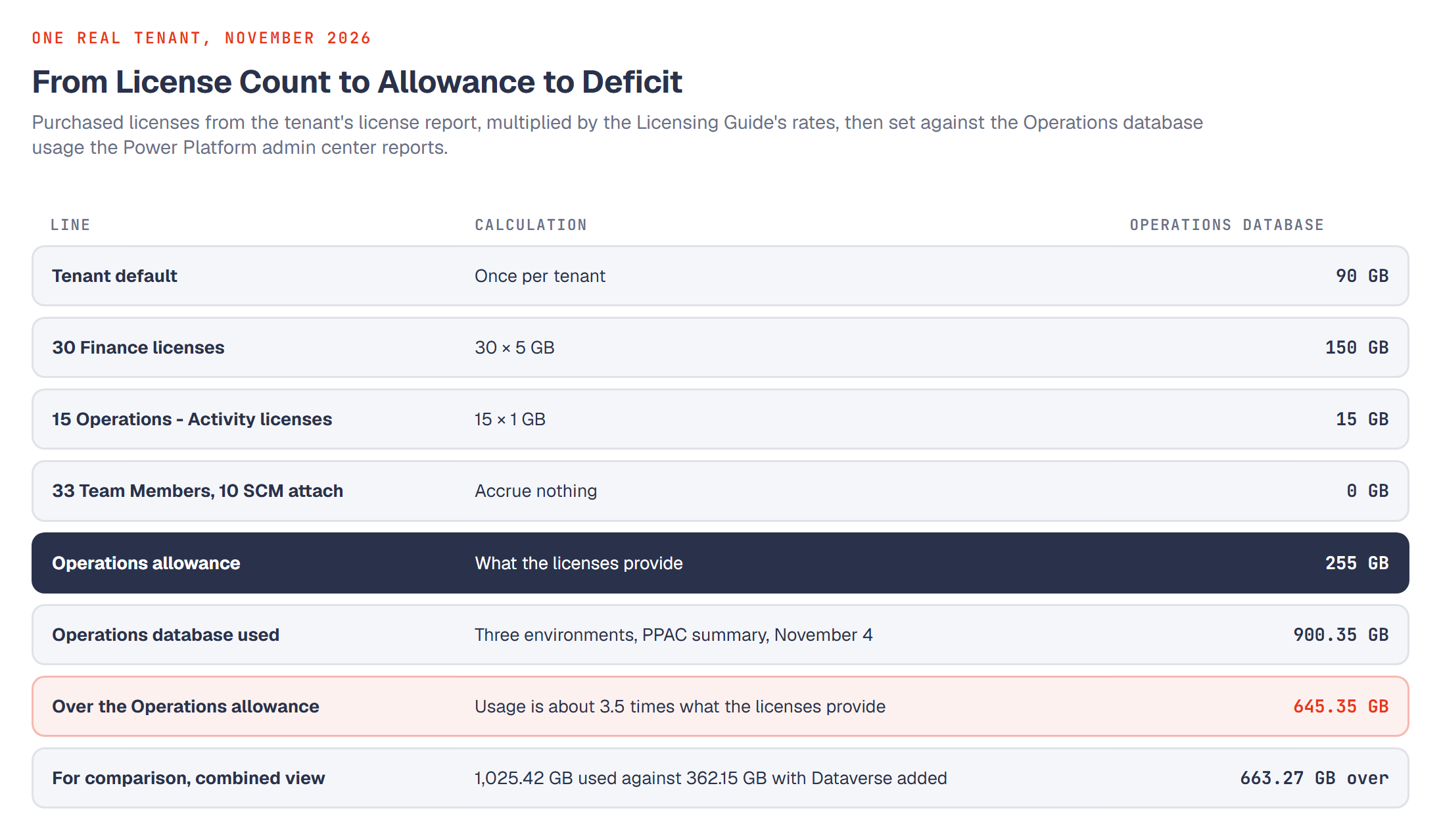
Run that through the guide: 90 GB, plus 30 times 5 GB, plus 15 times 1 GB, which is 255 GB of Operations database allowance. The Team Members and attach licenses add nothing. The capacity summary in PPAC, filtered to the Operations entitlement, shows exactly that: 255.00 GB of database and 260.00 GB of file. Capacity follows what's bought, so the 9 SCM base licenses assigned against 0 bought add nothing, and no sandbox add-on capacity is counted here.
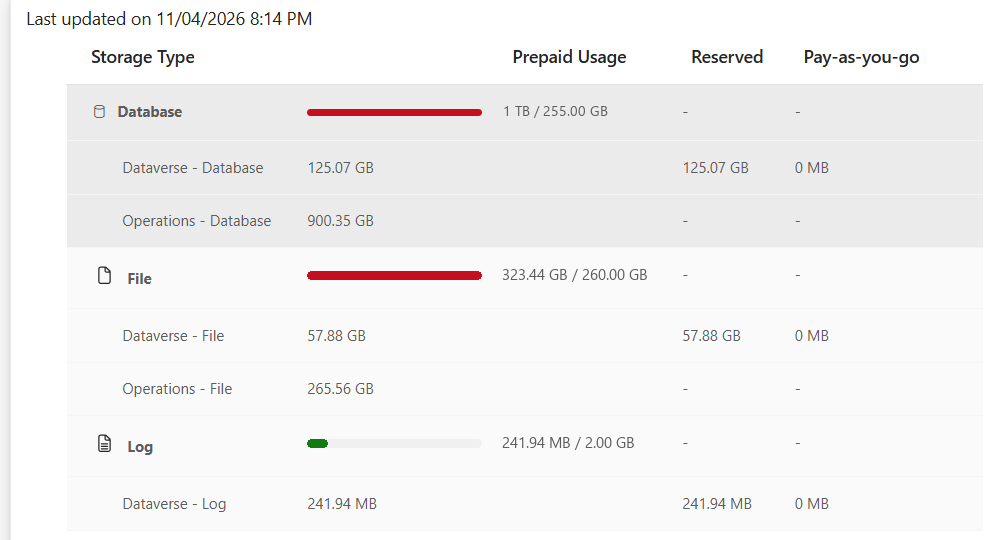
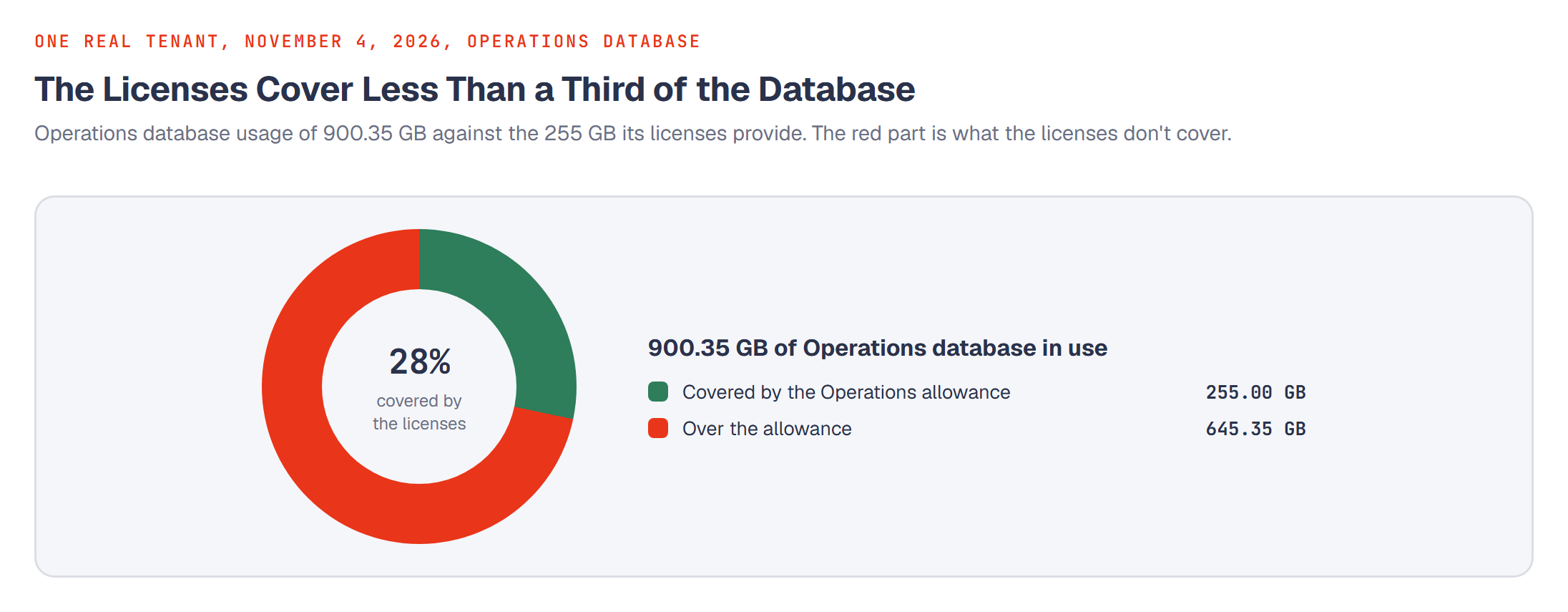
Against the 255 GB, the Operations databases of the tenant's three environments use 900.35 GB. That's 645.35 GB over, about 3.5 times what the licenses provide. Operations file storage is over too, if only just: 265.56 GB against 260 GB, 5.56 GB over. Database and file are separate meters, so check both.
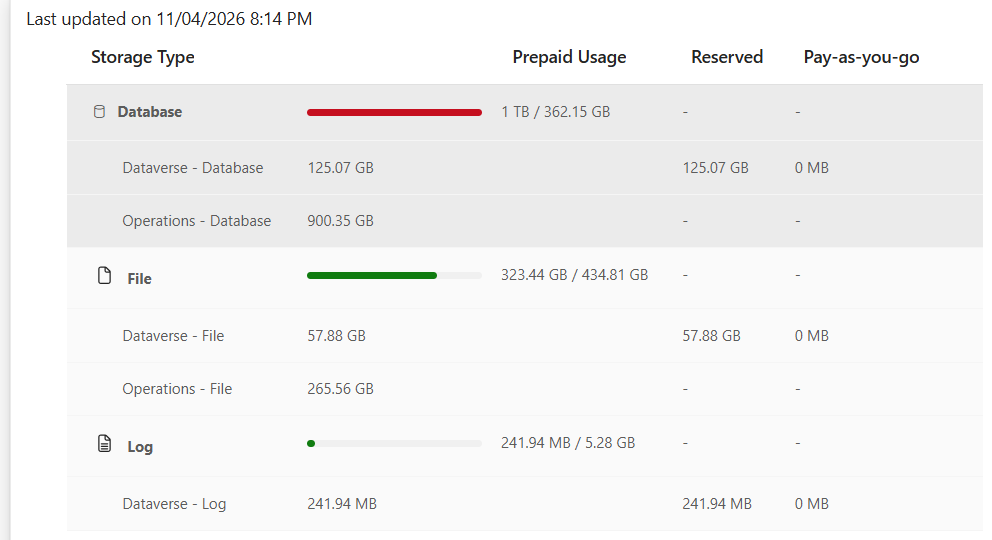
The default summary view adds Dataverse, Microsoft's Power Platform database, to both sides: 1,025.42 GB used against a combined 362.15 GB, which is 663.27 GB over. By subtraction, the tenant's Dataverse allowance is 107.15 GB. Dataverse is over on its own too: 125.07 GB used against 107.15 GB, 17.92 GB over. In that combined view, file looks fine at 323.44 GB of 434.81 GB, because the Dataverse file allowance has room to spare. Microsoft's pages don't say whether room in one product's allowance offsets a deficit in the other, so read both views.
What happens when you're over
Today, usually nothing you'd notice. Microsoft's storage page says that exceeding the entitlement currently doesn't affect the availability of the service, and the data stays durable. The same page says the online services terms still apply to consumption above the documented entitlements, and that Microsoft may suspend the service after reasonable notice. Its fix is short: delete environments and data you don't need, or buy more capacity.
What's changing is that capacity starts to gate actions. The LCS to PPAC migration checks that database storage capacity is available, and after migration a new environment needs at least 1 GB free of both Operations and Dataverse database capacity. A deficit you could live with in LCS can stop you from creating environments in PPAC.
The rates here are the November 2026 guide's. Microsoft's storage FAQ still mentions an older per-user figure, and the guide can change again. Read your own allowance in PPAC, not from a formula, before you make a purchasing decision.
Does this affect you?
- Are you cutting or downgrading full licenses? Multiply the users by 4, 5 or 10 GB and subtract it from today's allowance.
- Do you have more than one sandbox? Each one counts, and a full copy of production counts at production's size.
- Are you planning the move from LCS to PPAC? The capacity check runs before the migration does.
If any answer is yes, open Licensing in PPAC and compare the database allowance with usage before the license change goes through.
Cutting licenses saves money every month. It also lowers a ceiling you may already be above. Check the database allowance in the same meeting where you approve the new license count, and decide then whether you'll clean up or buy capacity.
Frequently asked questions
Does removing a Team Members license reduce our database allowance?
No. Team Members and attach licenses don't accrue Operations database capacity. The allowance comes from the tenant default and full licenses: 5 GB per Finance, SCM, Commerce or Project Operations user, 10 GB per Premium user and 1 GB per Operations - Activity user.
Do sandboxes count against the same allowance as production?
Yes. The Licensing Guide says the capacity is inclusive of production, nonproduction, reporting and entity store databases. A sandbox you buy as an add-on brings 10 GB of its own.
What happens if we're already over?
Currently nothing breaks, according to Microsoft. But the terms allow suspension after reasonable notice, and the LCS to PPAC migration checks capacity before it runs.