
A copy of your history in Microsoft Fabric frees 0 GB of D365 capacity until the rows are deleted in D365. Most of the space you can recover in a D365 Finance and Supply Chain database is technical history that standard cleanup routines delete, and the rest needs a copy, a decision or both.
Your D365 allowance only recovers when rows leave the D365 database. That one fact explains most of the confusion we see about archiving, and it shapes every decision on this page.
Database capacity series. Part 1, how license cuts shrink the allowance; Part 2, the LCS to PPAC capacity check; Part 3, where the space goes in four databases; Part 4, what to delete, copy, archive or keep; Part 5, a 3PL tenant on its way from 900 GB to 350 GB. The Part 5 tenant runs the 3PL and Freight Reconciliation solutions.
In plain words: a D365 database holds two kinds of data. Business records, like invoices and ledger entries, which you may have to keep for years. And technical history, like batch job logs and import staging, which the system writes as it works and nobody reads after a few weeks. Shrinking a database starts with the second kind.
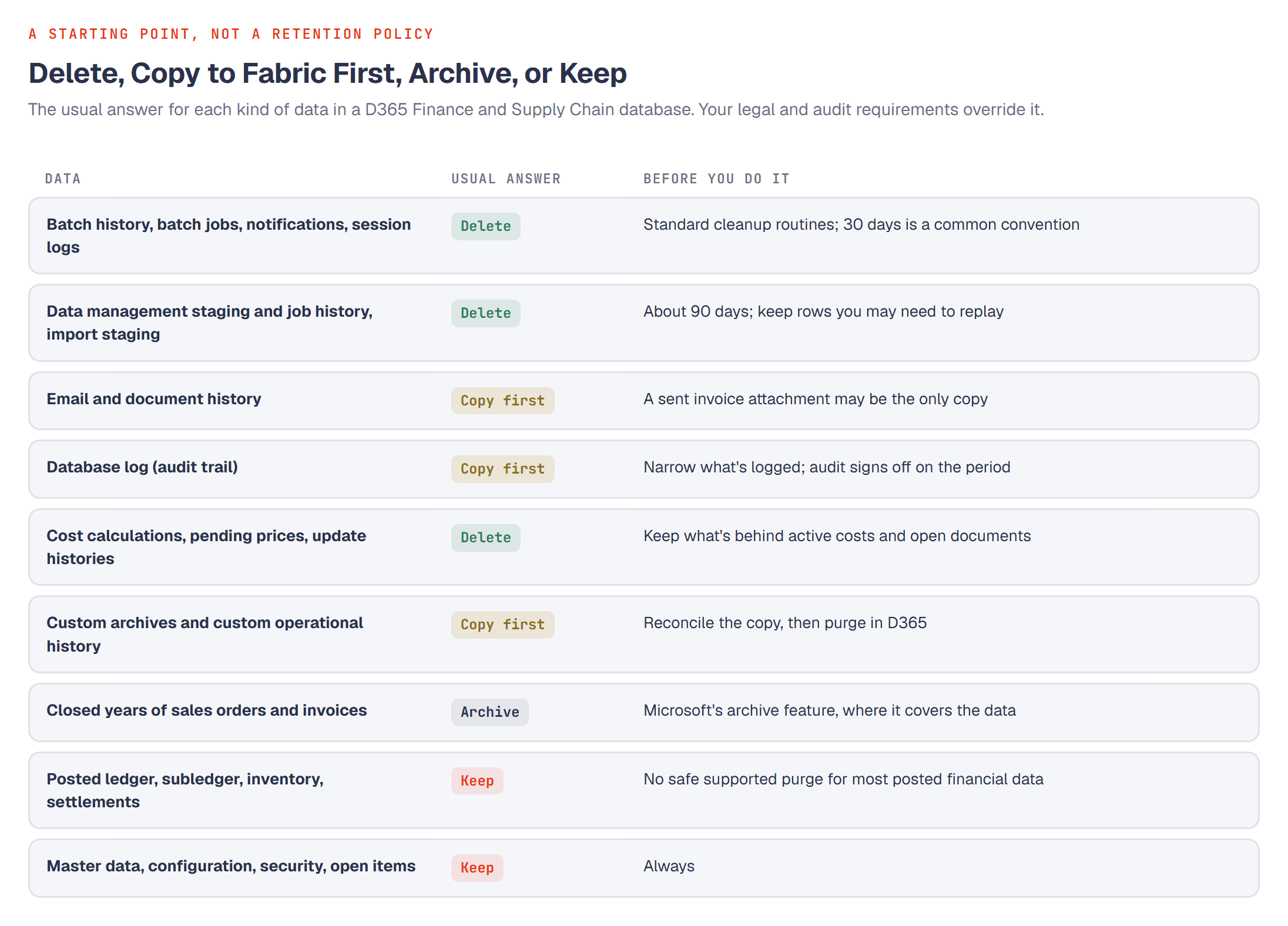
The decision, data type by data type
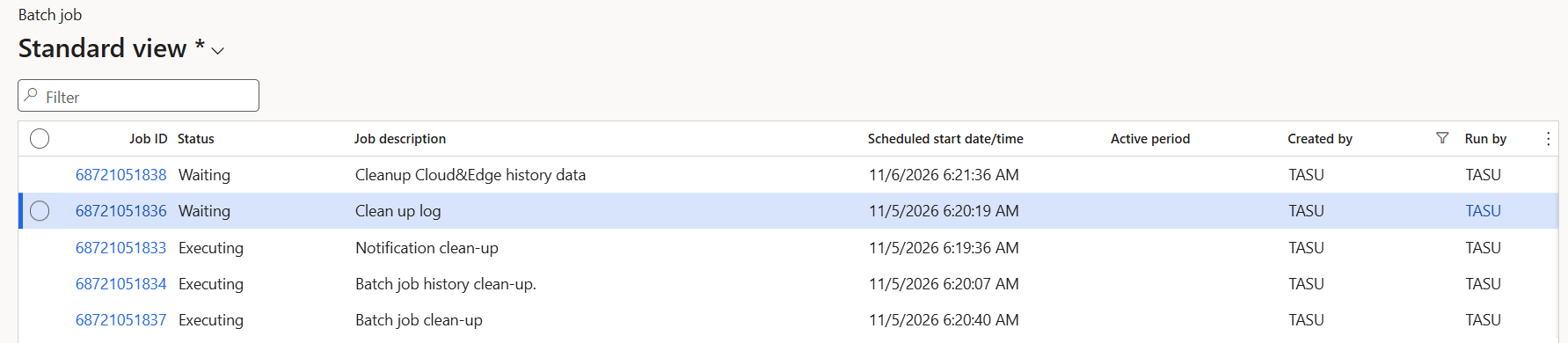
Start with the standard cleanup routines
Microsoft ships cleanup routines for most technical history: batch job history, batch jobs, notifications, data management staging and job history, email history and more. Each one runs as a batch job. Run it once and you get space back; give it a recurrence and you keep it.
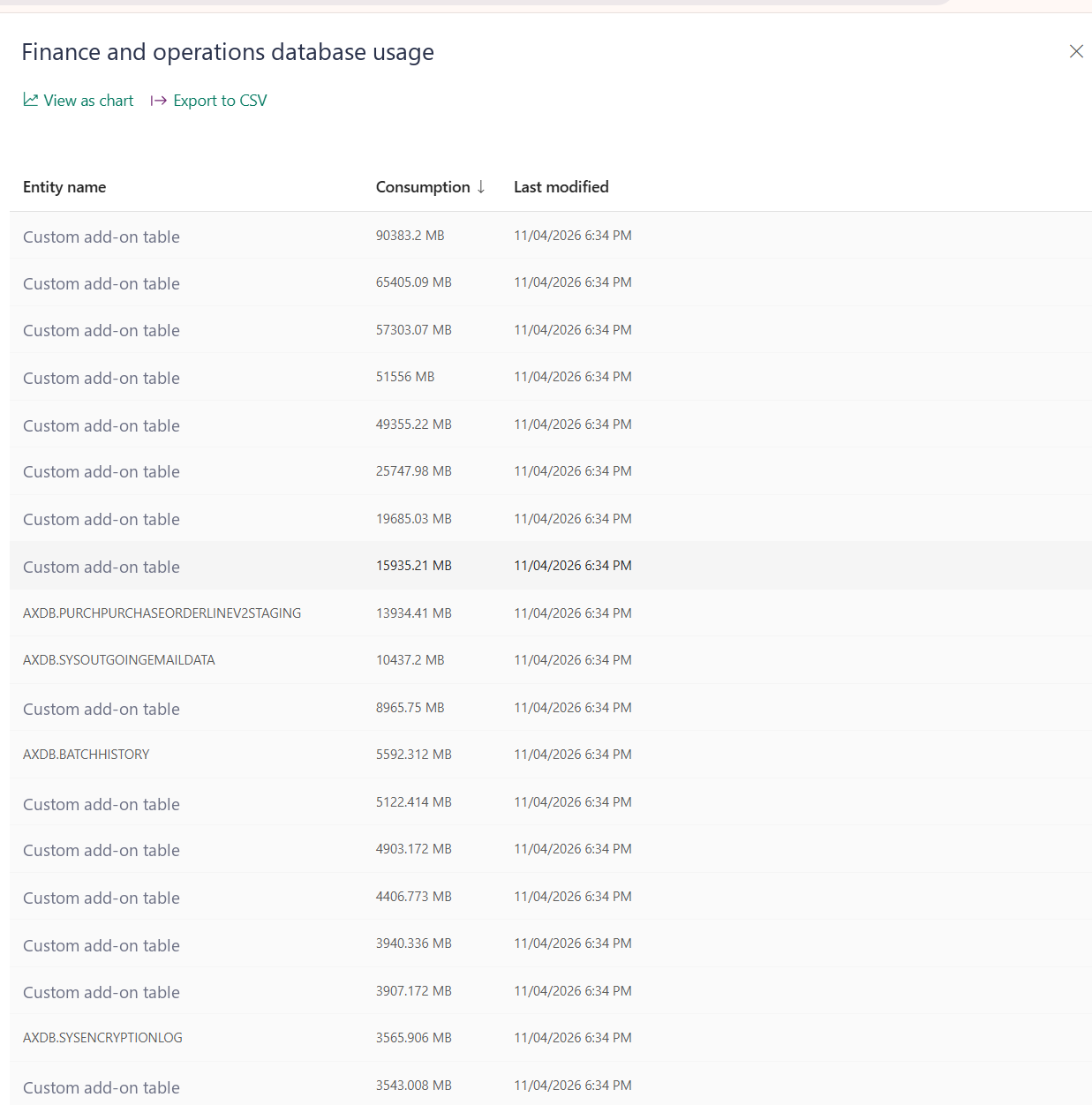
Then check what they'd find. In the table view of one environment of the Part 5 tenant, standard tables sit right under the custom ones: purchase order line import staging at about 13.6 GB, outgoing email history at about 10.2 GB, batch history at about 5.5 GB, the encryption log at about 3.5 GB.
One email setting deserves its own line. We've seen a sent-email retention of 0 days, which means keep forever. Before you change it, find out whether the attachments are the only copy of what you sent customers.
The no-regret cleanup is standard data, standard routines and a recurrence. It doesn't need a project, just an owner.
Copy to Fabric, then delete
For data that has value but doesn't need to live in D365, like a custom add-on's history or an old audit trail, the pattern is copy, prove, delete.
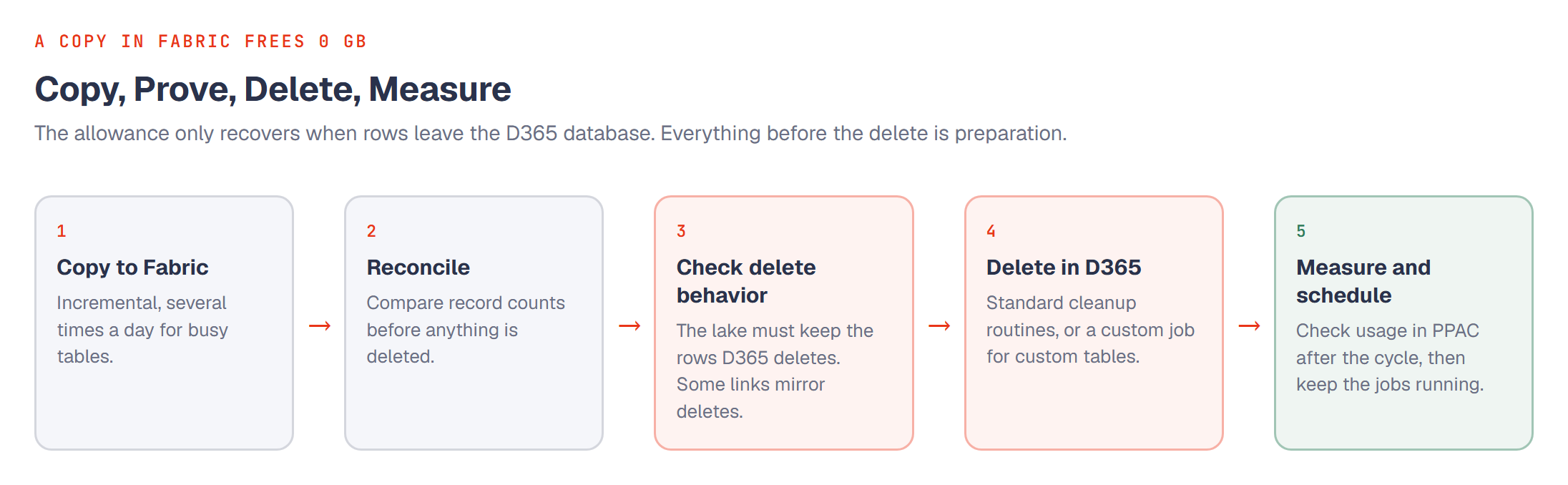
Step 3 is the one people skip. Some D365 to lake links mirror source deletes into the lake by default. Delete a year of history in D365 and the lake copy deletes it too, which destroys the history you meant to keep. Confirm, for the link you use, that deleted rows are retained, or build a separate copy that doesn't follow deletes. Those links also rely on change tracking, a SQL Server feature that records which rows changed, and it adds its own storage in D365.
Archive what Microsoft's archive covers
For closed years of standard business records, such as sales orders and invoices, Microsoft's archive feature moves data out of the live tables where it supports that data. Archiving posted ledger data comes with conditions, such as closed periods and chronological years. Check the current scope for your version before you plan on it, because it has been changing release by release. The archive copies data to Dataverse long-term retention and moves it from the live tables into history tables in the D365 database. Operations space only drops once those history tables are purged, and the retained copy can count against Dataverse capacity.
Keep posted financials, master data and anything open
There's no safe supported purge for most posted financial data. Narrow routines exist for specific history, and they need sign-off from finance. Master data, configuration, security and open transactions stay, always.
Five things that change the numbers in practice
- Deletes are slow. In production you delete through standard routines or X++, D365's own programming language, not SQL. On 100-million-row tables we've seen row-by-row deletes take 25 to 58 hours, and large custom tables need chunked, set-based delete jobs.
- Freed space isn't always billed space. Heavily deleted tables can keep half-empty pages. Check usage in PPAC after the first cycle rather than trusting the row count.
- A sandbox refresh undoes sandbox cleanup. A full copy brings a sandbox back to production's size, so clean production first.
- Dropping a custom table is final. Test in a sandbox, check every reference, and copy the content to the lake first.
- It grows back. Without scheduled jobs and someone who owns them, the space returns in months. Part 3 shows how fast.
This page gives the usual answer, not your answer. Retention periods are a legal, tax, audit and contractual question, and some data, like payment authorization history, has industry rules of its own. Get the owners to sign off before anything is deleted.
Schedule the standard cleanup routines this week. Then take the data that needs a decision one family at a time: copy it, prove the copy, delete it in D365, and measure. A Fabric copy is a place to keep history, not a way to save capacity on its own.
Frequently asked questions
Does copying data to Microsoft Fabric reduce our D365 capacity usage?
No. Capacity only falls when rows are deleted in D365. A lake copy is what makes the delete acceptable, not the saving itself.
Which data is safe to delete first?
Technical history that standard cleanup routines handle: batch job history, batch jobs, notifications, data management staging and job history. Schedule the routines with a recurrence so it stays clean.
Can we delete old posted ledger entries?
Generally not through a supported purge. Microsoft's archive feature covers some ledger scenarios with conditions, such as closed periods. Keep posted financial data by default and involve finance before any change.