
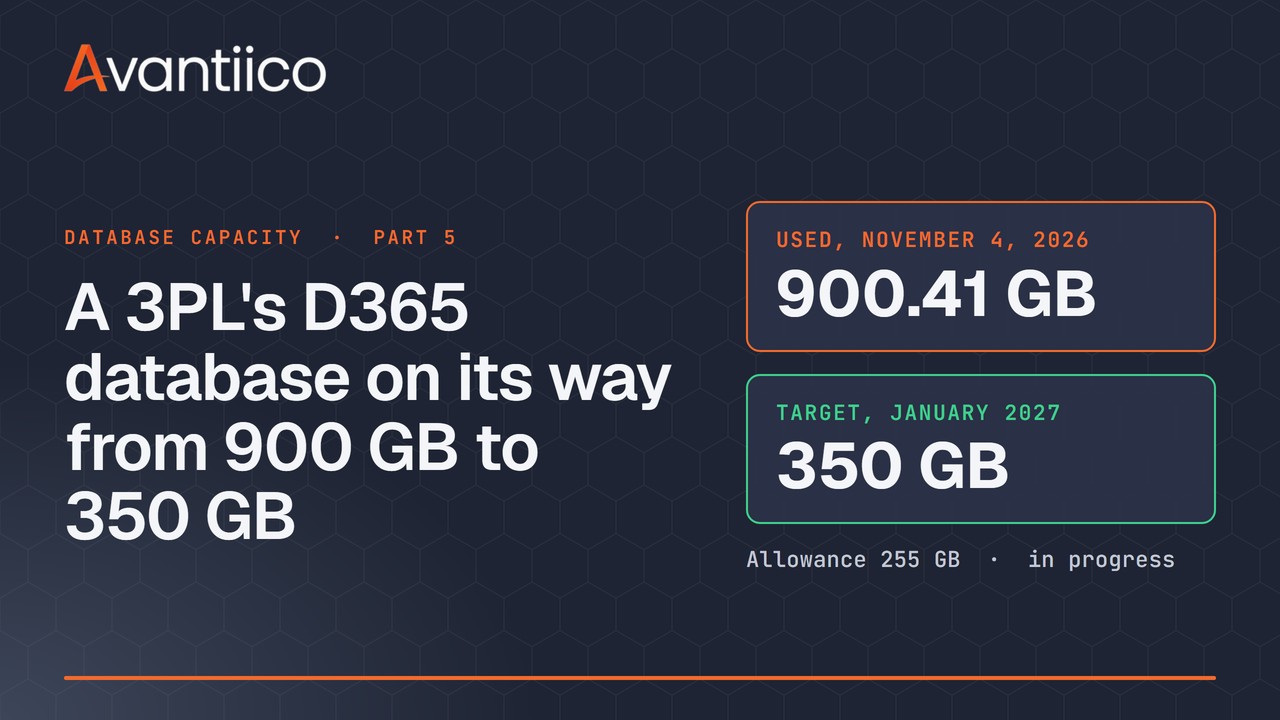
A high-volume third-party logistics tenant used 900.41 GB of D365 Operations database on November 4, 2026. The target is 350 GB by January 2027, with three months of active data in D365, a slimmer archive in D365, permanent history in Microsoft Fabric, and one of two sandboxes retired. This is a case study in progress, and we'll publish the result when it's measured.
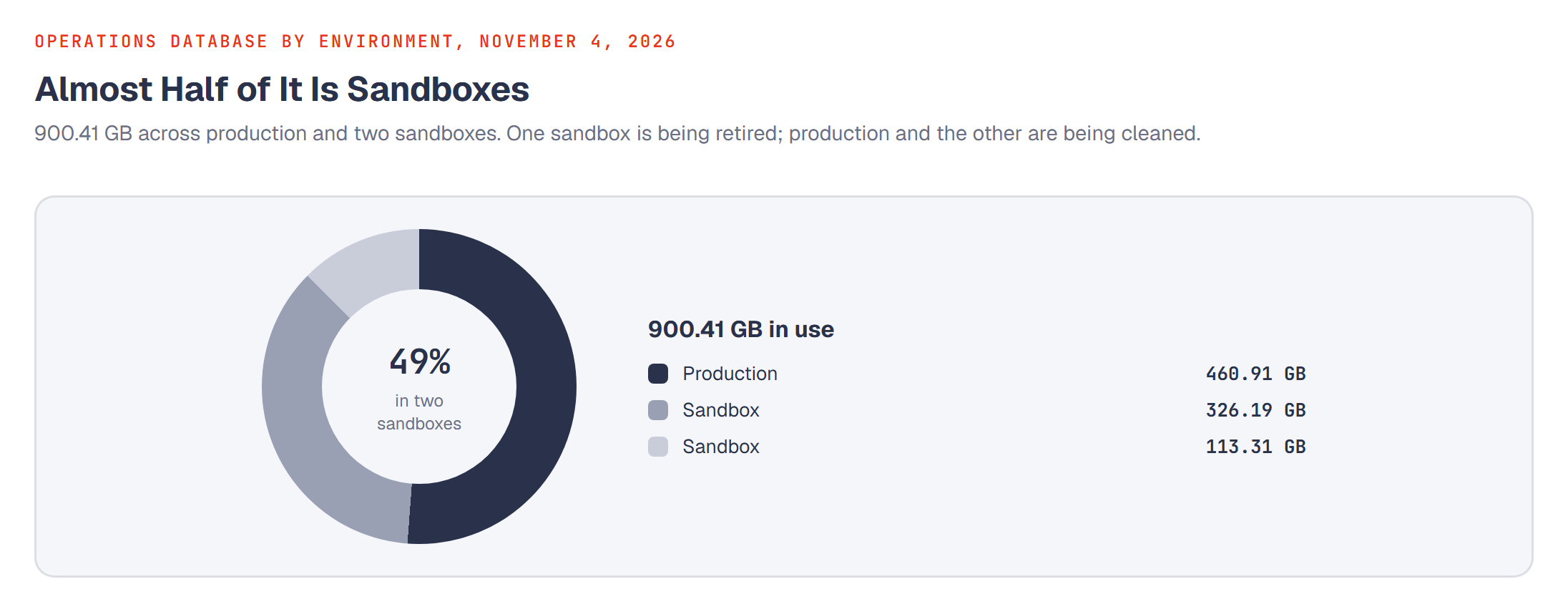
Two sandboxes held almost half of the 900.41 GB: 326.19 GB and 113.31 GB, next to 460.91 GB in production. Production, the other half, is mostly the data of two custom add-ons, the 3PL and Freight Reconciliation solutions, and it grows every day this third-party logistics (3PL) business operates.
Database capacity series. Part 1, how license cuts shrink the allowance; Part 2, the LCS to PPAC capacity check; Part 3, where the space goes in four databases; Part 4, what to delete, copy, archive or keep; Part 5, a 3PL tenant on its way from 900 GB to 350 GB.
In plain words: a 3PL records every billable warehouse and transport activity for its customers, so its D365 database grows every day. Most of that history is never opened again in D365, but it still has to exist somewhere, and the business reports on it. The project keeps recent data in D365 and moves the rest to Microsoft Fabric, the analytics platform, where it doesn't count against the D365 allowance.
Scope
| Item | Detail |
|---|---|
| Business | Third-party logistics, high transaction volume |
| System | D365 Supply Chain Management and Finance with custom 3PL and Freight Reconciliation add-ons |
| Environments | Production and two sandboxes; one sandbox is being retired |
| Operations database, November 4, 2026 | 900.41 GB |
| Target | 350 GB by January 2027 |
| Status | Archiving and synchronization running daily; target not yet reached |
The three environment figures add up to 900.41 GB; the PPAC summary for the same day shows 900.35 GB.
What we found
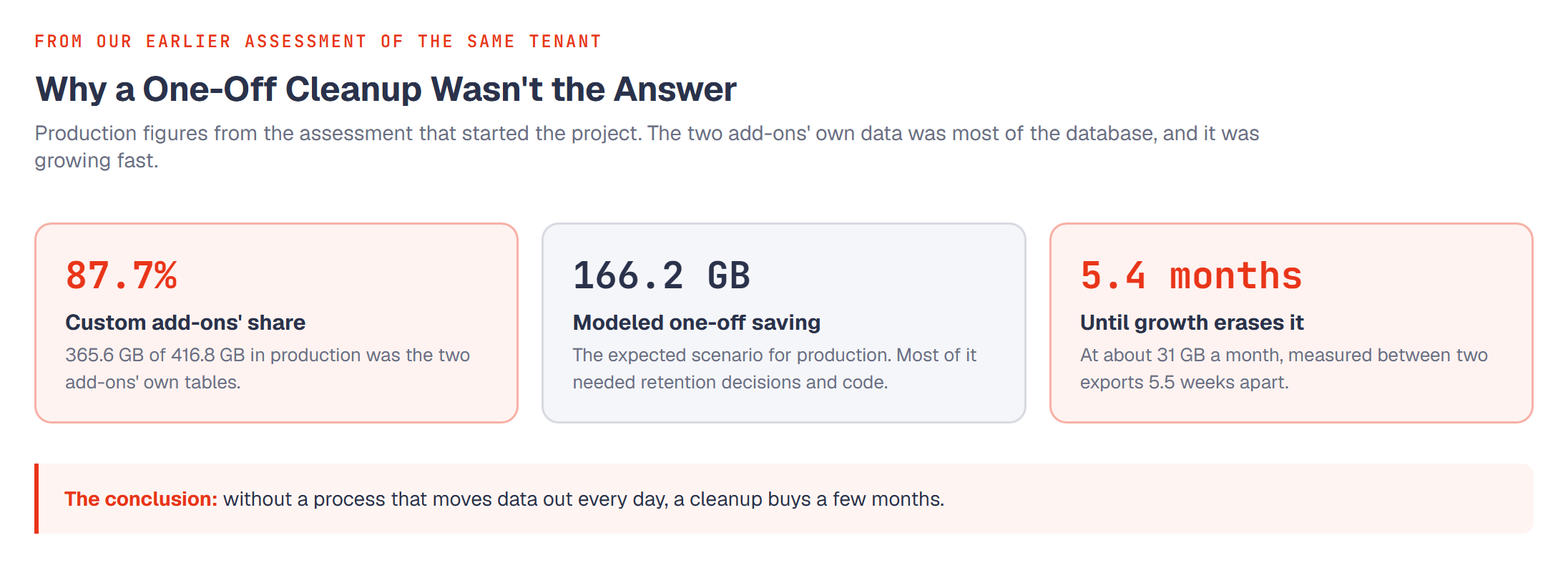
The project started with an assessment, and the numbers explain the design. At the time, the two add-ons' own tables were 365.6 GB of 416.8 GB in production, 87.7%. In the sandbox copy we analyzed, the whole general ledger was under 1 GB. Production was most recently growing about 31 GB a month, measured between two exports 5.5 weeks apart; an earlier measurement had it at about 16.5 GB a month.
The assessment found the usual technical debt too: three standard cleanup routines that had never run, a sent-email retention of 0 days, which keeps email history forever, a custom cleanup job that was failing, and an add-on archive purge that hadn't run since shortly before the sandbox copy. The only observed comparison was between two sibling sandboxes: the one with a purged staging history was 29 GB, or 39%, smaller. That's two different systems, not a before and after, but it pointed in the right direction.
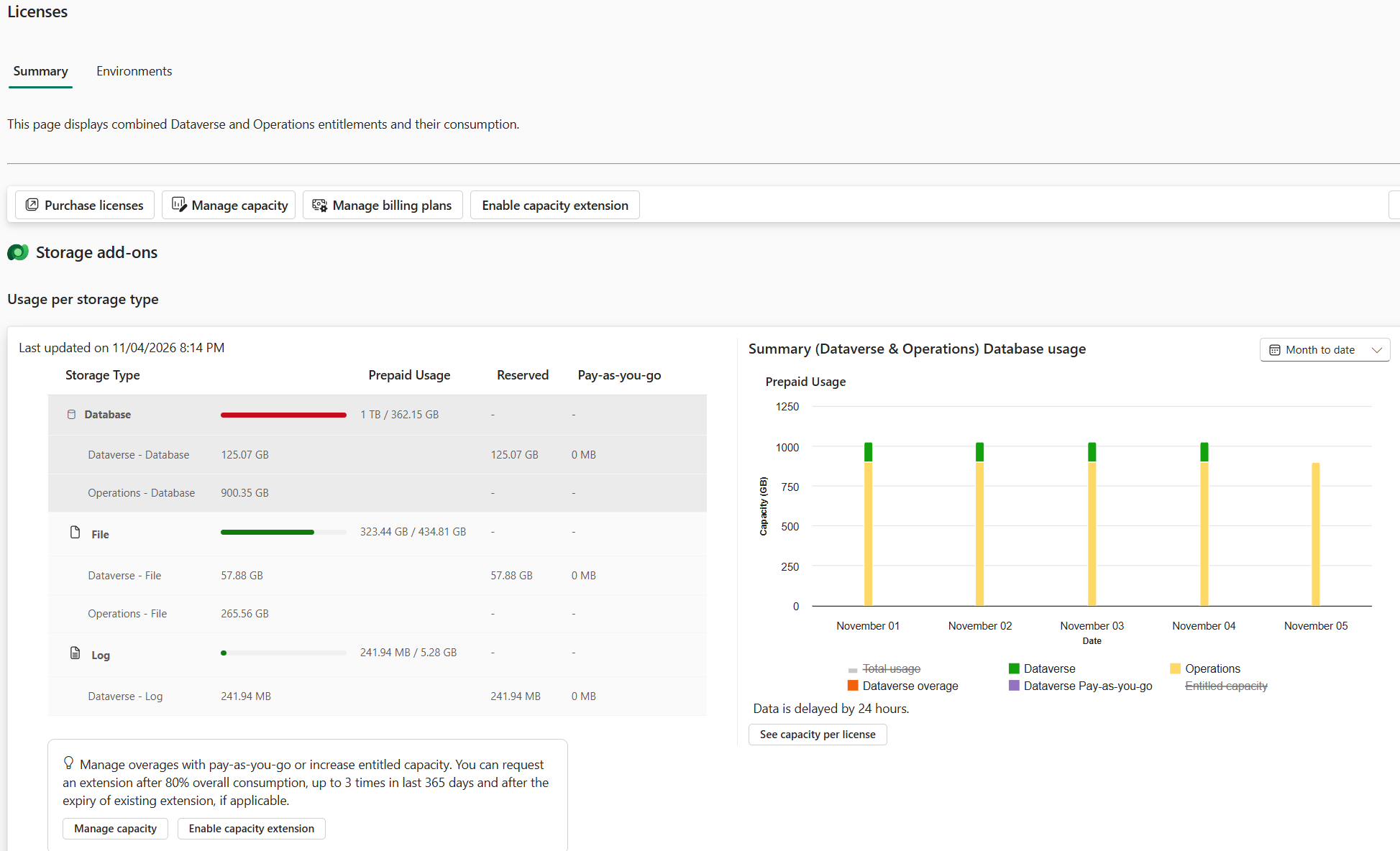
It also showed the allowance problem. On the capacity summary in PPAC, the tenant's Operations database usage is 900.35 GB against the 255 GB its licenses provide, about 3.5 times as much. With Dataverse added, it's 1,025.42 GB against 362.15 GB. Part 1 works through how its licenses produce that allowance.
What we built
Three layers, each holding a record for a different part of its life.
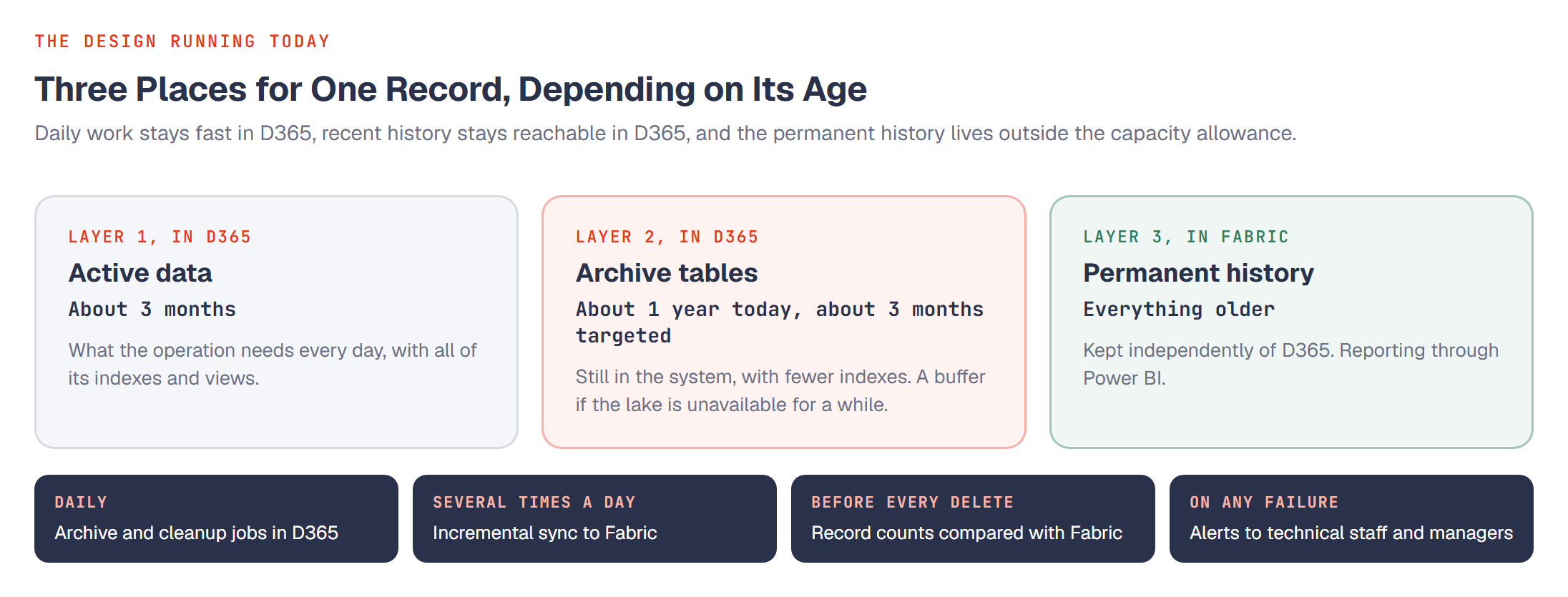
- Active data, about three months. What the operation queries every day, with all of its indexes.
- An archive inside D365. Older records stay in the system, in tables with fewer indexes and views, so they cost less space. Today it holds about a year; the target is about three months beyond the active window. It also acts as a buffer: if the Fabric side is interrupted for a while, nothing is lost, because D365 still has the data.
- Permanent history in Fabric. Incremental jobs copy new and changed records several times a day. The business reports on the full history through Power BI.
Two controls make the delete safe. Before any truncation, a notebook compares record counts between D365 and Fabric. And every failure sends an email to the technical team and to business managers, because executive reports depend on that data arriving on time. Retries and the D365 archive buffer cover short interruptions.
The archive isn't a cleanup. It's a process that runs every day, because this database grows every day.
Where it stands
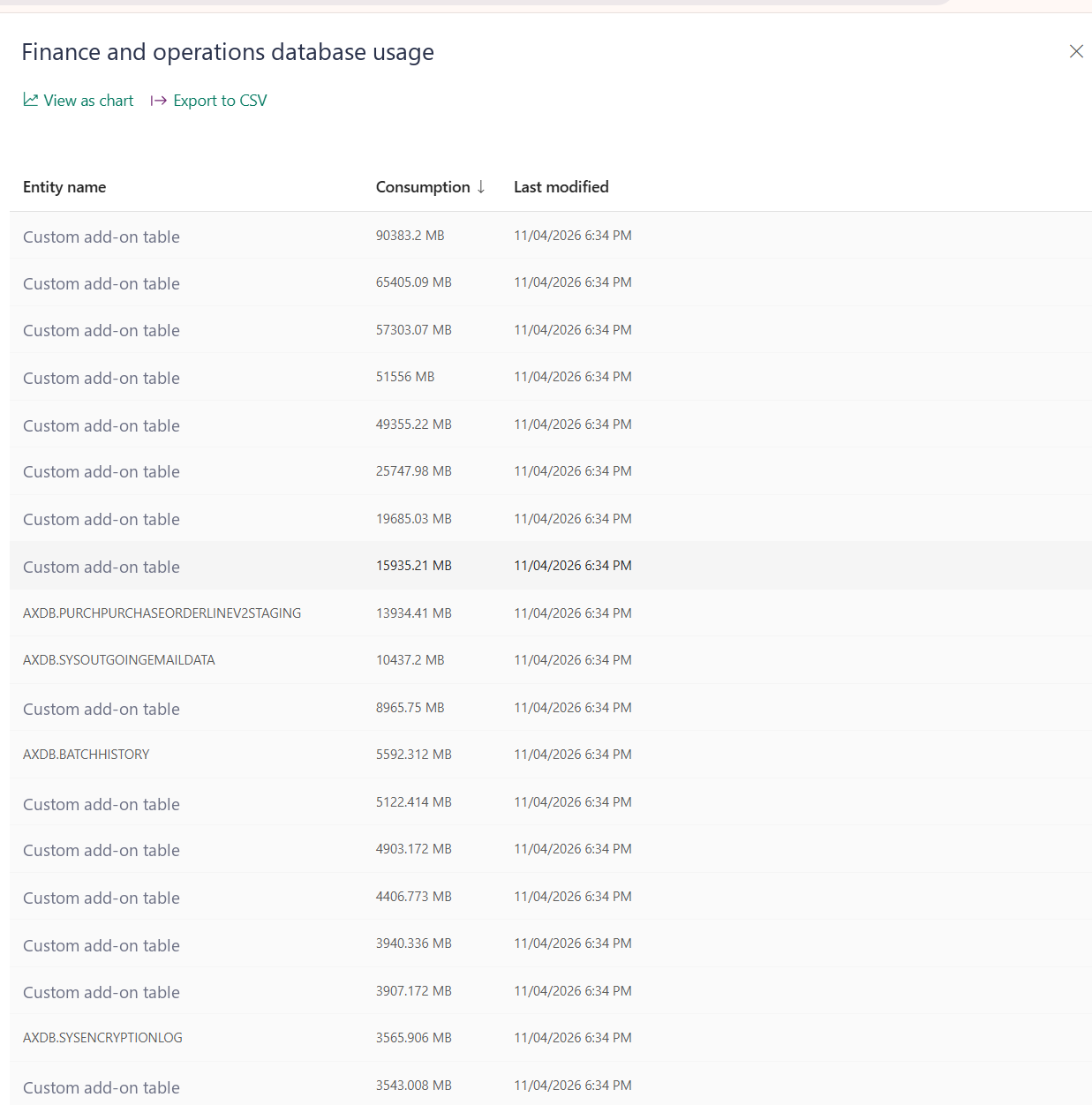
The table view in PPAC shows why layer 2 matters. In the environment shown, one add-on's archive table is the largest in the database at about 88 GB, bigger than the live activity table next to it at about 64 GB. Shortening the archive from about a year to about three months is the biggest single step left.
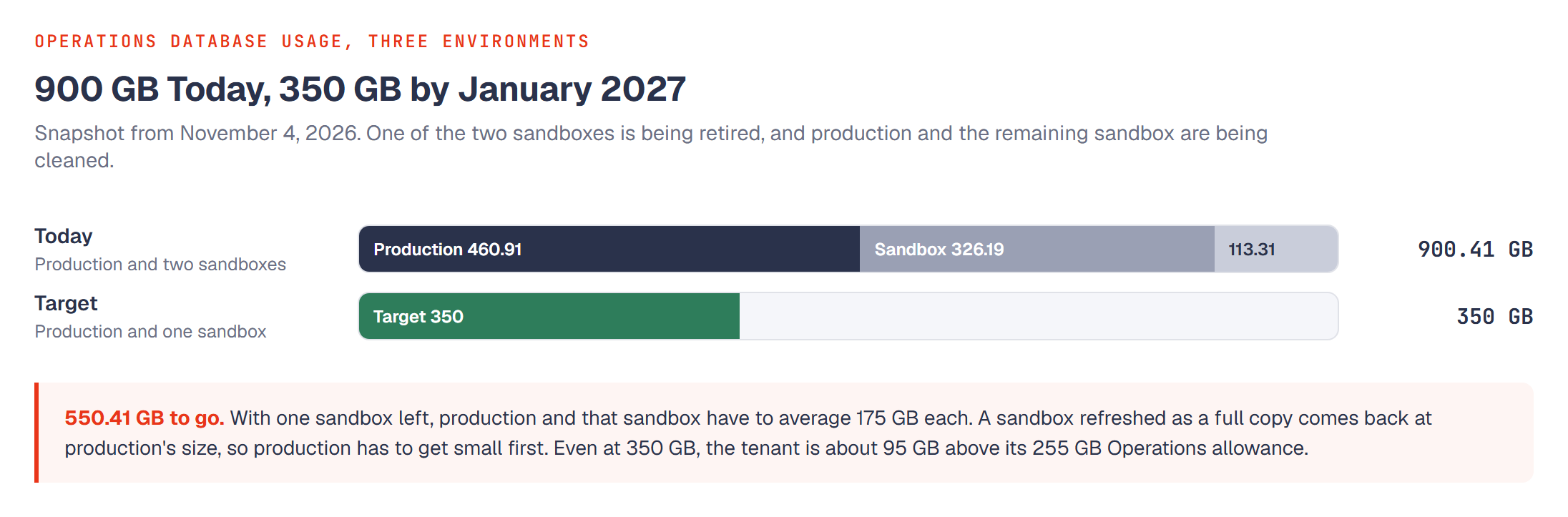
The plan to get there has three parts: retire one of the two sandboxes, shorten the archive window in production, and bring the remaining sandbox down with production. With two environments left, they have to average 175 GB each. Because a sandbox refreshed as a full copy of production arrives at production's size, the order matters: production gets small first.
350 GB doesn't end the overage. It's still about 95 GB above the tenant's 255 GB Operations allowance, so the plan also has to decide how that last part is covered: more capacity, or a shorter window still.
The 350 GB is a target, not a result. The archive length is still being agreed, because the client's view is that about 13 months must stay in the system, and whether a Fabric copy satisfies that is a legal question, not a technical one. We'll publish the measured number from PPAC when the project reaches it.
What would carry over to your tenant
- Find out whose data it is. Here, 87.7% of production was the two add-ons' data. If yours is similar, the decision is about the add-ons' retention, not about standard cleanup.
- Measure growth before you plan. Two exports a few weeks apart tell you whether a one-off cleanup lasts months or years.
- Check delete behavior first. A lake that mirrors deletes isn't permanent history. Part 4 covers the copy, prove, delete pattern.
- Put the sandboxes in the plan. The two sandboxes were about half of this tenant's usage.
For a database that grows by tens of gigabytes a month, a one-off cleanup is a delay, not a fix. What works is a daily process with a short active window in D365, a buffer, a reconciled permanent copy outside the allowance, and alerts that reach the people who depend on the reports. It applies to your tenant if one custom data family dominates the space and the business can agree on how long it stays.
Frequently asked questions
Why not just buy more capacity?
Buying is always an option, and it's a recurring charge. Here the database was most recently growing about 31 GB a month, so the bill would have kept rising. Moving history out every day is designed to stop the growth and shrink the overage, though at 350 GB this tenant still needs about 95 GB more than its licenses provide.
Is data in Fabric still in the system for retention purposes?
That's a legal question for your counsel and auditors, not a technical one. The design keeps a buffer in D365 and a reconciled permanent copy in Fabric, but whether the copy satisfies a specific retention rule depends on the rule.
What happens if the Fabric sync fails?
Nothing is deleted in D365 until record counts match, the D365 archive holds enough history to cover an interruption, and failures alert both the technical team and business managers.