
Every license optimization engagement has a moment where the numbers land and the client exhales. Ours came about five weeks into the telemetry window: $72,000 a month before remediation, $40,000 after. Thirty-two thousand dollars a month, a 44% reduction, on an environment that had already been discounted to the bone.
Then we showed them the security model that produced it, and they said no.
This is a case study about that no. What caused it, why the client was right, and what we're doing differently as a result. It's also, unavoidably, a case study about the limits of a playbook we've used successfully for years.
The client, and the pricing wrinkle
The client is a large, mission-driven organization, the kind that sits in an unusual seam of Microsoft's licensing programs, qualifying on paper for both educational and nonprofit pricing. That gave them something most organizations never get: a genuine choice of price tier.
We modeled both. Educational won, delivering a 70% discount and bringing the cost per seat down to a level that would make most CFOs stop asking questions. On a smaller estate, the analysis might have stopped there.
But scale changes the arithmetic. This organization has 964 users requiring licenses, and their Microsoft assessment demanded the full spectrum of SKUs: Commerce, Finance, Supply Chain Management, and Project Operations. Seventy percent off a very large number is still a very large number.
Why this was one of the hardest environments we've analyzed
Almost nobody at this organization logs into D365 the way you'd picture it. Their work happens in Power Apps and adjacent front ends; those applications connect through integration points into Finance & Supply Chain, where the transactions are actually created. The people need active, licensed accounts in D365, but they'll never see a D365 form.
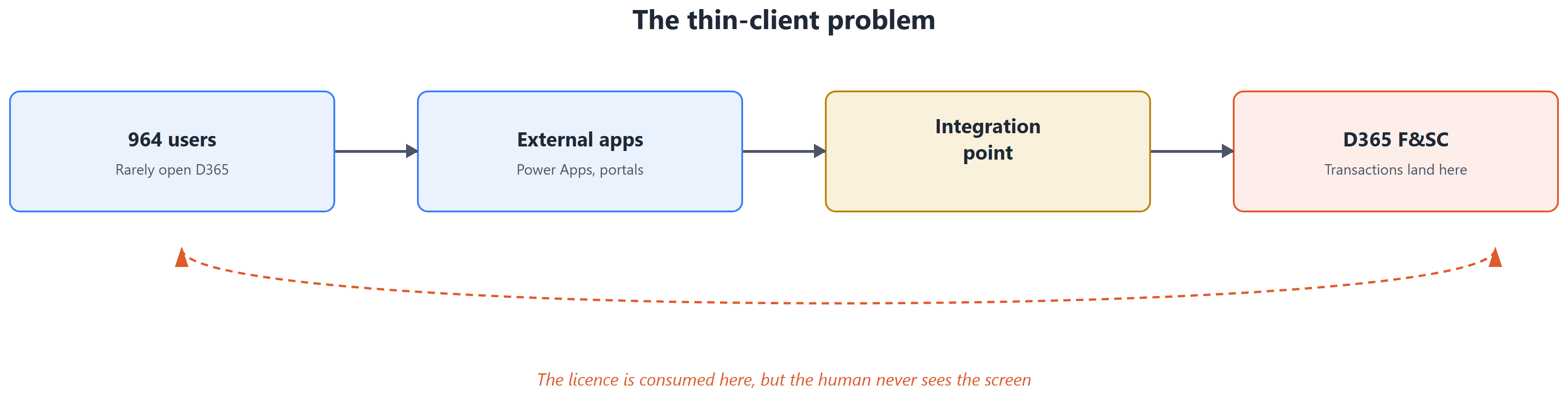
This thin-client pattern is consistently the most difficult scenario in license analysis, and here it applied to nearly the entire user base, with transactions spread across many modules. The security configuration reflected that complexity precisely.
Of the 51 roles assigned to users, 37 required more than one license. The integration roles were the worst offenders: at least ten of them demanded all four SKUs. When license requirements are mixed that heavily, one of two things is true: users hold access they never exercise, or the security design itself has drifted. In this environment, both were true.
The snowball
We also found a handful of privileges carrying mixed license requirements, a single privilege demanding, say, both Supply Chain and Project Operations. This matters far more than the count suggests, because license requirements only ever roll upward.
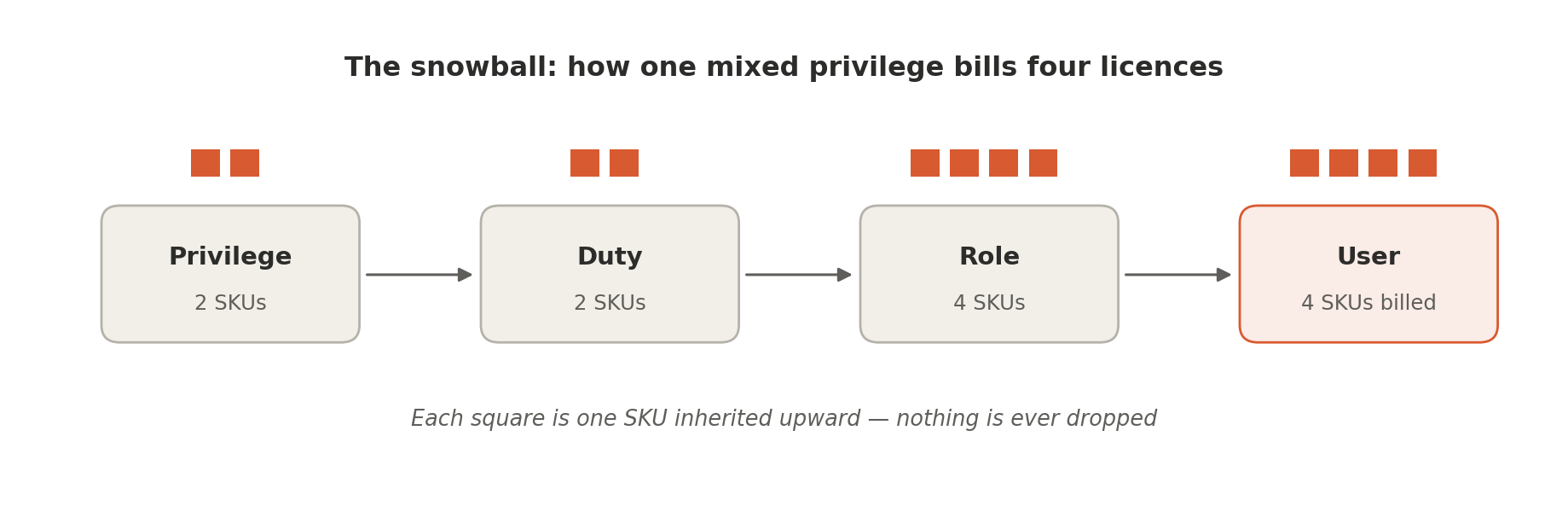
A privilege demanding two SKUs hands both to its duty. The duty hands them to the role. The role, now sitting alongside other privileges with their own demands, hands four to the user, and Microsoft bills for four. Two badly-scoped privileges can inflate the license footprint of hundreds of people.
Two badly-scoped privileges is exactly what we found. The snowball is real. The savings from fixing it were not: the mechanism was present, the mass was not.
Three of our four levers were dead ends
Our standard cost-reduction sequence starts with the easy wins. This time, the easy wins weren't there.
This is the part of the engagement that consulting write-ups usually omit. We opened with the inactive-user sweep that normally reclaims 5 to 10% of an estate and found nine accounts, all of them holding unlicensed system-administration or service roles. We looked for device users assigned Supply Chain roles when an Operations Activity license would do. We looked for over-provisioned external and partner accounts. Nothing.
By the end of the configuration review, our proven playbook had produced almost no money at all.
Telemetry did all the work
We had roughly five weeks of telemetry, and it turned out to be enough.
Our working rule in integration-heavy environments is that anything supporting an integration point is assumed to be fully utilized. Real utilization of integrations is often impossible to observe reliably, so we don't touch that access; the downside risk of breaking a running interface dwarfs the license saving. Everything reached through the user interface, however, can be measured directly.
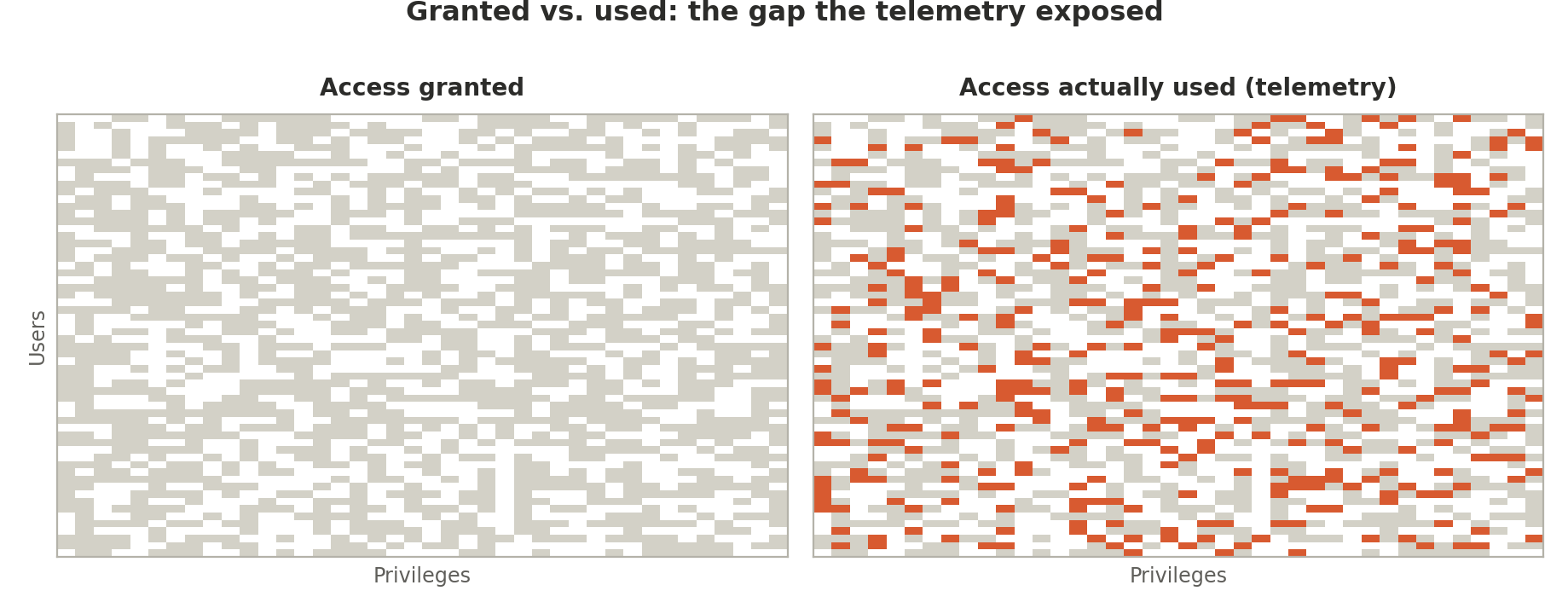
The gap was enormous. Users held access across modules they hadn't touched once in five weeks. Roles demanded Project Operations from people whose telemetry showed nothing but Supply Chain and Finance activity. Strip the license requirement back to what the evidence supports, and the monthly bill falls from $72,000 to $40,000.
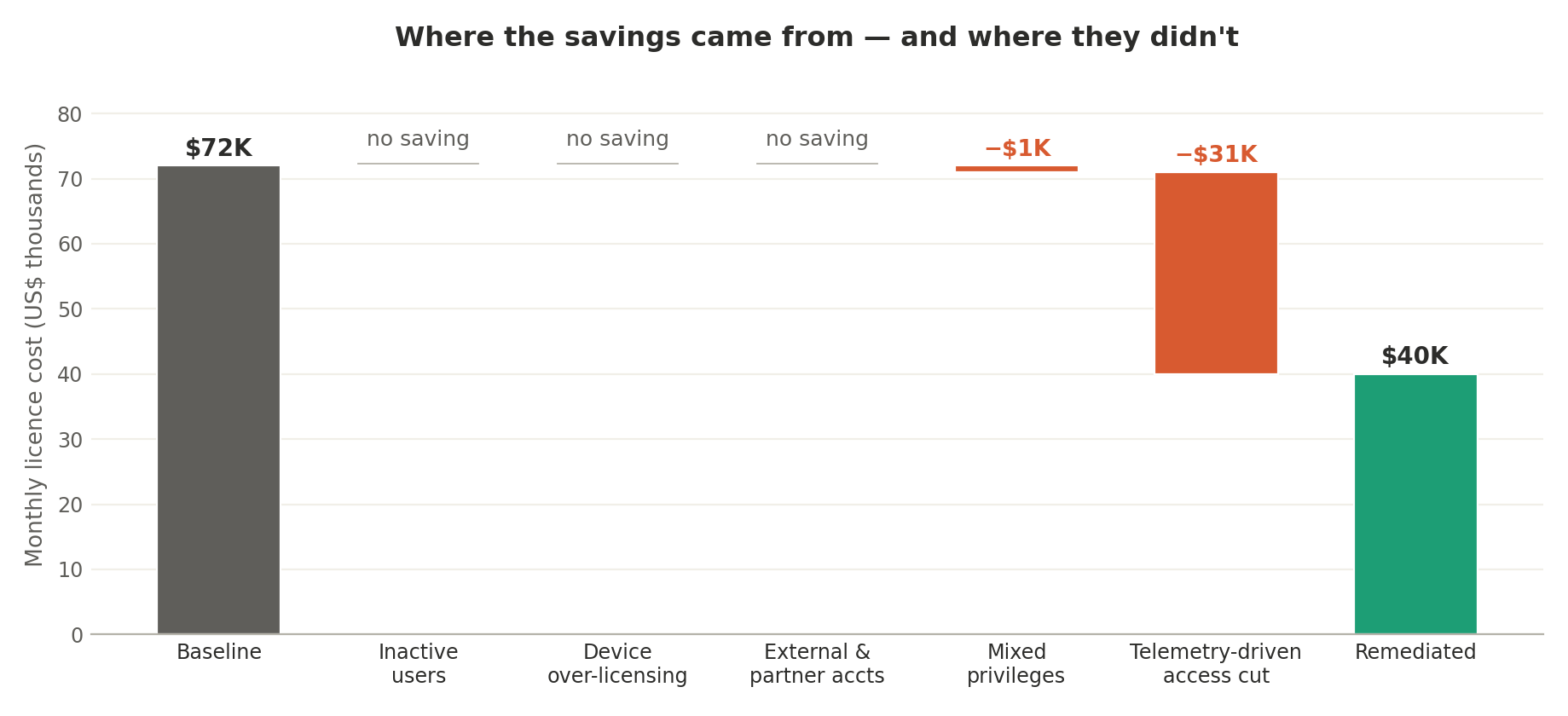
Read that chart carefully, because the flat bars are the story. Everything we normally rely on contributed nothing. The single lever that worked was the one that required five weeks of patience and a willingness to trust behavioral evidence over configuration documents.
The optimal answer, and why the client rejected it
We designed and presented the remediated security model using our standard technique: split every multi-license role by SKU. Each fragment inherits all menu items belonging to its SKU, plus everything already covered beneath it, Operations Activity items, Team Members items, and items requiring no license at all. A Supply Chain fragment holds everything the Supply Chain SKU covers, and nothing that it doesn't.
It's a clean technique. It's defensible. And with three dozen multi-SKU roles, ten of them demanding all four, it produced roughly one hundred roles.
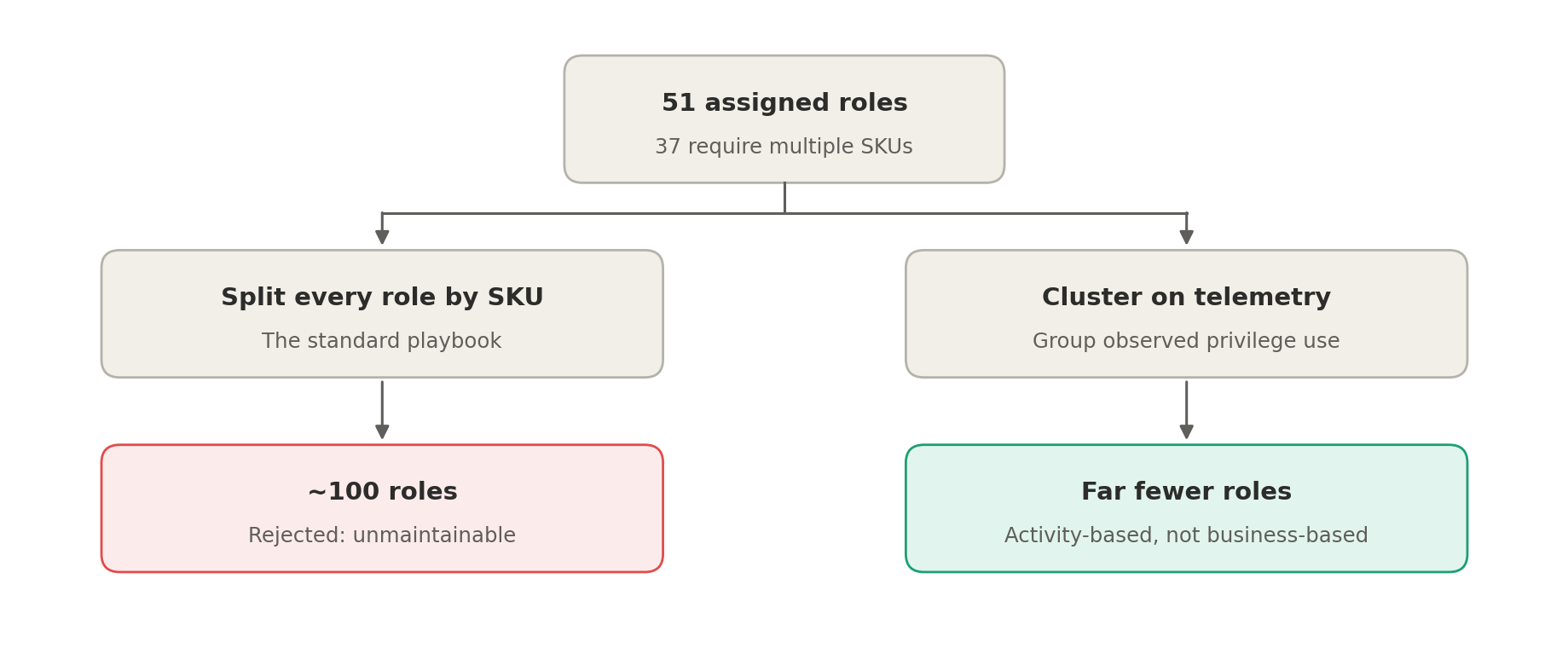
The client's response was immediate and, in hindsight, obviously correct: a hundred-role model is unmaintainable, untestable, and unintelligible to the administrators who have to live with it. A security design that no one can reason about isn't a security design; it's a liability with a spreadsheet attached.
They didn't dispute the savings. They disputed the shape of the thing that delivered them.
The rebuild: security as a role-mining problem
What they asked for instead is more ambitious. Rather than reshaping the roles that exist, start from what people demonstrably do, at the privilege level, not the menu-item level, and construct a role structure around the most common combinations of tasks, minimizing the number of roles each user carries.
Each user is described by two things:
- License requirement by observed utilization. If telemetry shows only Supply Chain and Finance activity, the Project Operations requirement is dropped.
- Privileges actually exercised. The specific tasks the person performs, as evidenced in the data.
In the room, we called this a clustering problem, and as plain language that holds up: group similar users, and the groups become the roles. Formally it's something sharper. We have a binary user-by-privilege matrix, and we're decomposing it into a user-by-role matrix and a role-by-privilege matrix, minimizing the number of roles subject to a hard coverage constraint: every user must retain every privilege the evidence says they need.
That problem has a name in the literature: the Role Mining Problem. It's a Boolean matrix decomposition, it's equivalent to set cover, and it's NP-complete. The distinction isn't academic. Ordinary clustering optimizes for similarity and has no concept of "must cover": a centroid will happily grant a privilege three people need to all ten in the cluster, or drop one that two people depend on. Naming the problem correctly is what steers you toward integer programming and set-cover heuristics rather than a k-means call that quietly breaks somebody's month end.
What we expect to go wrong
We're early in this rebuild, and we'd rather set expectations honestly than discover them in production.
- Administrators must adopt a new mental model. The new structure drops duties, and with them the business process as the organizing idea. Roles will no longer describe what someone is; they'll describe what someone does. A purchasing agent won't be a purchasing agent.
- The solution will change repeatedly. We'll trial several approaches, and each revision means administrators re-learning the model. We need a disciplined change-tracking mechanism from day one; this isn't our usual role-to-role rebuild, and the usual documentation habits won't survive contact with it.
- There will be no steady state. Action and output menu items, buttons on forms, reports, are the least traceable objects in telemetry, and not every integration point leaves a footprint at all. Users will surface access gaps after go-live. The model has to be built to absorb them gracefully rather than treated as a one-time delivery.
What we'd tell the next client
- Check for a thin-client user base before you promise standard savings. In integration-heavy estates, the inactive-user sweep and the over-licensing sweeps will both come up empty, and the whole engagement rests on telemetry.
- Behavioral evidence beats configuration analysis. Five weeks of telemetry outperformed every static review we ran. Start the collection on day one, not after the assessment.
- Role count is a first-class constraint, not an afterthought. An optimization that ignores maintainability isn't an optimization; it's a cost transfer from the license line to the payroll line.
- Two bad privileges can cost you six figures. Mixed-SKU privileges roll up relentlessly. Audit the privilege layer even when, especially when, the roles look reasonable.
| Standard lever | Result | What we found |
|---|---|---|
| Inactive users | Failed | Only 9 found, all held unlicensed admin or service roles. |
| Device over-licensing | Failed | No device users carrying needlessly expensive SKUs. |
| External / partner accounts | Failed | None of the usual over-provisioning patterns present. |
| Permission inconsistencies | Marginal | Update/create/delete granted without read; two mixed-SKU privileges. |
| Telemetry-driven access reduction | Worked | Five weeks of data exposed the entire $32K/month opportunity. |
This case is the exception, not the rule: it only plays out this way if your estate is genuinely thin-client and integration-heavy, most of your users touch D365 indirectly, and your roles were built around integrations rather than people. If that's you, expect the standard inactive-user and device-licensing sweeps to come up empty, and expect telemetry, not configuration review, to carry the engagement. If it's not you, the standard role-split approach is usually the right one; see our companion case study for what that looks like.
The deepest change here isn't technical. Our traditional model preserves the business role and trims its access: a purchasing agent with three SKUs becomes a purchasing agent with one. The new model abandons that comfort entirely. Roles will be defined by the operations people perform against the database, not by the part they play in the organization.
A third engagement in this series shows the other end of the remediation problem: see our case study on a fully automated D365 security migration for what it takes to move an optimal design into production without anyone building a role by hand, once the underlying security is already unremarkable rather than a hundred-role tangle like this one. A fourth shows the same discipline applied before any of this became necessary: see our case study on a greenfield security design, caught a day before UAT instead of years into production.
Whether administrators can live in that world is the real question this project will answer. It did, and not the way our first attempt at it predicted: see our report on the mining rebuild's first, unshippable draft and what the client actually chose to pay for once they saw the real trade-off.