
Their D365 Finance & Supply Chain security was among the best-configured we've assessed. It was still costing them $40,000 a month more than it needed to.
The client is a European organization running D365 F&SC for a little over 700 users, at a monthly licensing cost of about $105,000. For an estate of that size, this isn't an expensive configuration on its face. Nothing about the number suggests waste. The security review that followed found $40,000 a month of it anyway, a 35% cut, without anyone losing access they actually used.
A clean estate, and a natural question
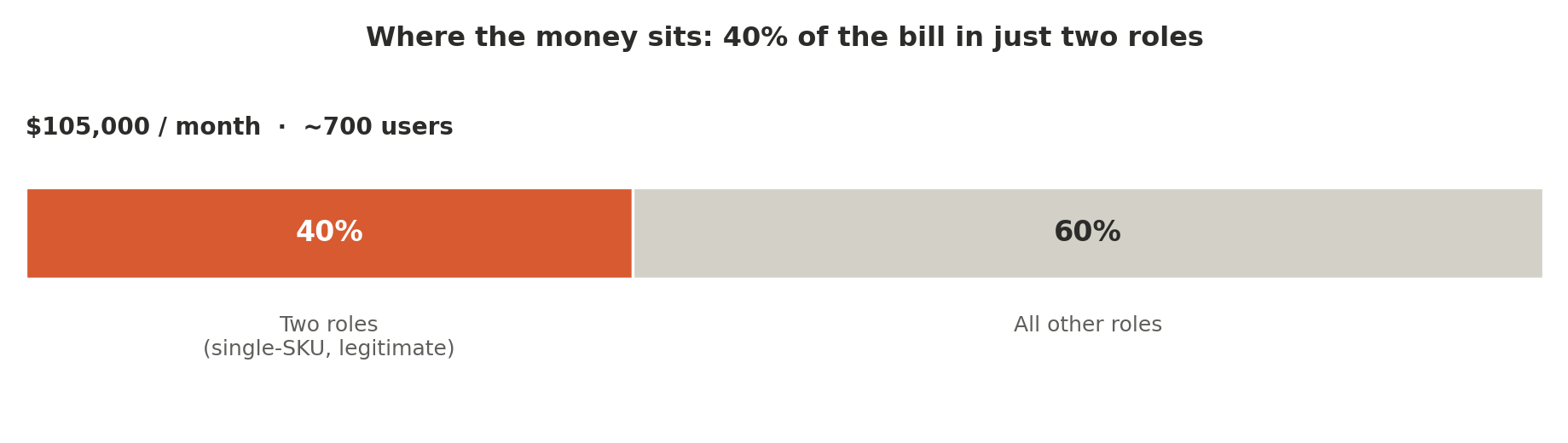
When we started digging into the license requirements, the picture only got tidier. Roughly 40% of the total spend was concentrated in just a couple of roles, and both of those roles legitimately required their licenses: one SKU per role, no ambiguity. Only a handful of roles in the entire configuration demanded multiple licenses at all.
This was, in almost every respect, the opposite of the integration-heavy environment we describe in our companion case study: a clean, tight, thoughtfully developed security model. Which raises the natural question. When everything looks well organized from the first glance, what's left to do?
The answer is our usual line of inquiry, just applied with more patience. Roles with multiple license requirements still exist here, so we still ask: what happens if we split those roles by license? Can we find users who hold a multi-license role but don't need every SKU inside it? Will telemetry show that some users never touch one of the licenses their role demands?
Those questions come later. The first pass is always about anomalies, the things that shouldn't be there. This client made that pass easier than most: with few integrations and users genuinely working inside F&SC rather than through external applications, behavior could be observed directly instead of inferred.
Ninety users who weren't there
Of the roughly 700 licensed users, almost 90 showed no activity in the previous 120 days. Those users are the first candidates for license reduction, access reduction, and cost reduction, and each one deserves an individual review by the client to determine whether the access is still required.
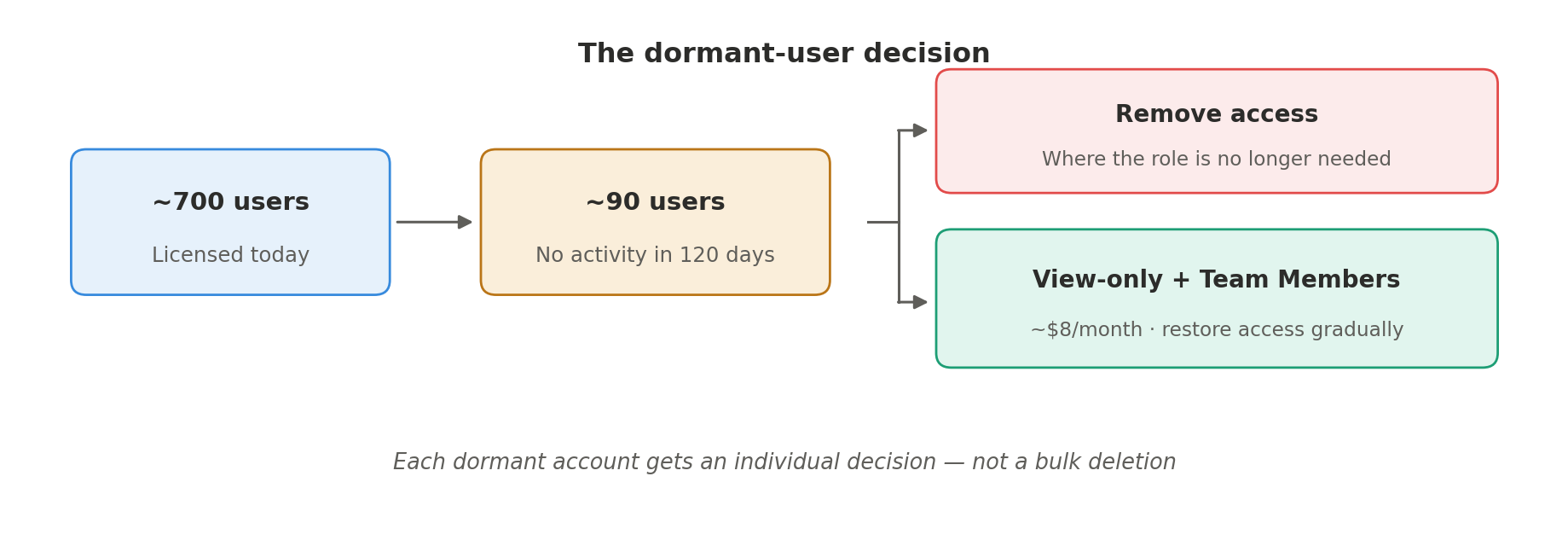
For users who have gone dormant but may plausibly return, our recommendation is a middle path rather than a hard removal: create a view-only role, assign it, and move the user to a Team Members license, inexpensive, in the region of $8 a month. The user keeps the ability to see information in F&SC, and if they eventually resume working in the system, access can be restored gradually, layer by layer, as their actual needs become visible.
The underlying logic is simple. If someone hasn't touched F&SC in months, that's a strong indicator they probably don't need full access. Some of these dormant users hold one, two, three, in one case even four licenses. Those assignments are worth reconsidering on their own.
System administrators doing business work
We also identified quite a few users holding system administration alongside genuine business roles. Not service roles, not a data management administrator or a similar technical assignment, but real operational roles, held by people who also carry full system administration.
Each of these assignments needs an explanation. Was system administration granted accidentally? Was it assigned temporarily to complete some task and never revoked? Or is this genuinely a system administrator who is also expected to operate in the business?
Microsoft isn't chasing this pattern yet. But the principle stands on its own: system administrators should administrate, not operate. It's easy to imagine Microsoft eventually tracking administrators holding business roles, precisely to enforce that separation. Either way, this finding goes to the client for review and validation. Only they can say what each assignment was meant to be.
The hidden discrepancy: paying full price for access nobody can use
The finding that generated real savings involves about ten roles carrying a permission discrepancy, a pattern that's common, consequential, and almost invisible to a security administrator unless they go looking for it.
In these roles, the lower-level permissions, Read, Update, Create, Delete, were unset or denied, while an upper-level permission such as Correct was granted. That combination is functionally useless. You can't delete something you can't see; you can't correct what you have no permission to display. Without the lower-level grants on the displaying items, actionable items, and open items, the higher-level permissions simply can't be exercised. It's a basic rule of security configuration.
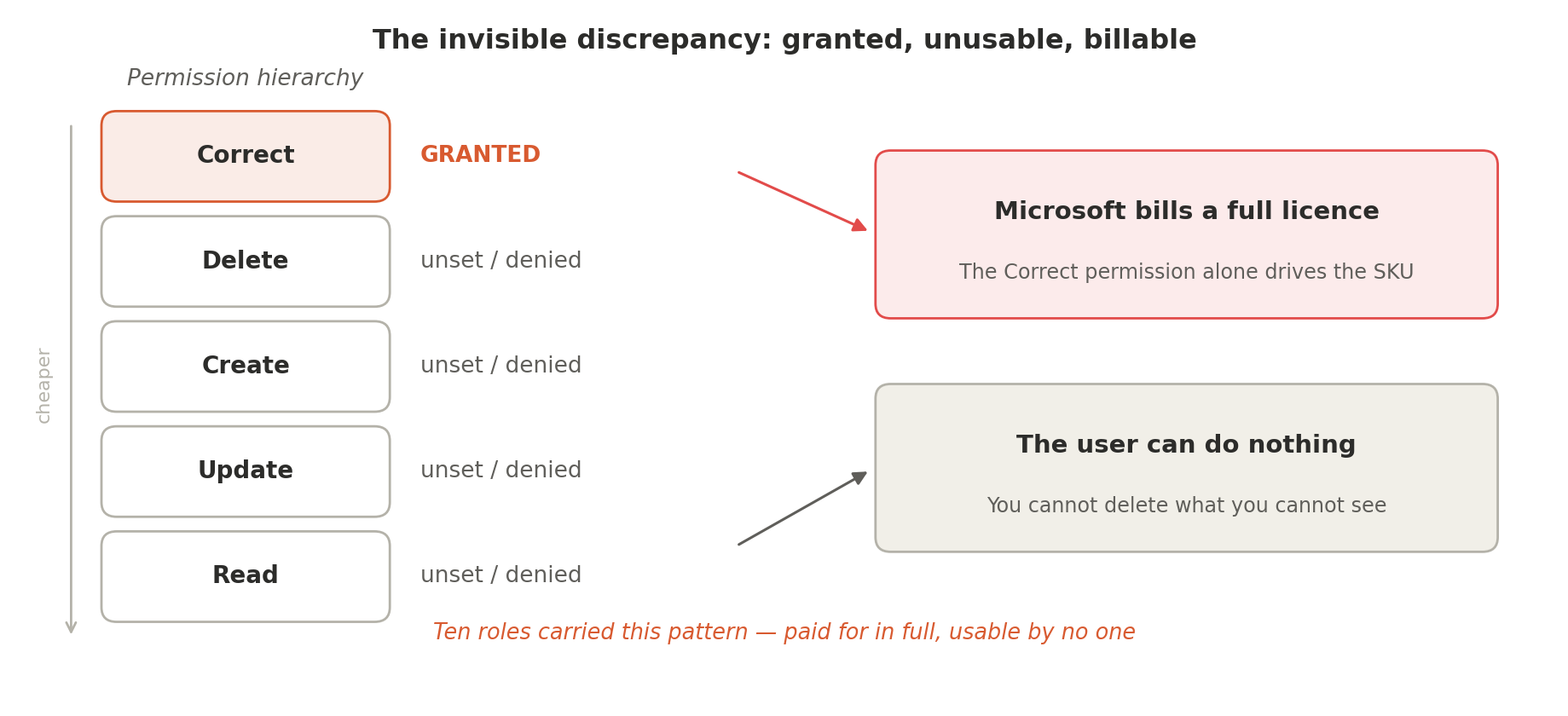
But the license engine doesn't care about usability. The Correct permission is the expensive one, and its mere presence drives a full license requirement. So the client was paying for full licenses against access that was never actually available to anyone, across ten roles. Fixing this is pure, uncontroversial saving, and it was one of the largest saving points in the engagement.
We also found one privilege with mixed license requirements, assigned to four roles. Mixed-license privileges snowball: the multiple requirement rolls up from the privilege to the duty, to the role, to the user. Here the blast radius was small, a single privilege, but correcting it still contributed to the total.
What telemetry showed
Then we turned to usage, and the telemetry told us something that was, in its own way, a compliment to the client.
In many environments, telemetry exposes configuration that's barely alive: a privilege where one person touched one item, once, in a blue moon. Not here. In this environment, what had been configured was genuinely and widely used, further evidence of how carefully the security had been built.
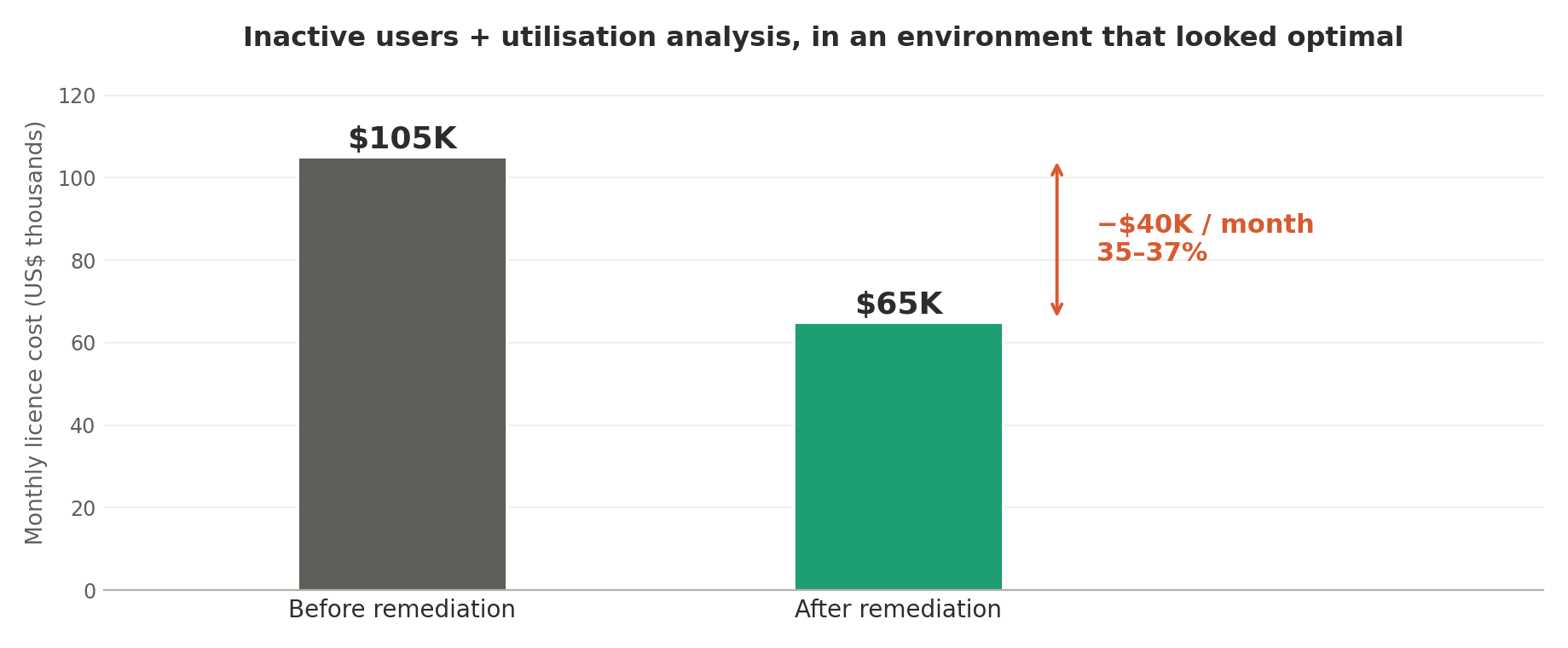
And yet, even so, the combination of inactive-user cleanup and straightforward utilization analysis, simply looking at what people actually do, yielded savings of roughly 35 to 37%, taking the monthly cost from $105,000 down to approximately $65,000. Fewer licenses required, less access granted, cleaner roles.
Everything we found, in one place
| Finding | Impact | What it means |
|---|---|---|
| ~90 dormant users | High | No activity in 120 days. Individual review, then removal or a view-only Team Members license. |
| 10 roles with permission discrepancies | High | Correct granted, lower levels denied. Unusable access, billed at full license. |
| Utilization gap | High | Even a well-used configuration still carried access nobody exercised. |
| Sysadmins holding business roles | Governance | Not billed today, but administrators should administrate, not operate. |
| 1 mixed-license privilege | Low | Assigned to four roles. Contained, but still rolls up to the user. |
| SoD violations in ~12 roles | Critical | Read-only finance role is the worst offender. Mitigate or rebuild. |
A different optimization problem: classification, not clustering
It's worth pausing on the framing, because it differs sharply from the integration-heavy case in our companion write-up.
In that engagement, the role structure had to be discovered from user behavior, an unsupervised problem. Here, the target structure is known in advance. We define the classes up front: roles scoped to secure one specific thing, one role, one SKU. The task is then to determine which users should be assigned to which class. That's a classification problem. We aren't inventing the categories, we're assigning members to categories we've already defined.
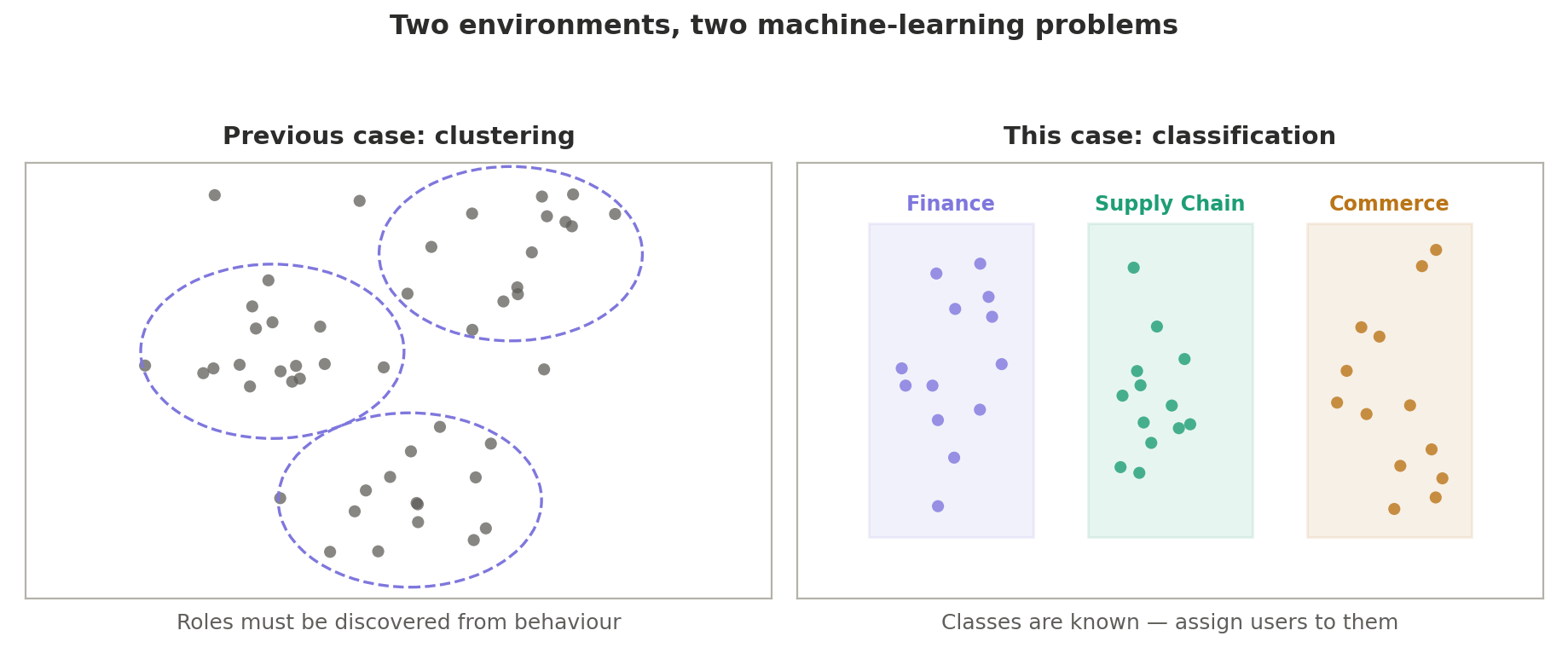
The distinction is more than academic. Classification against a known target is fundamentally more tractable than deriving a role structure from scratch, and it's only available when the existing security design is sound enough to be trusted as a starting point. This client's tidy configuration earned them a materially easier remediation, and the 35% anyway.
The second question: segregation of duties
As a European organization, the client raised an additional requirement: segregation of duties.
The conceptual model is well established. Certain duties, or certain tasks within a duty, create a control violation when the same person can perform both. The conflict can arise within a single role, where two conflicting duties or tasks are bundled together, or at the user level, where two individually acceptable roles combine on one person to produce the same violation.
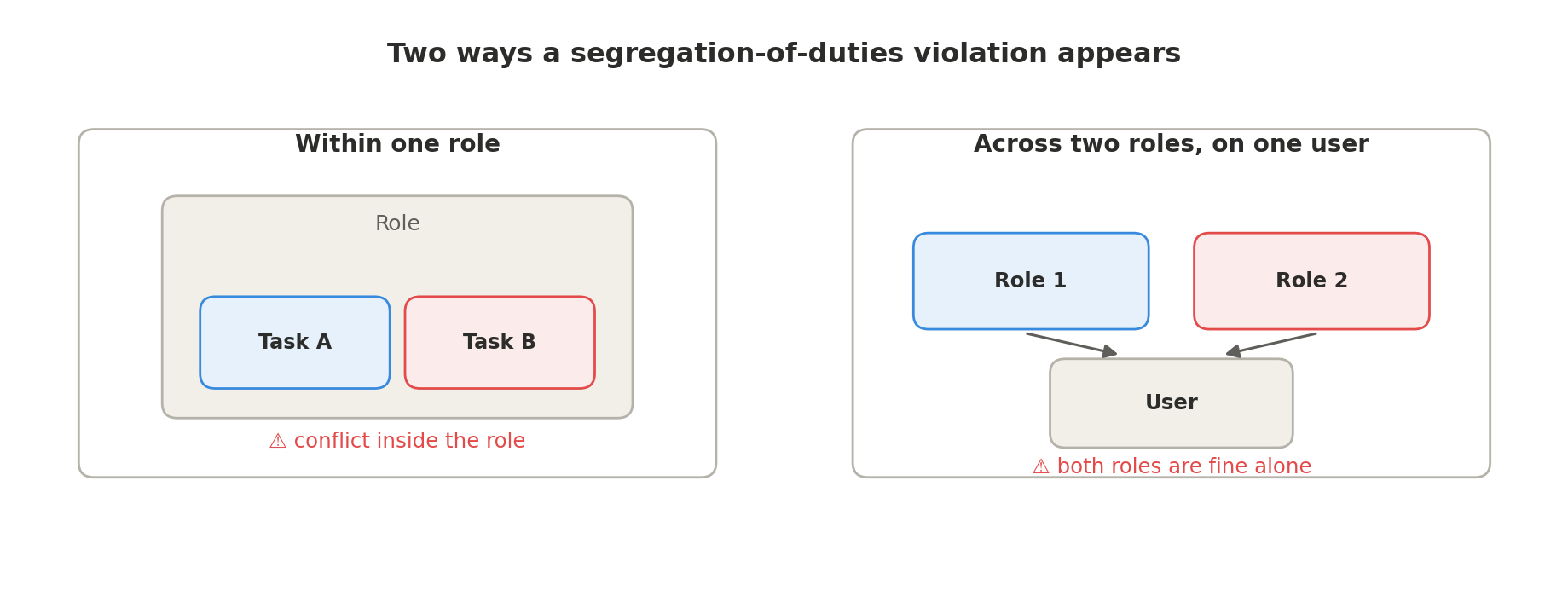
We built the rule set, ran the analysis against their configuration, and presented the results: critical and high-risk violations across roughly a dozen roles, each of which will be addressed.
The role nobody audits
The most interesting finding is one we encounter almost everywhere: the role with the most violations was the read-only role.
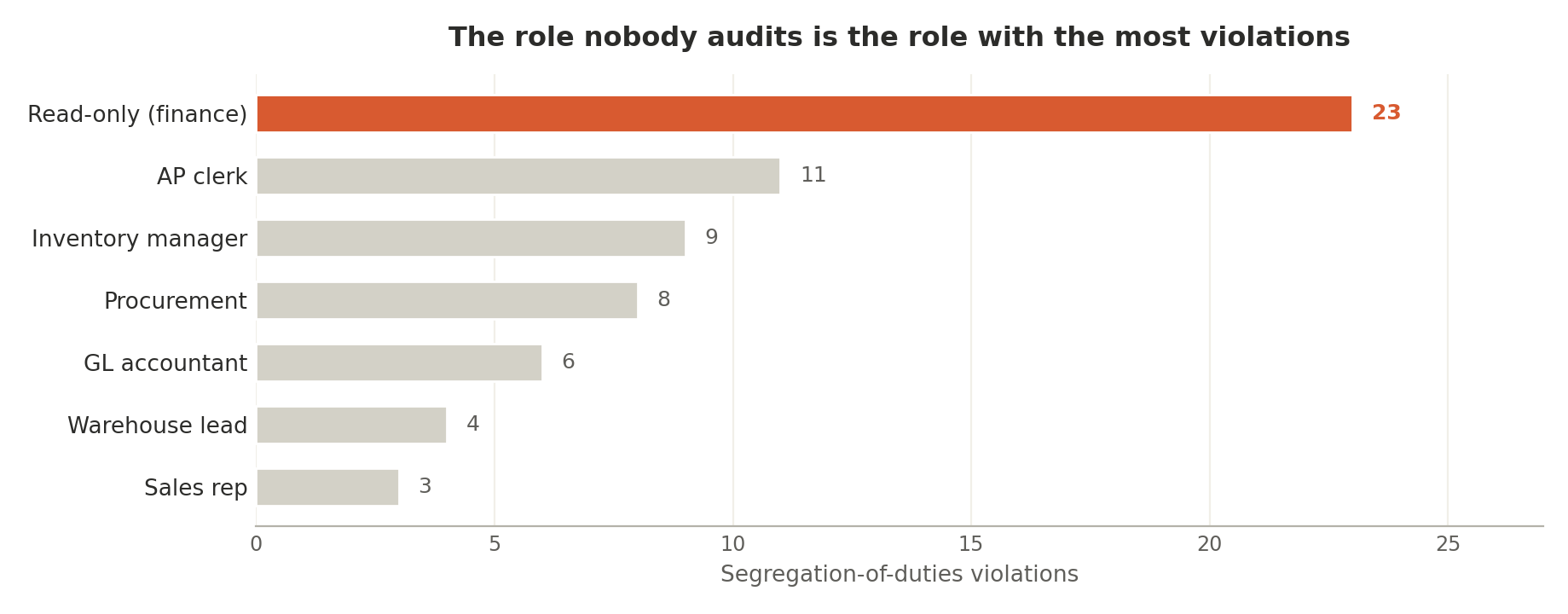
The read-only role is almost never actually read-only. It requires a license, and more often than it should, it grants far more than read access. Nearly every company builds one. In this environment the read-only role is a finance role, touching financial transactions, and it carried more segregation-of-duties violations than any other role in the system. If there's one universal takeaway here, it's this: audit your read-only role. It's the role nobody scrutinizes, precisely because its name promises there's nothing to scrutinize.
Two paths out of a violation
For each violating role there are two legitimate paths, and the choice belongs entirely to the client.
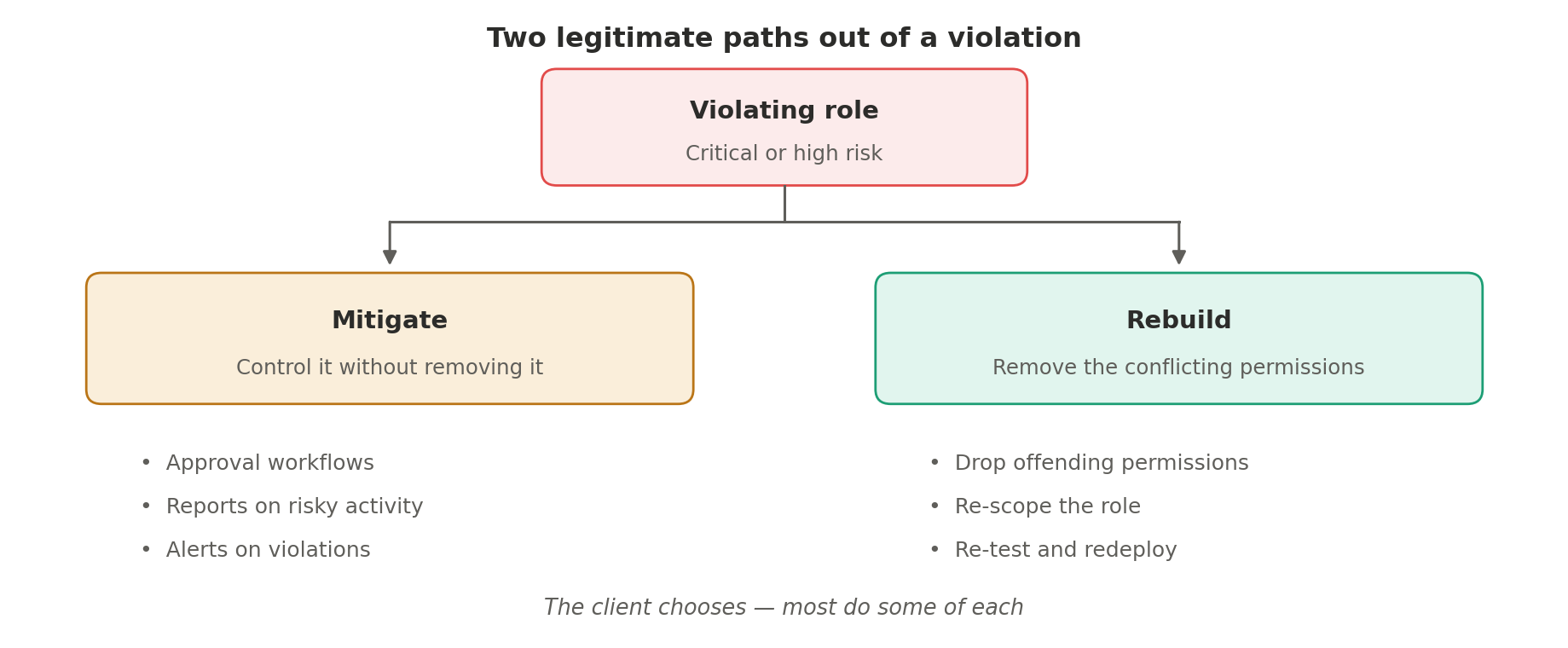
The first is mitigation: accept that the conflict exists, but control it, introduce approval workflows, build reports that surface the risky activity, and configure alerts on the violating business operations. The conflict persists, but nothing happens unobserved.
The second is rebuilding: restructure the role so the conflict no longer exists, dropping the specific permissions that create the violation.
We support both. We help clients design and build the workflows, reports, and alerts that make mitigation credible, and where a client prefers to eliminate the conflict outright, we can just as easily drop the offending permissions and keep roles aligned to segregation-of-duties requirements. In practice, most organizations do some of each: mitigate where the business genuinely needs the combined access, rebuild where it doesn't.
This scale of saving from inactive-user cleanup and utilization analysis alone assumes your security is already reasonably well-designed, roles that are mostly single-SKU, permissions that mostly follow the granted-hierarchy rules correctly. If that's true for you, this is close to the ceiling of what a first pass finds. If your estate looks more like scattered multi-license roles built around integrations rather than people, the playbook is different, and usually finds more, not less. See our companion case study for that scenario.
The lesson of this engagement isn't that the client did anything wrong. Their security was among the better configurations we've assessed, and their telemetry proved it.
The lesson is that a well-built security model and an optimally licensed one aren't the same thing. Dormant users accumulate silently. Permission hierarchies drift into states that are unusable but still billable. Read-only roles quietly stop being read-only. None of this shows up in a design review. It only surfaces when you compare what was granted against what's actually used, and in this case, that comparison was worth $40,000 a month.
A third engagement in this series pushed the remediation side further: see our case study on a fully automated D365 security migration for what it actually took to move an optimal design into production without anyone building a role by hand. A fourth shows what the same discipline looks like applied before go-live instead of after: see our case study on a greenfield security design that found a thousand segregation-of-duties conflicts the day before UAT, and what we did about it with no dollar figure attached.