
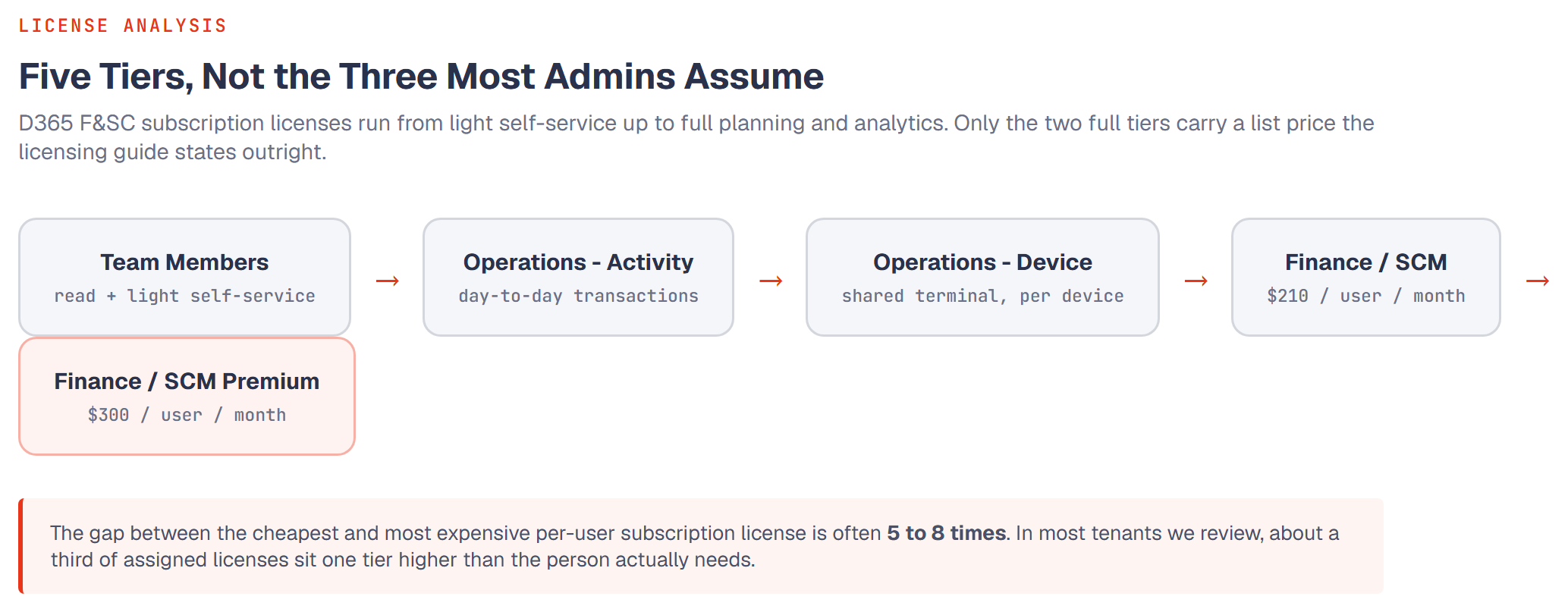
Every D365 Finance & Supply Chain licensing conversation starts the same way: someone opens the Microsoft price list, sees three or four subscription license (SL) tiers, and assumes the differences are cosmetic. They aren't. The gap between the cheapest and most expensive per-user SL is often 5 to 8 times, and we routinely find tenants where a third of assigned licenses are one tier higher than the person actually needs.
This is the guide we wish existed before our first F&SC licensing review. No sales pitch, just what each license type actually entitles you to, and the patterns that quietly inflate your bill. Every term used here is defined in the licensing and security glossary if you want a quick reference alongside.
The license tiers, in plain English
D365 F&SC licensing is built around named user subscription licenses (SLs). Per the official Dynamics 365 Licensing Guide, each user needs exactly one SL that matches the highest level of functionality they're capable of touching, not the functionality their department uses in general. There are five tiers relevant to F&SC, not three:
| Tier | Who it's for | What it unlocks |
|---|---|---|
| Team Members | Employees who need read access plus light self-service tasks, across the org | Read-only across most modules; record/approve their own time, expenses, and vendor invoices; create requisitions |
| Operations – Activity | AP/AR clerks, warehouse staff, planners doing day-to-day transactions | Everything Team Members gets, plus approving Operations-Activity transactions and creating/editing warehousing, receiving, shipping, and vendor-maintenance records |
| Operations – Device | Shared point-of-sale, warehouse, or production-floor terminals | A subset of Operations-Activity rights, licensed to the device rather than a person; multiple people can share it |
| Finance / Supply Chain Management | Full-function users in their respective module | Core financials or core supply chain functionality, full transactional access |
| Finance Premium / SCM Premium | Controllers, finance managers, supply chain leads needing planning & analytics depth | Everything in the base tier, plus business performance planning (budgets, forecasts, financial analysis) and higher default capacity |
Licensing is driven by the single most privileged action a user is capable of performing, not by how often they perform it. A controller who touches budget planning twice a year still needs a Premium-tier license, not Team Member.
Exactly how that "most privileged action" gets determined, rolled up from a single entry point through privileges and duties to the user who holds them, is walked through step by step in our license roll-up series.
What the base tiers actually cost
Per the current Licensing Guide, list pricing (billed annually, per user/month, before any attach or volume discounts) is:
| SL | List price | Default capacity highlights |
|---|---|---|
| Finance | $210/user/month | 100 e-invoice + 100 invoice-capture transactions/tenant/month; 90 GB database |
| Finance Premium | $300/user/month | 200 + 200 transactions/tenant/month; 125 GB database; 1K Copilot credits/user/month |
| Supply Chain Management | $210/user/month | 100 assets/tenant/month; 90 GB database; 20-seat minimum purchase |
| Supply Chain Management Premium | $300/user/month | 125 GB database; 1K Copilot credits/user/month; 10-seat minimum purchase |
Pricing is subject to change. Always confirm current figures against Microsoft's live pricing pages before quoting a client.
Base licensing vs. attach licensing
Two customers can pay very different amounts for the identical SL tier, and the mechanics are more specific than "get a discount if you already subscribe to something." The official rule: when a single user needs more than one Dynamics 365 application, the highest-priced application license for that user must be purchased as their base license. Every additional Dynamics 365 application for that same user can then be purchased as an attach license, functionally identical to a standalone license, just priced lower, and only assignable to a user who already holds the qualifying base license.
For example: a user who needs both Supply Chain Management and Finance access gets whichever is priced higher as their base, and the other as attach. Get the order backwards in your license assignment tooling and you'll either be blocked from assigning it or paying full standalone price for both.
We've seen tenants overpay simply because nobody checked whether a user's licenses were ordered correctly, base license assigned first, everything else attached to it, at renewal time.
Device licensing and the multiplexing trap
For shared-device scenarios, think a warehouse scanner terminal used by rotating shift workers, a point-of-sale terminal, or a production-floor device, Operations – Device licensing can replace multiple named-user licenses. But there's a well-known trap: multiplexing. If a device or integration is actually funneling transactions from many distinct back-end users through a single licensed access point, Microsoft's terms still require those underlying users to be individually licensed. This is one of the first things a compliance review checks.
Microsoft's more recent answer to a large chunk of these scenarios is Operations – Order Lines licensing, a per-tenant, transaction-based license that covers specific automated table updates (sales order lines, purchase order lines, general journal entries, production journal postings, IoT messages, and a defined list of others) without requiring a user or device license for each actor behind them. It's explicitly designed to reduce multiplexing friction for integrations, bots, and IoT devices that only touch a narrow, qualifying set of tables. If you have an integration that's been quietly multiplexing through a device license for years, this is worth evaluating as the compliant replacement rather than just adding more device licenses.
The five overbuying mistakes we see most often
- Copy-pasting roles at onboarding. A new hire gets the same security role, and therefore the same license tier, as their predecessor, regardless of whether their actual job changed.
- Defaulting everyone to Premium "to be safe." This avoids support tickets in the short term and costs the most in the long term. It also increases your security surface area for no functional reason.
- Never right-sizing after a re-org. Someone moves from an Operations-heavy role into a supervisory one, or vice versa, and their license tier never gets revisited.
- Licensing service accounts as named users by default. Accounts scoped only to non-interactive system roles (batch job manager, data management operations, and similar) are excluded from license requirements entirely, but only as long as nobody bolts a business-functional role onto that same account later for convenience.
- Ignoring dormant accounts. Contractors and seasonal staff whose access should have been deprovisioned but whose license is still ticking.
Running a self-audit before Microsoft does
A basic self-audit takes an afternoon and usually pays for itself immediately:
- Export current license assignments by user and by SL tier.
- Cross-reference against actual usage logs (module access, transaction types) for the last 90 days.
- Flag any user whose assigned tier is higher than their observed usage pattern justifies.
- Check that every user's base/attach license ordering is correct: highest-priced app as base, everything else attached to it.
- Review device licenses for multiplexing risk, and evaluate whether Operations – Order Lines licensing is a better fit for any integration touching them.
- Confirm your tenant's contract anniversary or renewal date. Microsoft's new per-user validation enforcement is scheduled against it. See our article on what changes and how to prepare.
None of this requires exotic tooling. A SysUserLicense × SysUserLog join gets you most of the way to a first-pass overlicensing report against your tenant's actual usage data.
The fix is rarely "buy fewer licenses across the board." It's matching tier to actual role, tier by tier, user by user, which is exactly the kind of unglamorous work that saves five and six figures a year at mid-size tenants.
Next up: how the same tenant that overspends on licensing usually also has segregation-of-duties conflicts sitting in its security roles, covered in our companion article on finding SoD conflicts before your auditor does.