
Open a privilege in D365 Finance & Supply Chain, look at its entry points, and it's easy to see five expensive workloads staring back at you: Finance, Supply Chain Management, Commerce, Project Operations, Human Resources. The instinct is to assume the privilege needs the most expensive one. That instinct is usually wrong, and it's the single most common reason organizations overbuy licenses they never needed.
License analysis tells you what a privilege currently requires. License optimization tells you what has to change to bring that requirement down. The two get confused constantly, and confusing them is expensive.
The two views that matter
Two system views carry almost the entire weight of this analysis:
LicensingRoleRequirementsDetailedView, the license picture at the role levelLicensingPrivilegeRequirementsDetailedView, the license picture at the privilege level
Both list every entry point (AOT name) tied to a privilege or role, whether it's entitled for a given SKU, and the access level (read or write) that entitlement requires. Filter to Entitled = 1, join to the security object table, and you can build a pivot showing exactly which licenses each entry point qualifies for.
The roll-up principle, worked through
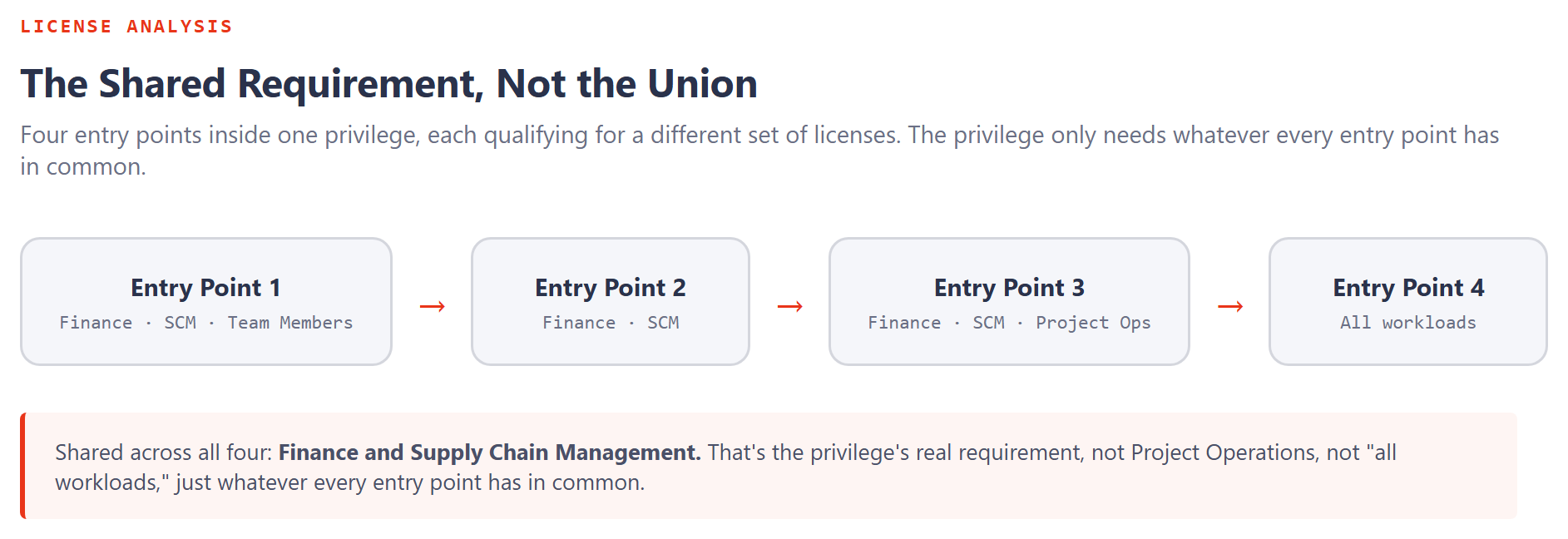
Say a privilege has four entry points. Individually, they qualify for wildly different license sets: one qualifies for everything up to Team Members, another only for Finance and Supply Chain Management, a third for Finance, Supply Chain, and Project Operations. Stack them side by side and the instinct is to assume the privilege needs whatever the most demanding entry point needs.
That's not how the roll-up works. The privilege's requirement is the intersection of what every entry point shares, not the union of everything any single entry point could qualify for. If three of the four entry points are covered by Finance and by Supply Chain Management, and the fourth is too, then Finance alone covers the privilege. Supply Chain Management alone covers it too. You need one qualifying license, not both, and definitely not whatever the single most expensive entry point could theoretically justify.
You don't buy every SKU visible in the entry-point matrix. You identify the minimum license that every entitled entry point in the privilege has in common.
Where the priority order comes from
When more than one license would technically satisfy a privilege, Microsoft's own priority ordering decides which one the system treats as the natural fit:
| SKU | Priority |
|---|---|
| Supply Chain Management Premium | 100 |
| Finance Premium | 90 |
| Supply Chain Management | 80 |
| Finance | 70 |
| Commerce | 60 |
| Project Operations | 50 |
| Human Resources | 40 |
| Operations-Activity | 30 |
| Team Members | 20 |
| Human Resources Self Service | 10 |
| None | 5 |
Higher priority doesn't mean better. It means the engine will surface that SKU first when several qualify. Knowing the order matters when you're deciding which entry point to attack first during optimization. The highest-priority qualifying license among your entry points is usually the one anchoring the whole privilege's cost.
Optimizing toward a target, not just describing the current state
Once you know a privilege is too expensive, optimization starts from the other direction: pick the license tier you actually want the privilege to land on, then find which entry points are the ones preventing it.
Two levers do almost all the work:
Approach 1: remove the entry points forcing the higher tier
If two of four entry points are the only ones requiring Finance or Supply Chain Management, and the business genuinely doesn't need them inside this privilege, removing them drops the whole privilege to whatever the remaining entry points share, often Operations-Activity.
Approach 2: downgrade the permission depth instead
Removing an entry point isn't always an option. Sometimes the access is genuinely needed, just not at full strength. An entry point only requires a full-cost license when it carries write-level access (create, update, delete, or correct). If the actual business need is reviewing a sales order rather than maintaining it, stripping the entry point back to read-only can drop its qualifying license all the way to Team Members, without removing anyone's ability to see what they need to see.
A privilege that looks locked into Finance or Supply Chain Management isn't fixed there permanently. Find the specific entry points forcing the higher tier, then either remove them or strip them down to read-only, and the privilege's real requirement usually drops further than expected.
The gotcha: lighter isn't always cheaper
One counterintuitive result is worth flagging before anyone assumes optimization always moves in the obvious direction: duplicating a role that's currently Project Operations or Human Resources, then stripping out the entry points specific to that workload to make it "lighter," can land the duplicate on Supply Chain Management instead, a different license, not a smaller one. The roll-up logic doesn't know "lighter" was the intent; it just recalculates the shared requirement across whatever entry points remain. Always re-check the resulting SKU after trimming a duplicated role rather than assuming the direction of the change.
We've walked through how a single privilege's requirement gets set. Next: how that requirement compounds as privileges stack into duties, duties into roles, and roles land on a real user, including the moment one extra privilege quietly triggers an attached license nobody budgeted for.