
Which D365 security grants you can observe from write-evidence is fixed by the platform, not by your tenant. Screens are observable, buttons and reports and in-form controls largely are not, and the split barely moves from one client to the next.
One map, four very different coverage rates
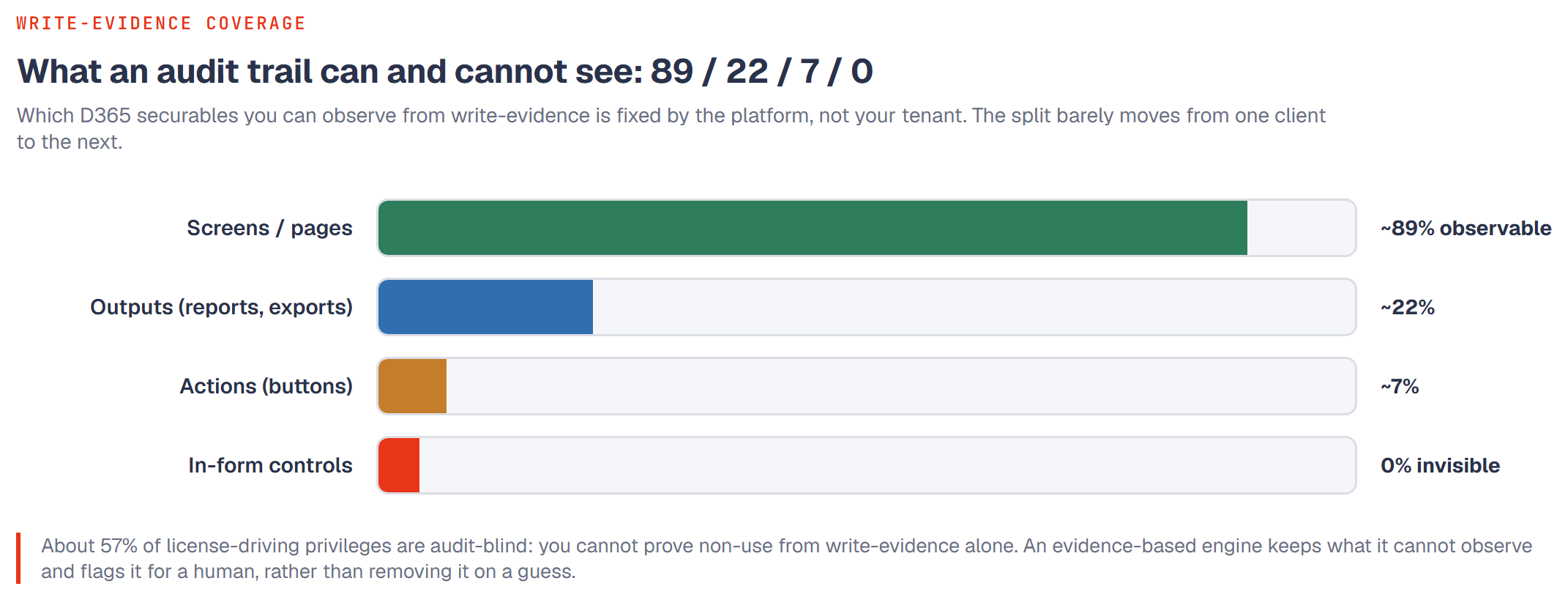
D365's own compiler generates a map called `SecurityEntryPointInferredTables` that binds a security entry point to the tables it touches. That map covers about 89% of display menu items, about 22% of report outputs, about 7% of action menu items, and 0% of in-form controls. Measured across three independent clients, the numbers line up almost exactly:
| Entry-point type | Client 1 | Client 2 | Client 3 |
|---|---|---|---|
| Menu item display | 88.7% | 88.0% | 88.5% |
| Menu item output (report) | 22.0% | 21.7% | 21.6% |
| Menu item action (button) | 7.0% | 7.2% | 7.2% |
| Form control | 0% | 0% | 0% |
Three separate tenants, built by different teams, with different customizations, and the coverage rates match to within a fraction of a percent. That is the signature of a structural property, not a per-tenant data problem.
Why the blind spot is predictable, not noise
The compiler infers a table binding only when an entry point has a declared data source. A form is backed by a data source, so display menu items that open forms map cleanly, which is why they sit near 89%. A button that runs "Post," "Confirm," "Approve," "Calculate," "Start," "Firm," or "Release" is a class method invocation with no declared data source, so the compiler emits nothing, which is why action menu items sit near 7%. In-form controls are method-on-form buttons with no data source either, so they sit at a clean 0%.
Reports read data, they do not write it, so even the 22% that map are not write-evidence you can act on. An output menu item that touches a table is still only reading from it.
The point is that the gap is a consequence of how the map is generated. The same compiler rule runs against every tenant, so every tenant inherits the same coverage profile. You can predict the blind spot before you look at the data.
What this means for deciding what is safe to drop
The whole purpose of write-evidence is to retire grants nobody uses. The observability rule tells you exactly which grants that reasoning is allowed to touch.
A display menu item is observable. If a user holds a screen privilege and the write-evidence shows no activity on the tables behind that screen, "no evidence" genuinely means "not used," and a drop is defensible.
An action, a report, or an in-form control is not observable. The absence of write-evidence for a "Post" button tells you nothing, because the platform never emitted a mapping that could have carried the evidence in the first place. Dropping it for lack of evidence is not a cautious call, it is a measurement error.
In one client's role analysis, 11,612 privileges (about 57% of those with menu-item entry points) had no inferred-table mapping on any of their entry points. Of all the "drop" recommendations a naive pass produced, 36,274 landed on these unobservable privileges. Every one is a potential false negative: a privilege recommended for removal that the method had no way to watch being used.
The guardrail the rule forces
Because the blind spot is predictable, you can guard against it with a flag rather than a hope. Compute, per privilege, whether any of its entry points has a mapping in the compiler map or in a curated supplement. If none do, the privilege is unobservable, and the "drop" branch of the decision is not allowed to fire. It routes to a "no evidence" state for human review instead.
This is the difference between "we watched and saw nothing," which licenses a drop, and "we had no camera pointed at it," which does not. Applying it removes the tens of thousands of structurally unsafe drops in a single stroke, with no new data required.
Which blind spots are worth closing
Not all of the 7% and 22% are equally recoverable. Action menu items for the transactional verbs that drive license cost, journal posting, invoice posting, BOM and route approval, quotation confirm and cancel, collapse to roughly 10 to 15 patterns. Those are tractable to curate by hand, mapping each to the terminal table it writes. Reports are not recoverable through write-evidence at all and belong on the telemetry side (did the user run it). Form controls stay mostly unobservable and are accepted as permanent review items.
Bottom line
The 89/22/7/0 split is a structural constant of D365, confirmed near-identically across three clients. Treat screen privileges as observable and safe to reason about from write-evidence, and treat actions, reports, and in-form controls as blind by default, never dropping them merely because evidence is absent. The blind spot is predictable, so it can be guarded against by rule rather than discovered deal by deal.
Frequently asked questions
If coverage is identical everywhere, why measure it per client at all?
To confirm the structural rule holds for that tenant's build and customizations, and to size the specific set of high-value actions worth curating. The ratios are constant; the absolute privilege counts behind them are not.
Can we raise action-menu coverage above 7%?
Yes, for the transactional verbs, by curating a supplement that maps each action to its terminal table. You will not move the platform's native 7%, but you can add the mappings the compiler never emitted for the actions that matter.
Do reports really give no write signal?
Correct. Reports read, so audit-log write-evidence can never attribute them. Their usage signal comes from telemetry, not from table writes.