
On one estate, the D365 user list held roughly 2,180 accounts, but barely 955 of them were real people doing real work. Your license count starts with telling them apart.
Here is the number that should make a finance leader pause. On a recent engagement with a client whose Dynamics 365 Finance and Supply Chain user list ran to roughly 2,180 accounts, about 1,105 of those accounts did no human work at all. They were service accounts, integration accounts, and system accounts: credentials that move data, run batch jobs, and keep connectors alive. None of them sat at a desk. None of them needed a paid human seat.
That single fact reframes almost every licensing conversation that starts with "look how many users we have, so look how many licenses we must need."
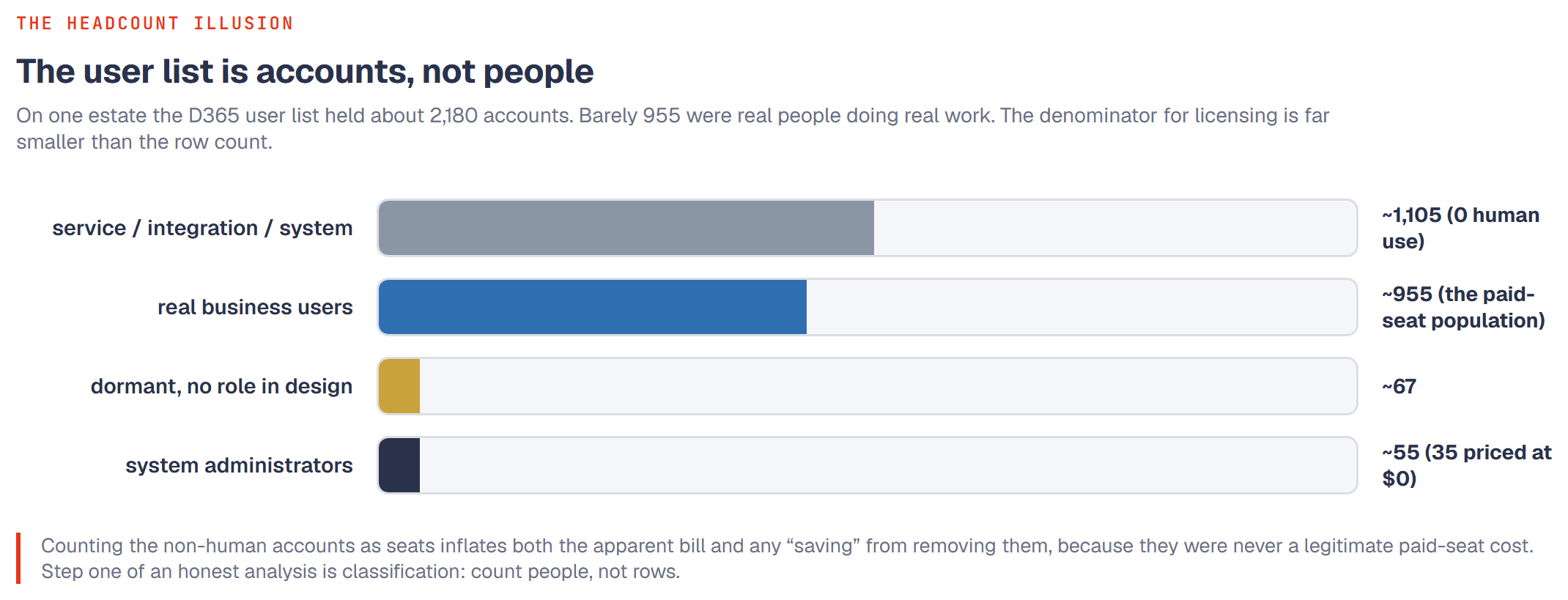
The headcount illusion
The instinct is understandable. You open the user administration list, you see a row count, and the row count looks like a bill. Microsoft prices D365 F and SC primarily per named user, so rows feel like dollars. If the list says two thousand, the mental math says two thousand seats.
The problem is that the user list is not a list of people. It is a list of accounts. And in a mature ERP estate, a large share of those accounts exist purely to make the system talk to other systems.
On this client's estate the breakdown looked like this:
- - About 1,105 accounts were service, integration, or system accounts with zero active human use.
- - About 955 accounts were actual business users, people who log in and do finance, supply chain, or operations work. (This is the "roughly 1,000-user estate" referred to in our companion articles; the real human population is what those pieces size their analysis against.)
- - About 55 accounts were system administrators, of which only roughly 35 were in scope to be priced, and in this estate those priced at $0.
- - A final sliver, about 67 accounts, held business access today but had no place in the redesigned model, mostly dormant leftovers awaiting a decision rather than people doing daily work.
Read that again. The count of non-human accounts was larger than the count of real business users. The denominator everyone reaches for first (the raw account total) was wrong in both directions at once: far too high as a measure of paid seats, and quietly hiding the fact that the real population of people needing a license was under a thousand.
Who all these non-humans are
Three categories account for most of the inflation, and it helps a finance buyer to picture each one.
Service and integration accounts. Modern ERP does not run alone. It feeds a data warehouse, syncs with a CRM, accepts orders from an e-commerce front end, exchanges files with a bank, and pushes records to a dozen downstream tools. Each of those pipes typically authenticates as its own account. Those accounts can be busy (some of the most active "users" by transaction volume are integrations) but busy is not the same as human. A pipe does not consume a user license the way a person does.
System accounts. These are the plumbing: accounts the platform itself creates, scheduled-batch owners, workflow executors, and framework credentials. They appear on the list because they are technically users in the directory sense, not because anyone bought them a seat.
Inactive and orphaned accounts. Separate from the two above, most estates also carry accounts for people who left, projects that ended, or test setups nobody cleaned up. These are human-shaped but dormant. They are a different cleanup problem, but they inflate the same row count.
The licensing point is the same across all three. A row on the list is a candidate for a license, not a confirmed need for one. The work of licensing is deciding which rows are real.
Why this changes the money, in both directions
This is not just a tidiness argument. Getting the denominator wrong distorts two numbers that a CFO actually cares about.
It inflates the apparent bill. If you size a renewal or a true-up against the raw row count, you are budgeting for seats that no person will ever use. Vendors and well-meaning internal estimates both do this. The quote looks bigger than reality because it is priced against accounts, not people.
It inflates the apparent savings. This is the subtler trap, and it is why honest license analysis matters. Some optimization tools and some consultancies price every account, including the 1,105 non-human ones, and then report a large "savings" when they recommend not licensing them. But those accounts were never going to need a paid human seat. Removing a cost that never truly existed is not a saving. It is an accounting artifact. When someone shows you a dramatic savings figure, the first question is: what was in your denominator?
The real opportunity lives in the 955. That is the population where tier assignment actually matters, where a person on a full license might only need an activity or team-member level of access, and where genuine, defensible optimization happens. (Our companion primer walks through what those tiers are and what each one is allowed to do.) You cannot even begin that work until you have separated the people from the plumbing.
Step one of any honest analysis
So the first move in any credible license review is not pricing. It is classification. Before anyone assigns a tier or quotes a renewal, every account on the list should be sorted into human or non-human, active or dormant, in-scope or out-of-scope. Only the in-scope humans belong in the licensing denominator.
This also has a knock-on benefit beyond cost. Service and batch accounts do not just distort the license count, they distort the audit trail, because their activity can swamp or mask what real users did. A separate article in this series covers that security and governance angle in its own right. For licensing, the headline is simpler: count people, not rows.
If you remember one thing, make it this. The number of rows on your D365 user list is not the number of seats you need to pay for. On this estate, more than half the list was non-human, and the true population of licensable people was meaningfully smaller than the headline count. Start there, and every number downstream gets more honest.
Frequently asked questions
We pay Microsoft per named user. Doesn't that mean every account costs us?
No. A named user license attaches to a person who signs in and uses the application. Service, integration, and system accounts authenticate to move data, and they are not licensed the way interactive human users are. Treating them as paid seats over-counts your obligation. The right first step is to classify accounts, then price only the ones that represent real human usage.
A tool told us we could save a large amount by cutting unused licenses. Is that real?
Check the denominator. If the tool priced non-human accounts and then "saved" you money by recommending you not license them, part of that saving is an artifact, because those accounts were never a legitimate paid-seat cost. Real savings come from right-tiering the actual business users, not from removing costs that never existed.
How do we tell a service account from a real user?
Usage patterns and provisioning records. Service and integration accounts show machine-like behavior (steady, high-volume, non-interactive activity, often tied to a connector or batch job) and are usually provisioned deliberately by IT. Real users show interactive sign-ins and human work hours. A disciplined review cross-checks the user list against sign-in telemetry and the catalog of integrations before anything is priced.