
On a recent 1,000-user estate, just five privileges were pinning 110 of 127 Full-tier users at the most expensive seat. Here is why your license cost is almost never spread across thousands of settings, and almost always concentrated in a handful you can name.
The number that stops the meeting
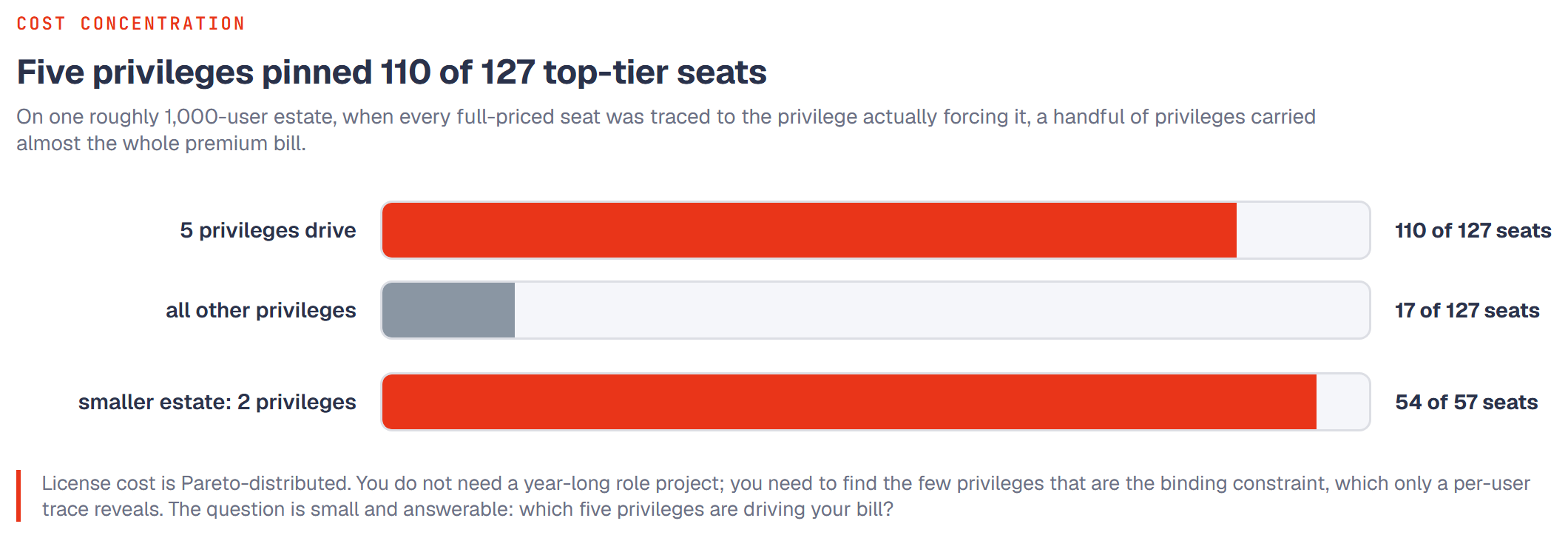
Picture a Dynamics 365 Finance and Supply Chain estate with about 1,000 users. On that estate, 127 people sat on a Full user license, the top-priced seat Microsoft sells. When we traced what was actually forcing each of those 127 users up to the Full tier, the answer was not "hundreds of permissions scattered everywhere." It was five privileges. Those five privileges, between them, were responsible for 110 of the 127 Full seats.
Read that again. Out of an enormous catalog of roles, duties, and privileges, five line items were pinning nearly 87 percent of the most expensive seats on the estate.
This is not a fluke of one big client. On a much smaller estate, roughly 80 users, we found the same shape at a smaller scale. There, just two privileges were pinning 54 of the 57 Full-tier users. Different company, different size, same story: a tiny set of privileges is carrying almost the entire premium bill.
License cost is Pareto-distributed
Most people assume that if their D365 license bill is high, the cause must be sprawling and messy, thousands of over-provisioned permissions that would take a year to untangle. That assumption is expensive, because it makes the problem feel too big to start.
The reality is the opposite. License cost follows a Pareto distribution. A small number of privileges account for a large share of the premium seats. The long tail of other permissions, the thousands of things people can technically do, mostly does not change anyone's license tier, because those users are already being billed at the top tier for one or two specific reasons.
That changes the entire economics of a remediation project. You do not need to boil the ocean. You do not need to redesign every role before you see savings. You need to find the five privileges (or the two, or the handful) that are the binding constraint on your estate, confirm the evidence supports changing them, and act on those first. That is targeted remediation, not a year-long role-engineering program.
Why you cannot guess which five
Here is the part that surprises people. You cannot find these privileges by reading role names, by intuition, or by asking "which roles sound powerful." You have to find them by analysis, per user.
The reason is in how Microsoft bills. A user's required license is determined over the union of everything their assigned roles grant them. If a person holds four roles, Microsoft does not price each role separately and let you pick the cheapest. It looks across all of them together, finds the single highest-tier capability anywhere in that combined set, and bills the user at that tier. One qualifying privilege, buried in one of four roles, sets the price for that entire person.
That is why the work has to be done per user. For each Full-tier user, you have to ask: across everything this specific person can do, what is the one privilege (or the few) actually forcing them to the Full tier? Do that for all of them, then count how often the same privilege shows up as the culprit. The privileges that appear again and again across many users are your binding constraints. On the 1,000-user estate, five privileges kept showing up. They were the answer.
You will not see this by looking at roles in isolation, because a role that looks expensive might be assigned to people who are already Full-tier for a different reason, so removing it saves nothing. And a role that looks harmless might contain the exact privilege that is pinning 90 people. Only the per-user trace, the union math done the way Microsoft does it, tells you which is which. (Our companion primer on per-user billing walks through that union logic in detail if you want the mechanics.)
"Just make it read-only" is usually not the fix
Once people hear that a few privileges drive the bill, the next instinct is "fine, let's just make those read-only and downgrade everyone." It sounds obvious, and it usually does not work. Read access to many high-value areas still requires a premium license, so flipping a privilege from write to read often leaves the user exactly where they started, still billed at the Full tier. Our existing read-only article covers why that lever disappoints more often than it helps. The short version: downgrading a privilege only saves money if the resulting capability genuinely falls to a cheaper tier, and that has to be checked, not assumed.
Which brings it back to the same discipline. The savings are real, but they are specific. You find them by tracing the evidence, user by user, and then changing only the privileges where the trace says a cheaper seat is genuinely available.
What this means for you
If you are a CFO or an IT leader staring at a D365 renewal, the useful question is not "how do we fix our entire security model." It is far smaller and far more answerable: which five privileges are driving my bill?
That question has a concrete answer on your estate right now. It is a finite list. It can be produced by analysis in far less time than a role redesign, and it tells you exactly where the leverage is before you commit to any remediation work. Most of your expensive seats are hanging on a few threads. The whole game is finding which ones.
Frequently asked questions
Is it always exactly five privileges?
No. Five was the number on one roughly 1,000-user estate, where five privileges pinned 110 of 127 Full-tier users. On a roughly 80-user estate, two privileges pinned 54 of 57. The point is not a magic number, it is the shape: a small handful of privileges carries most of the premium cost, and the exact list is specific to your estate.
Can we just run a report to get this?
Not a standard one. The answer requires computing each user's required tier over the union of all their roles, the way Microsoft bills, and then attributing each Full seat to the specific privilege forcing it. That per-user attribution is the analysis that turns a vague "our bill is high" into a named, finite list you can act on.
How long does it take to find them?
Finding the binding privileges is a focused analysis measured in days to weeks, not the months a full role redesign takes. That is the whole argument: you identify the high-leverage few first, then decide what is worth remediating.