
A single D365 F&SC role can grant a user several hundred privileges. Nobody exercises several hundred privileges. Most people work a handful of screens, a handful of buttons, day after day. Everything else on that role is a license cost riding along for free, until someone has to make a call on each one: keep it, restrict it, or take it away.
That call can't be a guess, and it can't be "if it looks unused, remove it." Get it wrong in one direction and you leave money on the table. Get it wrong in the other and you cut off someone's ability to do their job, or worse, strip access that was never actually unused, just never observed. Stage 2 of our Evidence-First method is built specifically to avoid both failure modes. This is how that stage actually works, one privilege at a time.
Two kinds of proof, and they're not interchangeable
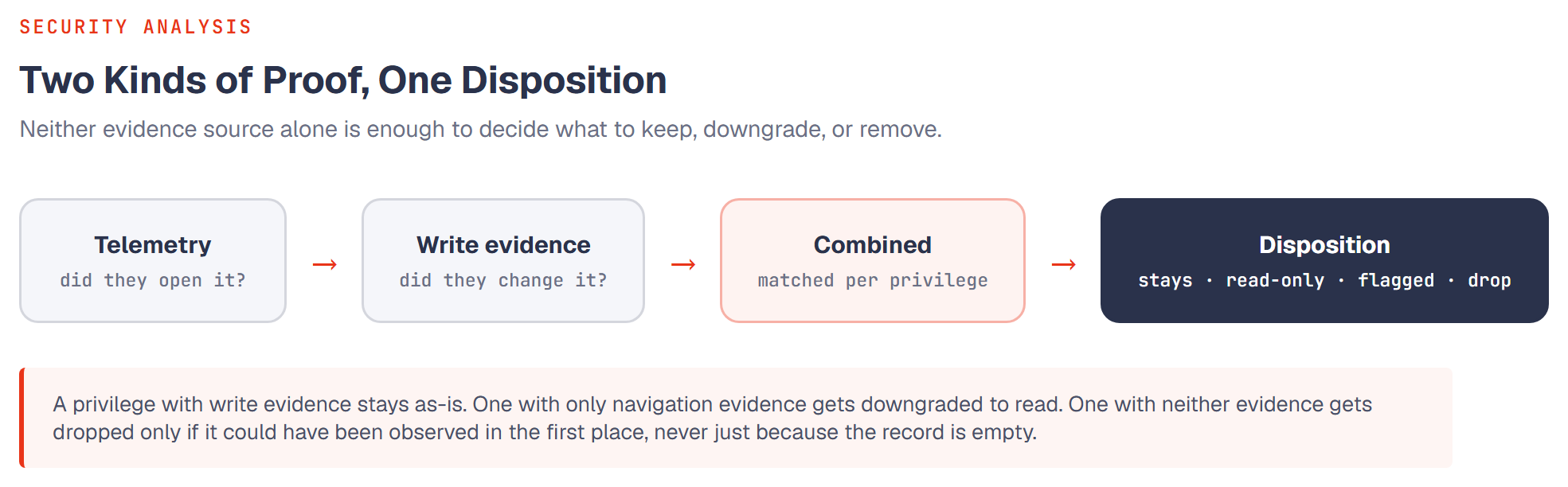
Think of the difference between a building's key-card log and its work-order log. The key-card log tells you someone walked into a room. The work-order log tells you they actually did something in it. Neither one lies, but they answer different questions, and mixing them up produces wrong answers.
D365 gives us the same two kinds of proof for every privilege a user holds:
| Evidence source | What it actually proves | What it can't prove |
|---|---|---|
| Telemetry | The user opened the screen, ran the report, or clicked into the form | Whether they changed anything once they got there |
| Write evidence (the audit trail) | A record was created or modified, and this user did it | Which specific button or screen among several possible ones caused it, when more than one could have |
Telemetry alone tells you someone looks at a form. It doesn't tell you they need write access to it. Write evidence alone can't see something that never leaves a trace, like a menu item that was opened purely to check a number. You need both, matched to the same privilege, to make a decision that will actually hold up.
The five outcomes
Once both evidence sources are matched to a privilege, there are exactly five places it can land. This is the actual decision table we run against every privilege a user holds through an enabled role:
| Outcome | What the evidence showed | What happens |
|---|---|---|
| Stays as-is | Write evidence found: the user genuinely used this privilege to change something | Kept exactly as granted |
| Downgrade to read | Telemetry only: they open it, but never write through it | Restricted to read access, often unlocking a cheaper license tier |
| Stays, covered by seat | No evidence either way, but the license this privilege requires is already covered by something else the user demonstrably needs | Left alone, removing it wouldn't save a cent |
| Flagged for review | No evidence, and this privilege genuinely can't be observed by either camera | Kept, and surfaced to a human, never auto-removed |
| Drop | No evidence, not covered by anything else, and the privilege could have been observed if it were being used | Removed from the recommended role |
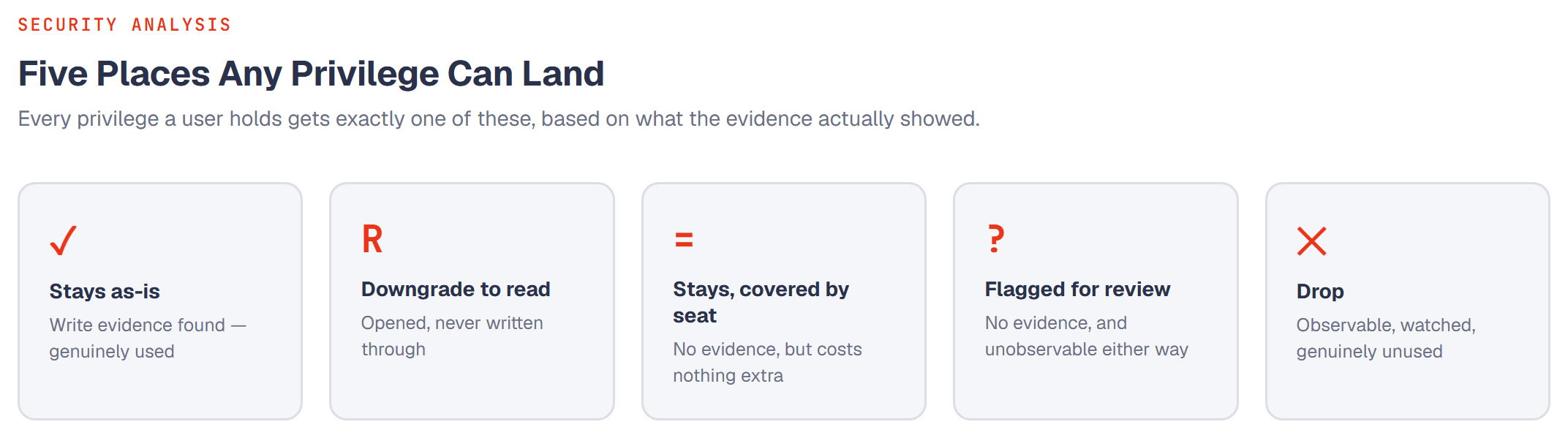
That fourth outcome is the one that separates a defensible analysis from an aggressive script.
The rule that makes this safe to act on
Not every access path in D365 leaves the same kind of trail. Some don't leave one at all, not because nobody uses them, but because of how the underlying system is built. Posting a journal, approving a document, cancelling a work order, these are often single-button actions the platform simply doesn't stamp with "who pressed this," the way it stamps a form record with who created or edited it.
A privilege we genuinely cannot observe is never removed for lack of evidence. It gets flagged for a person to decide, not dropped by default. We only remove a privilege when there was a working way to see it being used, and nothing showed up.
That's the difference between "we watched carefully and this was never touched" and "we had no way to watch this one at all." Collapsing those two into a single "no evidence = remove" rule is the single most common mistake we see in DIY or overly mechanical cleanup attempts, and in a full-tenant analysis, this guardrail alone is routinely what keeps tens of thousands of individual permissions from being wrongly recommended for removal on the basis of a coverage gap rather than real disuse.
The same discipline applies to the license number itself. A privilege that's downgraded to read-only can also drop the license tier it requires, but only for that privilege. The user's overall required license is never assumed up front and then reverse-justified; it's built, afterward, as the natural result of every individual privilege decision added together. If every privilege that once required an expensive license has genuinely moved to read-only or been dropped, the requirement for that license disappears on its own. It can never contradict the decisions it was built from.
Questions we get asked
Isn't "no usage data" the same thing as "not needed"?
Only if the system could have shown us usage in the first place. A lot of D365's most sensitive actions, posting, approving, cancelling, simply aren't instrumented at a per-user level by the platform. No evidence there means "we couldn't see," not "nobody's doing it." Those get flagged for a person, never dropped automatically.
What if telemetry and the audit trail disagree?
They're answering different questions, so this isn't really a disagreement. Telemetry only tells you someone opened something; the audit trail tells you they wrote through it. If the write evidence is there, it wins, because it's the stronger claim: you can write to something you also opened, but you can't write to something you never wrote to.
Could this ever cause someone's access to be wrongly cut?
The model is deliberately conservative in that direction. A privilege only gets dropped when it was observable and genuinely showed no activity over the full period analyzed. Anything ambiguous, unobservable, or already covered by the user's other access is kept, not removed.
Does this replace a role redesign?
No, it feeds one. This produces a per-privilege verdict for every user. The next step takes those verdicts and rebuilds the actual roles, grouping what's genuinely shared into a lean core and everything else into targeted add-ons, rather than editing the existing over-provisioned roles in place.
Glossary
| Term | Meaning |
|---|---|
| Telemetry | D365's own record of which screens and reports a user opened, and for how long |
| Write evidence / audit trail | A record that a user created or modified data in a given table, drawn from the system's own change-tracking columns |
| Entry point | A specific menu item, form control, report, or data action, the smallest unit a security privilege actually grants |
| License tier | The license family (Full, Activity, Team Members, or none) that a given entry point requires |
| Disposition | The final keep / downgrade / flag / drop verdict assigned to one privilege for one user |
This is the mechanism behind Stage 2 and Stage 3 of the Evidence-First Framework. For the underlying attribution logic, how a single table write gets traced back to the exact privilege responsible when several privileges could plausibly have caused it, see the follow-up piece: Inside an Evidence-Based Disposition.